Vista Digital Mixing System
16 Software V4.1 SW V4.1 Date printed: 20.08.09
A.5.7 Control Network
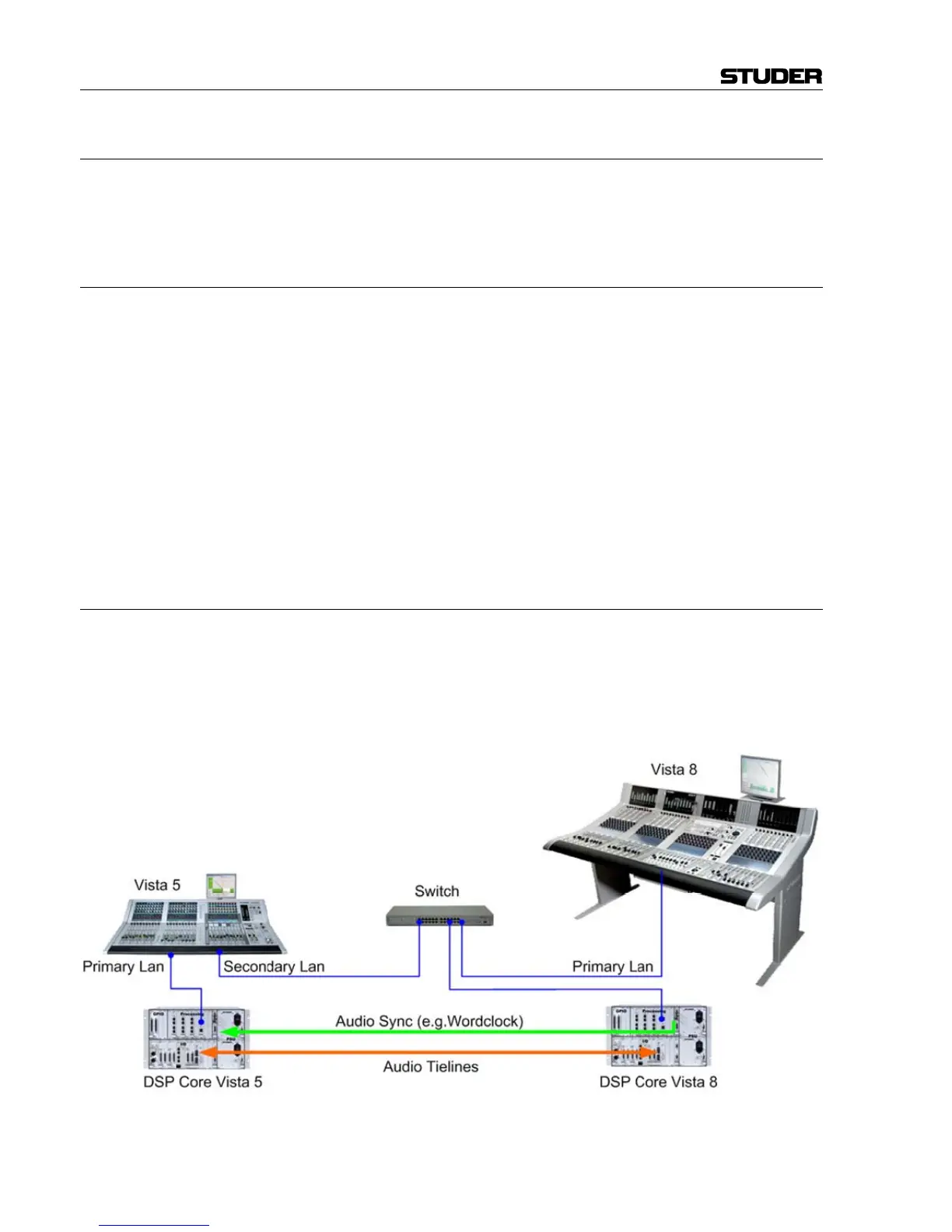
All systems that need to be part of the I/O Sharing network need to be
interconnected via Ethernet. On the Vista side, it is always the desk that
needs to be networked.
A.5.7.1 Vista 5
Vista 5 is by default equipped with two network ports: Primary LAN and
Secondary LAN, the sockets thereof can be found on the rear side of the
desk.
The simplest way is to use the Secondary LAN port for I/O Sharing. In
that case, the Primary LAN port can still be wired directly to the bridge
card of the SCoreLive. In case of cable redundancy to the bridge card (both
ports of the desk are wired to both ports of the bridge card in parallel), an
Ethernet switch needs to be placed between Secondary LAN port and
bridge card. From this Ethernet switch, the connections are made to all the
other I/O Sharing devices.
In case the I/O Sharing network only consist of two Vista 5 consoles, also a
X-over network cable between both Secondary LAN ports of the two
consoles could be used instead of an Ethernet switch.
A.5.7.2 Vista 6, 7, 8
Since Vista 6, 7 and 8 are not equipped with a second network port per
default, an Ethernet switch needs to be used.
In the case of a Vista 8 with a redundant control system it is recommended
to connect the Ethernet switch between the network port of the main con-
trol system and the bridge card of the SCoreLive. The network port of the
redundant control system would then still be connected straight to the sec-
ond port of the bridge card.
• Vista desk networked (Ethernet)
• Tie lines between cores (MADI, AES, or HD Links)
• DNET technology from OnAir product range



 To Next Page