Vista Digital Mixing System
2-8 Desk Operation SW V3.3 Date printed: 05.08.03
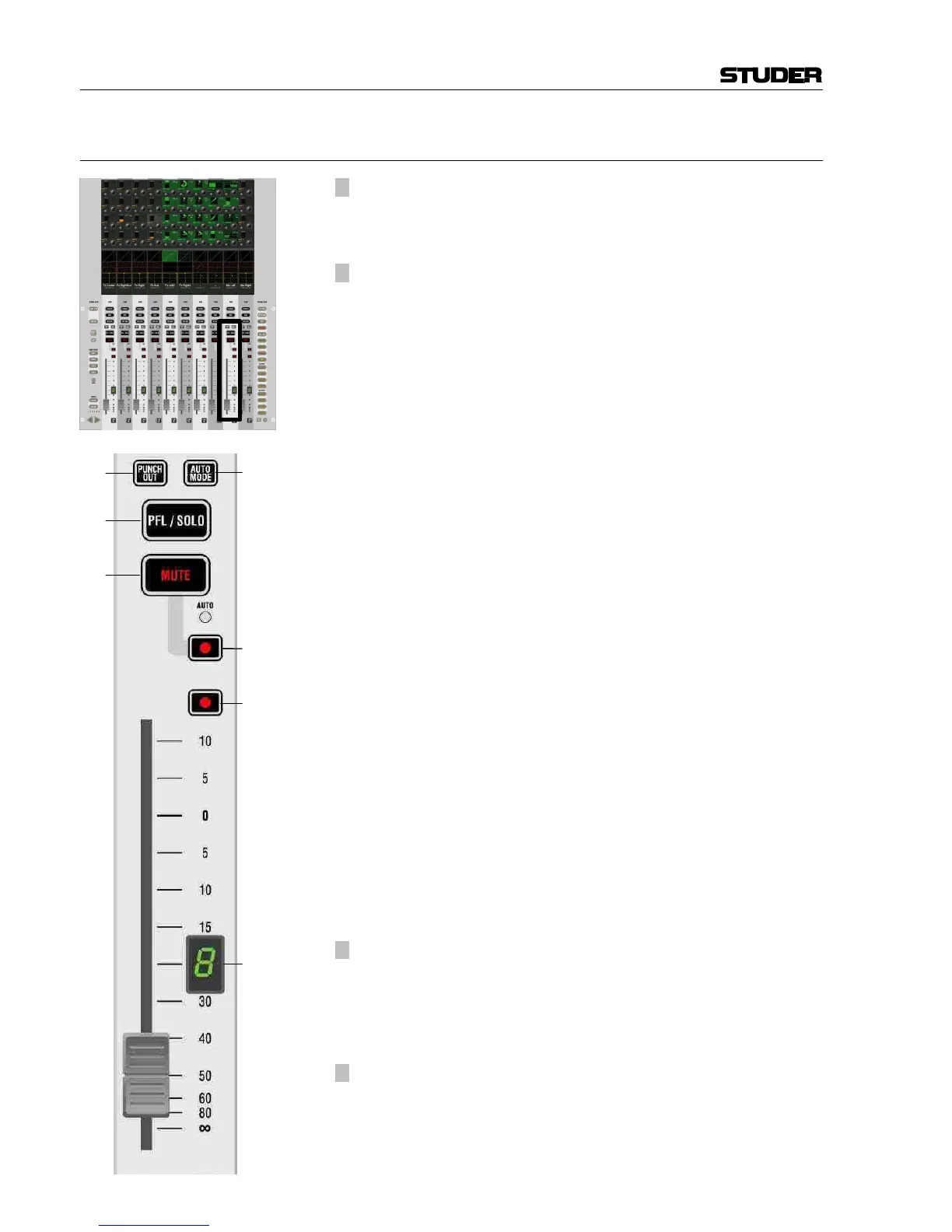
2.2.4 Area 3b – Faders
[20] ¹ PFL/SOLO
Depending on the setting of PFL, SOLO, and SOLO IN PLACE keys [135],
this activates the PFL, SOLO, or SOLO IN PLACE function of the corre-
sponding channel.
[21]
¹ MUTE
Mutes the corresponding channel. The small AUTO LED indicates when
the channel is muted by a SOLO IN PLACE function. In dynamic automa-
tion mode, the small AUTO LED shows the MUTE value during the last
mix pass (replay status). The AUTO LED also indicates if the channel is
muted through activation of SOLO IN PLACE.
[22] Control Group Indication
Indicates the control group to which this channel is assigned (this is a
function similar to “VCA groups” known from analog mixing consoles).
[23] PUNCH OUT of all elements of this channel (Dynamic Automation).
Vista 6: This key is not available.
[24] AUTO MODE
Dynamic Automation:
Toggles this channel through selected automation modes, such as WRITE,
TRIM, READ, and ISOLATE (selection definable in the “Options” menu
of the AutoTouch+ panel). Acts also as the “modifier” key to change
HOLD and TOUCH RECORD modes of this channel, depending on the
options currently set.
Static Automation:
You may add whole channels to your snapshot filter by pressing this key. It
is also possible to isolate only certain elements of a channel, such as the
EQ. This is done by pressing and holding the AUTO MODE key while
pressing the corresponding audio key. Pressing e.g. the EQ on/off key will
put the whole EQ into ISOLATE mode. Touching a rotary encoder will put
just that rotary into ISOLATE mode, indicated by a yellow “I” or – if one
of the Vistonics keys is selected – just by changing its color to yellow. It is
also possible to e.g. open up the EQ view on the Vistonics screen and se-
lect only one single parameter of the EQ to go into ISOLATE. If one of the
EQ parameters is isolated, but not the whole EQ, the EQ on/off key be-
comes half-lit while pressing AUTO MODE. If the “Enable Trim Mode” op-
tion in the Static Automation Options page is active, the status of the ele-
ments doesn't only toggle between READ and ISOLATE, but also goes to a
red “T” (TRIM). On Vistonics keys this status is indicated simply by
changing the button’s label color to red.
[25]
¹ l MUTE Punch-In/Out (Dynamic Automation)
Half-lit: MUTE is armed for recording (TRIM or WRITE mode)
Fully lit: MUTE is being recorded
Upon press: Punch-in/out of MUTE.
Vista 6: TALK key, activates talkback to the direct output of this channel
and, if applicable, to the n–1 bus output.
[26]
¹ l Punch-In/Out of Fader (Dynamic Automation)
Half-lit: Fader is armed for recording (TRIM or WRITE mode)
Fully lit: Fader is being recorded
Upon press: Punch-in/out of fader.
Vista 6: This key is not available.



 To Next Page