Vista Digital Mixing System
8-4 Vista 8 Differences
SW V3.5 Date printed: 06.04.2005
• Custom meters may be fitted into the meter bridge (2 units wide), while the
flexible assignable meters are maintained. As an option it is possible to re-
move the assignable meter panel and fit custom metering across the whole
central meter bridge (11 units wide).
8.2 Hardware Differences
8.2.1 Graphic Controller Screen
The TFT screen displaying the graphic controller software (GC) is not an
integral part of the console anymore. It is therefore possible to connect any
3
rd
-party TFT screen with DVI input to the console. If the system is
equipped with a redundant control system, the resolution of the screen may
be 1024 × 768 or 1280 × 1024 (see chapter 8.2.6). If no redundant control
system is fitted, the resolution is only limited by the capabilities of the in-
ternal graphics card. In order to provide power to the external screen, a
power plug is provided on the rear side of the console. This connector has
active power whenever the control system is powered up. This includes any
redundancy option possibly fitted in the console. The output is automati-
cally set to the same voltage as the mains voltage provided to the console.
8.2.2 Power Up/Down
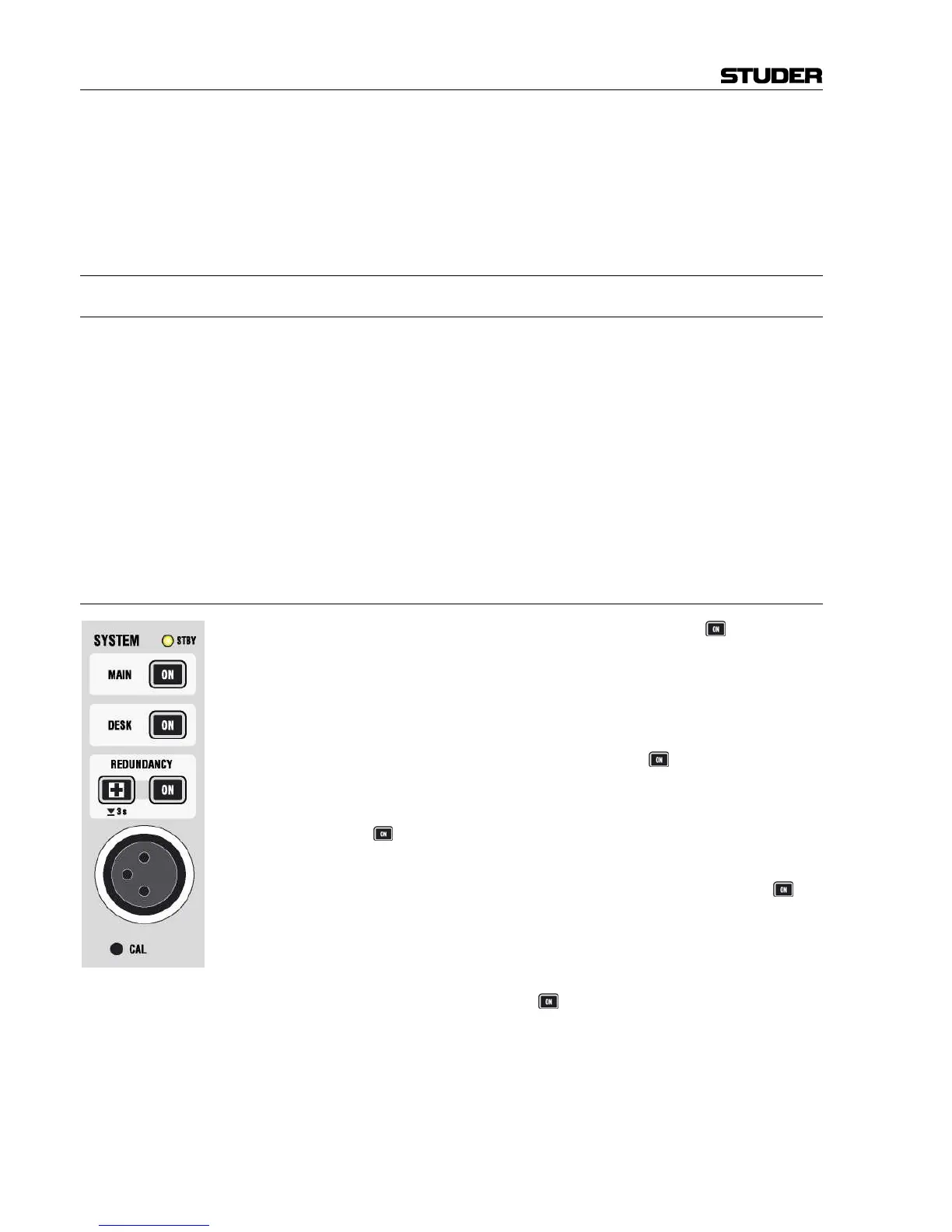
The console is powered up by pressing the (upper) MAIN key located in
the meter bridge. Shutting down the system is achieved by selecting the
corresponding command within the console software (“System Shut-
down”).
If a redundant control system is fitted, it is powered up whenever the main
system is (default). However, it is possible to start the redundant control
system individually by setting an internal jumper accordingly (see service
instructions for details). Use the REDUNDANCY
key to start the redun-
dant control system separately.
For servicing reasons it may be required to power down the desk while
keeping the control system powered up. This is achieved by holding the
DESK
key for several seconds.
Power down: The system is powered down by using the corresponding
command within the software. In case an “emergency shutdown” should be
required, this is possible by pressing-and-holding the (upper) MAIN
key
for several seconds.
The STBY LED is on whenever power is connected to the console. The ON
keys are lit whenever the corresponding part is powered up. If a key is
flashing, the redundant power supply is no more active.
Emergency shutdown: Should it be necessary to power down the system without software control,
it is possible to hold the MAIN
key for several seconds. This will acti-
vate the emergency shutdown of the system.
Note: This should be used only if software-guided shutdown is absolutely not
possible anymore!



 To Next Page