Vista Digital Mixing System
2-22 Desk Operation SW V3.3 Date printed: 05.08.03
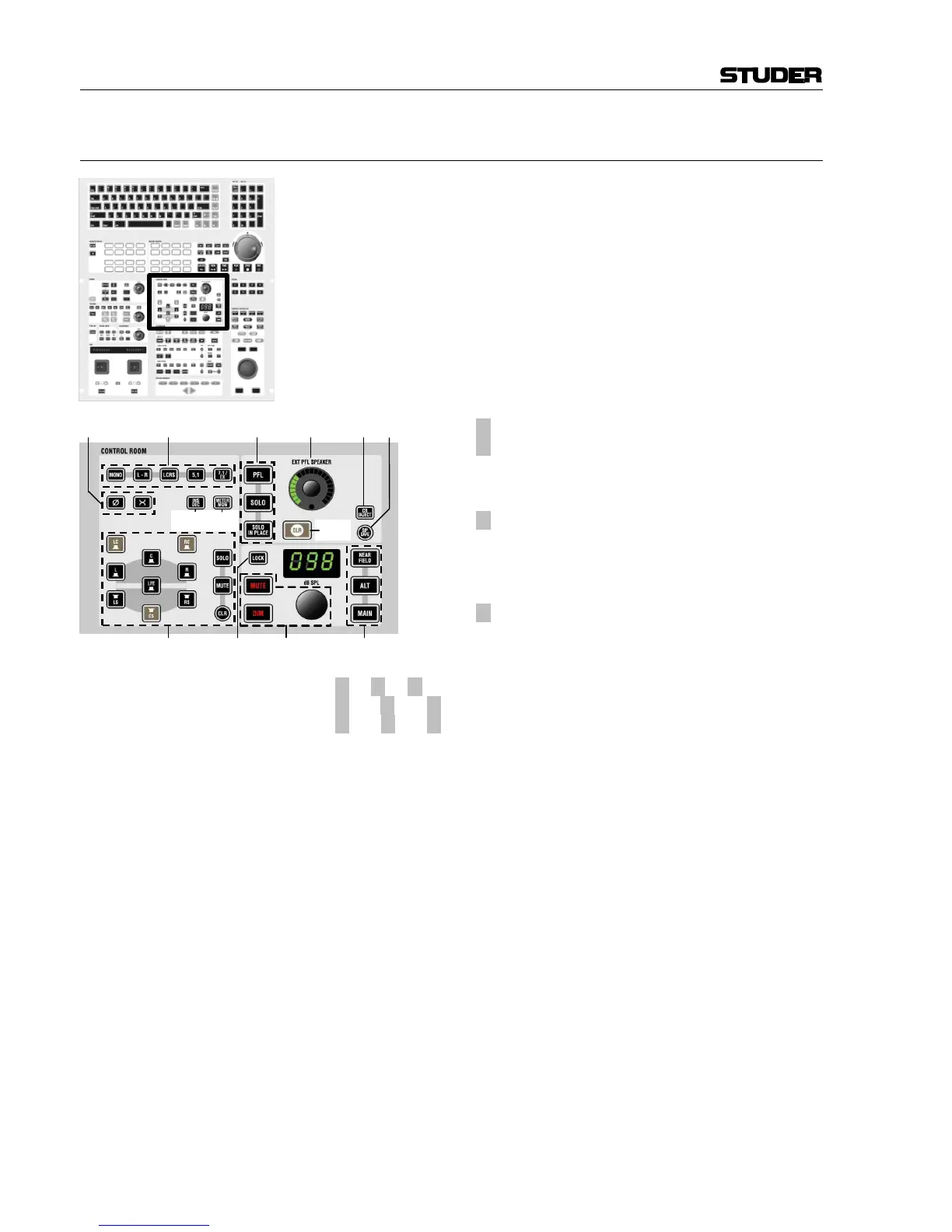
2.4.7 Area 7 – Control Room Monitoring
[130] MONO
L-R
LCRS
5.1
7.1 / EX
Selects the control room monitoring format by mut-
ing unused speakers. The “mono” setting will sum
the left and right monitor speaker signals.
The maximum number of surround channels is de-
termined by the available monitoring hardware and
the settings in the monitoring.ini file. These may be
edited by experts only.
[131]
¹ Ø
¹ X
Phase inversion on left channel, and left/right chan-
nel swap for mono or two-channel stereo mode.
[132]
¹ INS DEC
Inserts encoder/decoder chain (Inputs/Outputs on the
DSP core are pre-defined and may be activated at in-
stallation time by experts only).
[133]
¹ METER MON
Makes the monitor meters [84] indicate the moni-
tored signal instead of the pre-assigned signals.
[134]
¹ L, ¹ C, ¹ R,
¹ LC, ¹ RC, ¹ LS,
¹ CS, ¹ RS, ¹ LFE
These keys act as solo or mute keys for each speaker being currently ac-
tive, depending on the monitoring format selection [130]. The mode is pre-
selected by the SOLO and MUTE keys on the right. It is also possible to
clear all pressed keys with the (circular) CLR key next to MUTE.
[135] PFL
SOLO
SOLO IN PLACE
These keys determine the mode the console is in when pressing PFL/SOLO
on a channel strip. It can be either PFL (pre-fader listening), SOLO (post-
fader listening incl. pan), or SOLO IN PLACE (solo by muting all channels
but the selected one, masters and other defined channels; destructive
mode).
[136] CLR
If any of the PLF/SOLO keys on the console is active (even if it is not cur-
rently visible on the surface), this key will be lit. Pressing it clears all acti-
vated PLF/SOLO functions on the channels.
[137] EXT PFL SPEAKER
If an external PFL speaker is used, this rotary control adjusts the level of
the PFL signal on that speaker. The same speaker is used for talkback sig-
nals as well, however with a different control for the level setting ([153] in
chapter 2.4.9).



 To Next Page