Vista Digital Mixing System
4 Software V4.0 SW V4.0 Date printed: 17.06.08
A.1.1 Channel Patch
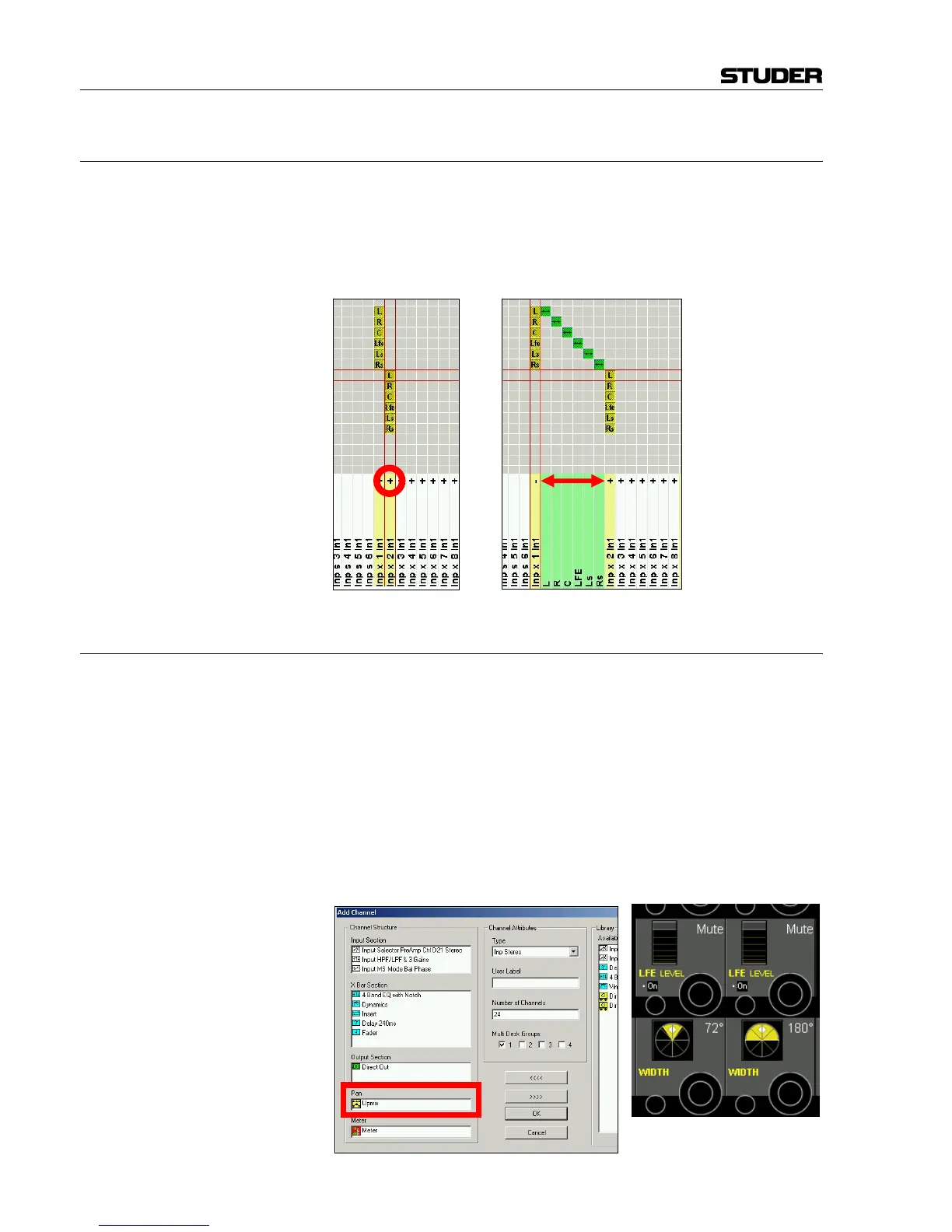
A surround source can very easily be patched to a 5.1 input channel by
using the “auto” route facility, where all six discrete mono sources are
patched at once and with one single click. Moreover, there is a "+" unfold
icon with every 5.1 target. When clicking on it, all 6 individual legs of the
surround target are shown and can be patched in any desired order. Click-
ing on "-" closes this view to show only one single patch connection again.
A.1.2 "Upmix" Panner for Stereo Channels
Normally, a significant number of stereo sources is still used for a typical
surround production, so they need to be brought into the 5.1-channel for-
mat. The upmix panner is a way to pan stereo signals to a surround mix,
providing the possibility to ‘unwrap’ a simple stereo signal to a surround
sound field.
Every stereo channel can be equipped with the new “upmix” panner. There
are three operating modes: "Normal LR", "5.1", and "5.1 width" modes.
"LR" mode is normal stereo panning; "5.1" mode simply uses “standard”
panning, where e.g. the left channel is also sent to the left surround
speaker, etc. The most uncommon of these modes is "5.1 width", applying
a special algorithm (using Harman corporate intellectual property), extend-
ing the stereo width control to the rear channels as well.



 To Next Page