Vista Digital Mixing System
2-32 Desk Operation SW V3.3 Date printed: 05.08.03
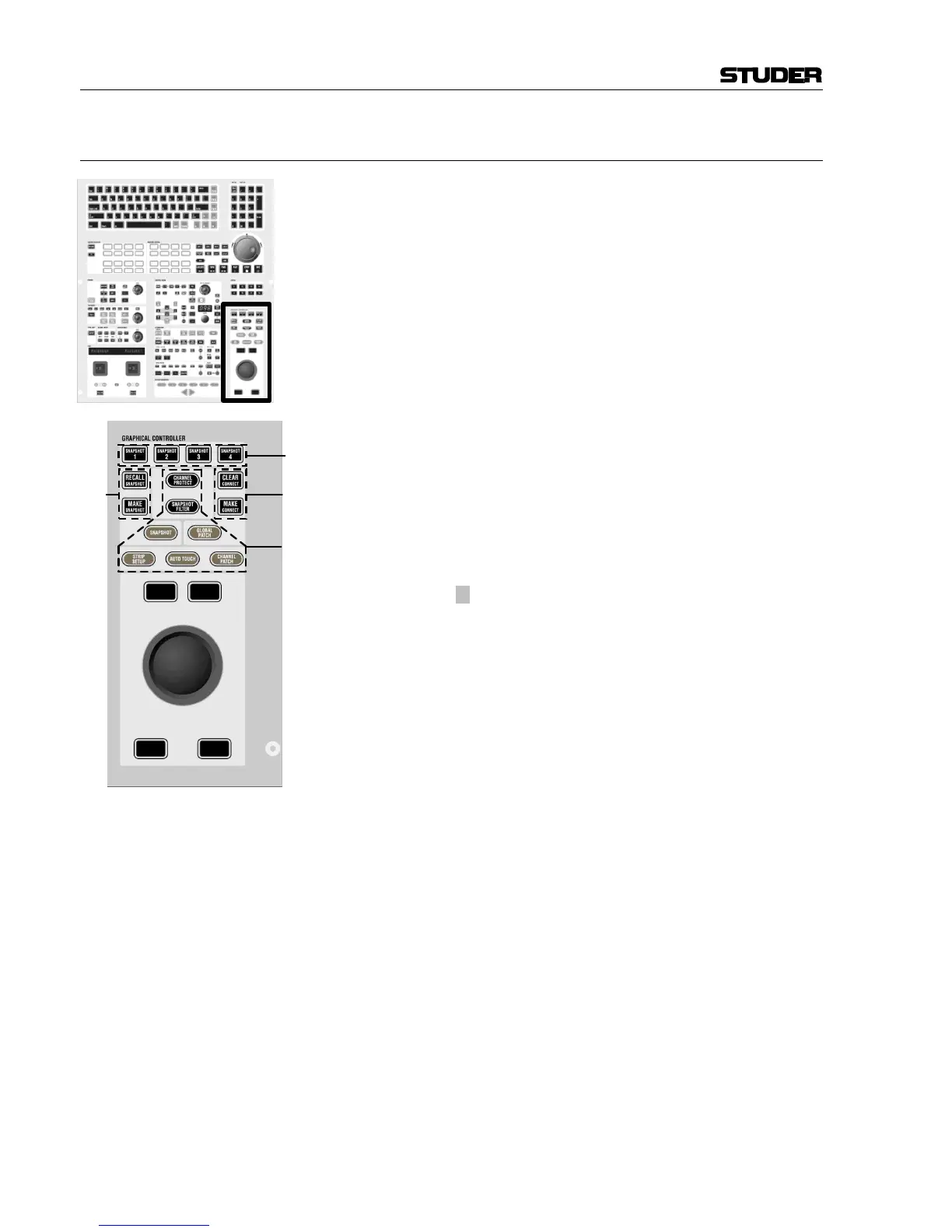
2.4.13 Area 12 – Shortcut Keys for Graphic Controller
[210] SNAPSHOT 1...4
A snapshot contains all audio settings including patching and labels.
These keys allow four snapshots to be stored and recalled without making
use of the Graphic Controller screen.
• Making a snapshot:
Press and hold MAKE SNAPSHOT [211], then press one
of the four SNAPSHOT 1...4 keys. This will program this
key with the current audio settings.
• Recalling a snapshot that has been programmed on one
of the SNAPSHOT 1...4 keys:
Press and hold RECALL SNAPSHOT [211] while pressing
one of the SNAPSHOT 1...4 keys. This will recall the
snapshot instantly, if warning mode is not active (see
description of the “Options” menu on the Graphic Con-
troller.)
• Preview of a snapshot that has been programmed on one
of the SNAPSHOT 1...4 keys (SW V3.3 and up):
Pressing one of the four keys by itself will activate a
preview of that specific snapshot and illuminate it. Val-
ues in the previewed snapshot that are different from the
current console settings will be visible on the Viston-
ics™ modules using magenta-colored indicators.
¹ This preview function can also be activated momen-
tarily or latching.
[211] MAKE SNAPSHOT
RECALL SNAPSHOT
Pressing and releasing MAKE SNAPSHOT will create a
snapshot with an automatically generated name, listed in
the Graphic Controller. Filtering may be applied upon re-
call of the snapshot. See shortcut keys [213].
[212] MAKE CONNECT
CLEAR CONNECT
If the general patch window is opened on the Graphic
Controller, these keys will make or clear a patch connec-
tion at the intersection of the red lines.
[213] CHANNEL PROTECT
SNAPSHOT FILTER
SNAPSHOT
GLOBAL PATCH (General Patch)
STRIP SETUP
AUTO TOUCH
CHANNEL PATCH
These shortcut keys will open the corresponding windows on the Graphic
Controller.



 To Next Page