Vista Digital Mixing System
1-10 Introduction SW V3.3 Date printed: 05.08.03
1.1.5 Scrolling
Most of the installations will have more channels available in the DSP core
than there are physical faders on the console surface. Most manufacturers
deal with that fact by introducing “layers”. The console surface can be
switched in order to show the different layers, all together making all DSP
channels available to the user. The Studer Vista operating concept has
slightly modified this concept: Rather than thinking of layers, sitting on
top of each other, we think of the layers being arranged in a horizontal
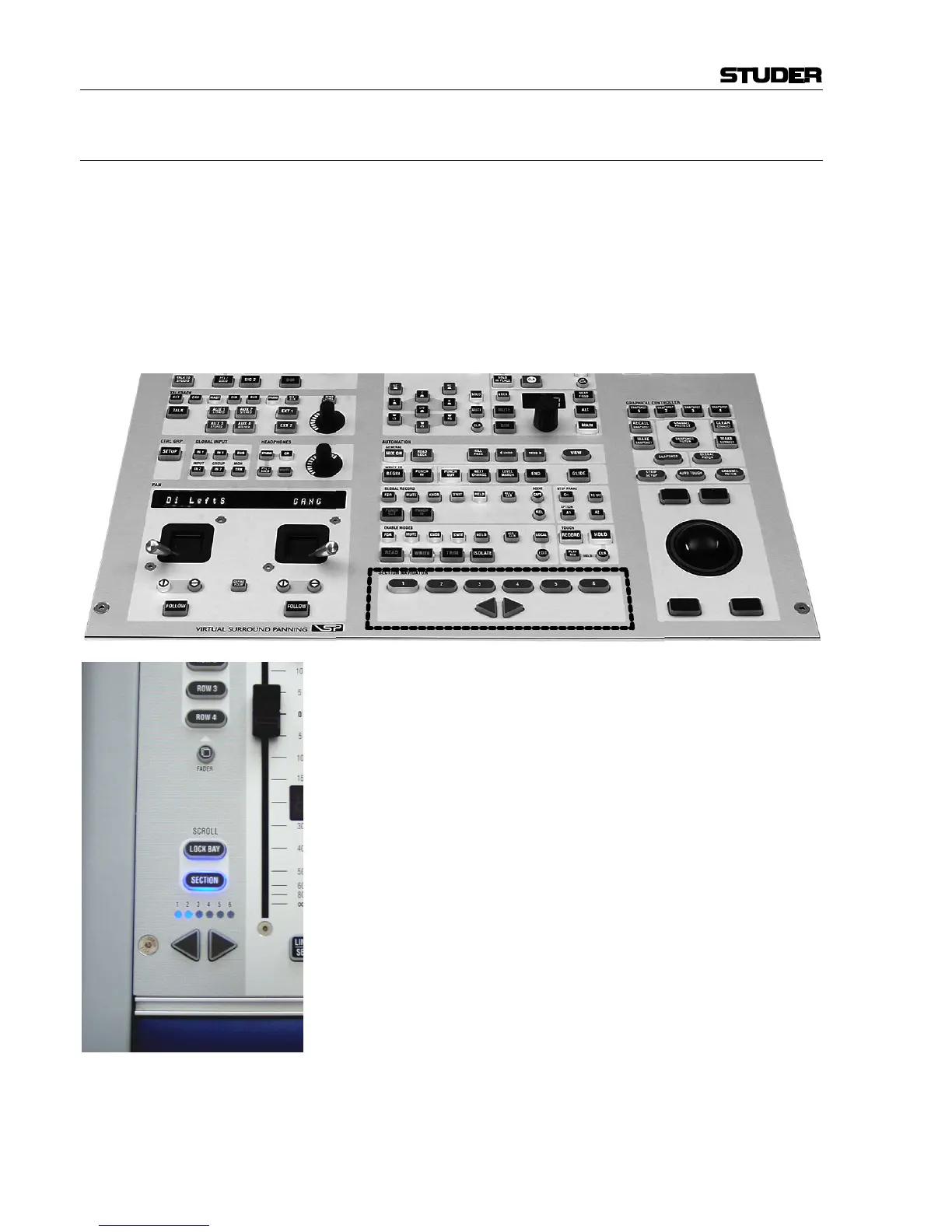
line. The “Layer” is now called “Section”. The six sections are next to
each other on an imaginary horizontal line, as indicated by the “Section
Navigator” keys in the control bay.
As long as the user wants to switch to a specific section, there is no differ-
ence in operation to the “layer” concept. Changing to another section is ac-
complished by pressing one of the corresponding keys in the SECTION
NAVIGATOR area of the control bay, or by pressing the arrow keys located
in each bay with SCROLL: SECTION set to ON (see left).
The information on which section is currently displayed is given by the lit
keys (Control Bay) or the LEDs representing the different sections (Fader
Bay). Looking at the Graphic Controller with the “strip setup” screen in
the foreground will also indicate the currently displayed section by putting
a dark background to the displayed channels.



 To Next Page