Vista Digital Mixing System
3-16 Parameters SW V3.3 Date printed: 05.08.03
3.3.10 EQ Parameters
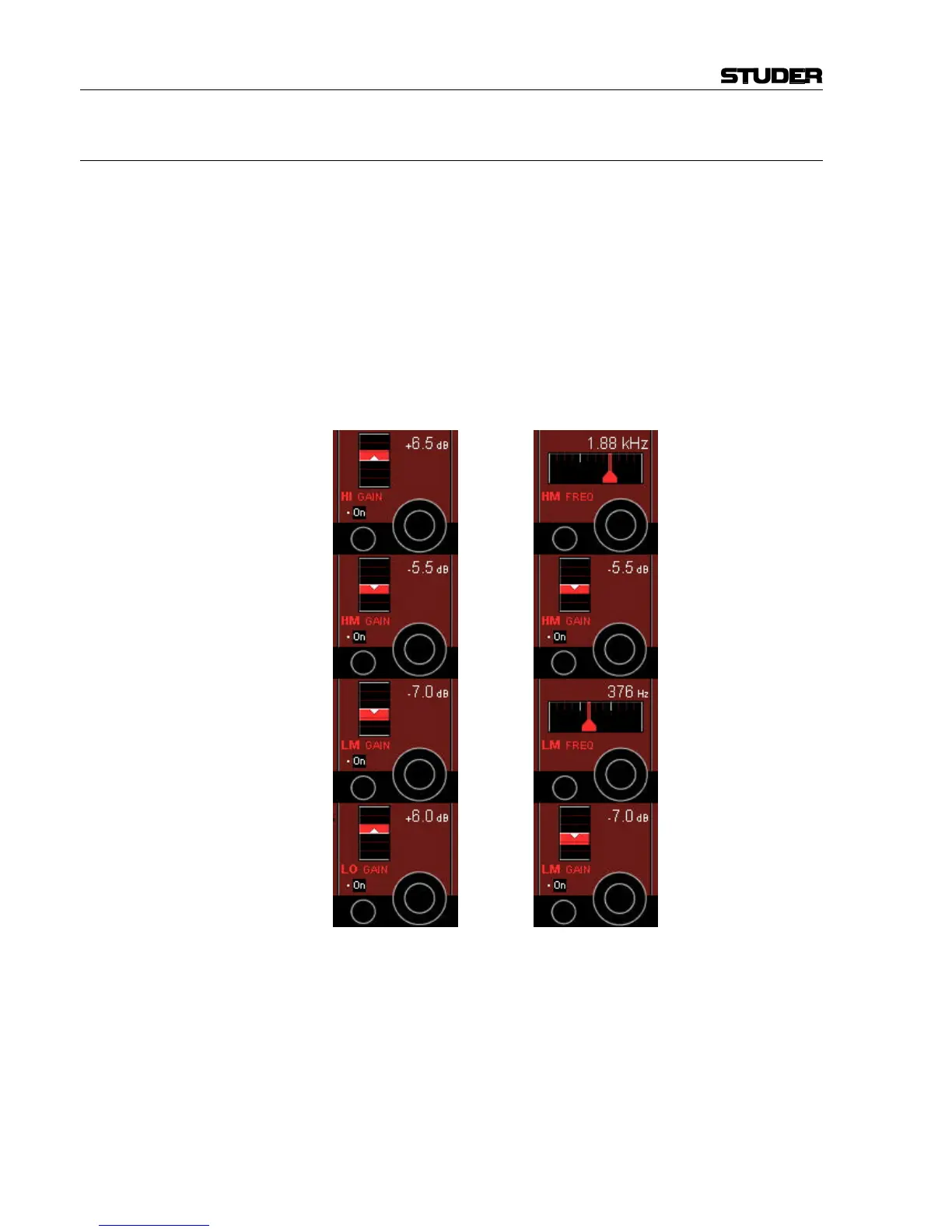
There are two views enabling the user to control the most important pa-
rameters of the EQ section. The standard view (on the left, showing the
gain values of all four bands) is activated by just pressing GLOBAL VIEW:
EQ; for activating the alternate view (on the right, showing gain and fre-
quency values of the high-mid and low-mid bands), first press ñ (Shift).
The complete parameter set is available on the channel-related EQ view,
refer to chapter 3.4.1. In that chapter you will also find the parameter de-
tails.
Please note: All four bands of the EQ section can be activated simultane-
ously with the EQ hardware key below the channel meters – in addition to
the individual on/off keys described below.
Standard view: Alternate view:
HI/HM/LM/LO On/Off On/off function for the selected EQ band.
HI/HM/LM/LO GAIN Boost/cut adjustment; ±18 dB in steps of 0.5 dB.
HM/LM FREQ Center frequency adjustment for the high-mid and low-mid bands. For both
bands, the center frequency can be adjusted from 20 Hz through 20 kHz, in
120 steps.



 To Next Page