Vista Digital Mixing System
Date printed: 05.08.03 SW V3.3 Parameters 3-19
3.3.13 Generic and Label Display Area
Channel label display: The top line always indicates the inherited label
(corresponds to the user label of the patched source – “track sheet”) of
each channel. The second line normally is set to user label display, but can
be changed by pressing GLOBAL VIEW: LABEL TYPE.
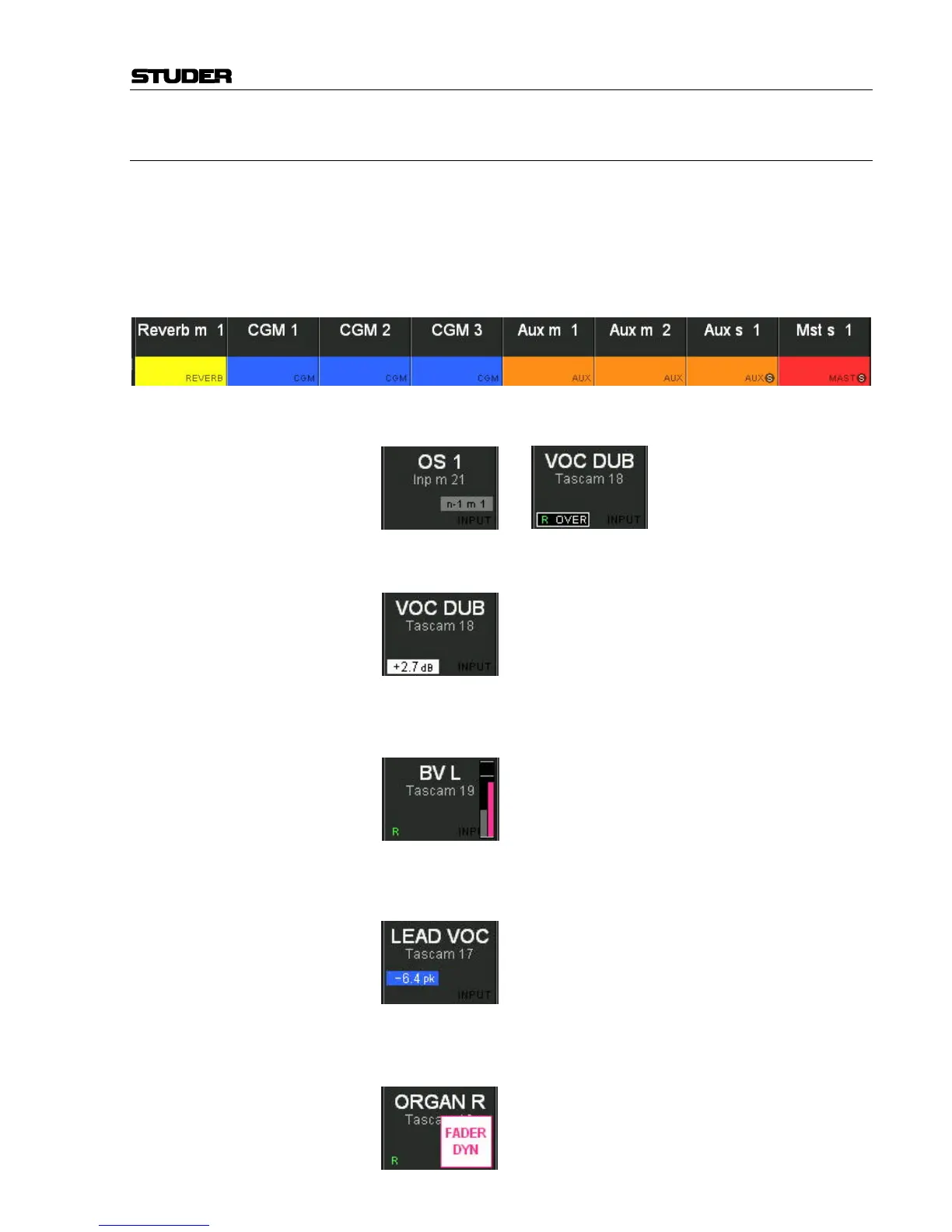
The channel type is indicated with colors in the label display; in addition,
the bottom right corner of the label field shows the channel type in writing,
as shown below.
Generic Displays, as n–1, OVER (fader over-range), automation mode (R
= read, W = Write, T = Trim, I = isolate), etc. are only shown if active:
The numerical fader value in dB is displayed whenever the fader knob is
touched; it disappears a short while after the fader knob has been released.
The graphical display of replay value and current fader value pops up over
the right-hand part of the display area, showing the values as bar graphs
(current value in gray, replay value in pink).
The display below is only visible if the PEAK HOLD CONT function is on or
if OVERLOAD HOLD is active and an overload condition occurred; it shows
the current peak hold value of the channel meters:
The display below indicates that mutes or faders are dynamically auto-
mated. This is only visible if the VIEW key in the AutoTouch+ panel is ac-
tive (for more information on automation indications refer to chapter 3.5).



 To Next Page