Vista Digital Mixing System
Date printed: 05.08.03 SW V3.3 Parameters 3-7
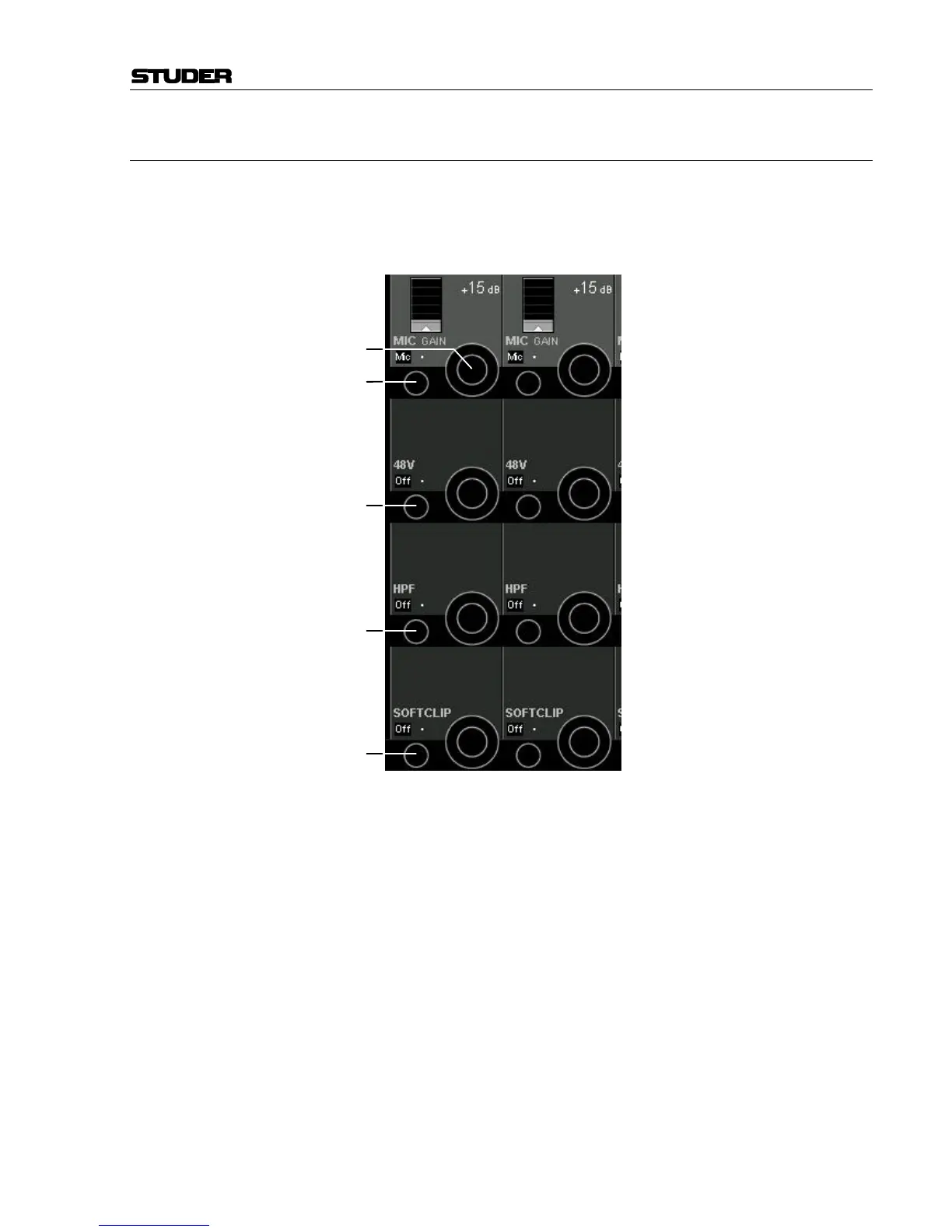
3.3.2 Pre-Amp Remote Parameters
Press GLOBAL VIEW: A / D CTRL.
Various functions of the D19m MP4RC quad mic/line input cards can be
remote controlled (refer to chapter 4.4.2.2 for details on how to activate or
deactivate pre-amp remote control).
Mic/Line [6] Mic/Line Switchover
MIC/LINE GAIN [7] If Line is selected with [6]: Gain setting in 35 steps of 1 dB, within a –9
through +25 dB range (depending on the current nominal level and head-
room settings).
If Mic is selected with [6]: Gain setting in 60 steps of 1 dB, within a +20
through +80 dB range.
The display indicates the gain applied to signals passing through the mi-
crophone pre-amplifier card.
48 V [8] Selects Phantom Power ON/OFF for the microphone pre-amplifier.
HPF [9] An analog low-cut filter for the microphone-level input, with a fixed cutoff
frequency of 75 Hz and a slope of 12 dB/octave is available.
SOFT CLIP [10] It is possible to insert an analog limiter to avoid clipping artifacts. Soft
clipping is activated once per MP4RC card (i.e. for four channels at a
time).
[6]
[7]
[8]
[9]
[10]



 To Next Page