STUDER 21. Sep. 2004 Release Notes Vista 3.4
5/18
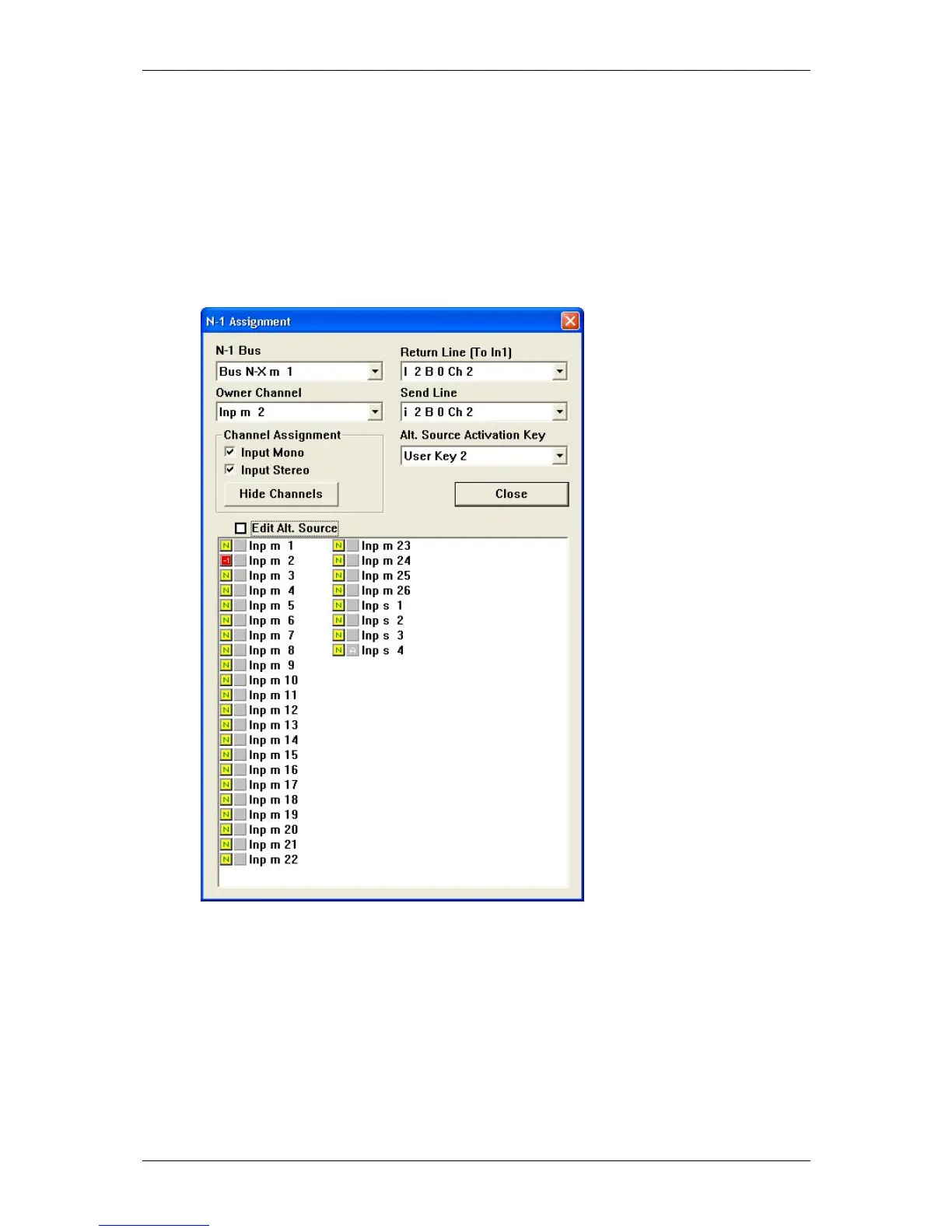
1. Open the menu “N-1 Assignment” in the OPTIONS menu of the graphical controller
screen.
2. Select the n-x bus you want to define the alternate signal for.
3. Click on “Edit Alt. Source”
4. Select any channel (or multiple) to be the alternate signal source for the selected n-
x bus. (Their prefade signal will be used, weighted with the “n-1 send level” to form
the alternate signal for this n-x bus.)
5. Define the USER1 or USER2 button to be the activation key
In order to not to repeat this process too often, such a setup may be stored in a snapshot or
preset and used at any time by all operators.
4. New multitrack busses with option to switch prefade and switching pan
off
When configuring the new "Multitrack Enhanced" bus type, additional parameters become available
on the console: When looking at the global view "OUT n-1" or the local CHAN view, a multitrack send
level is visible. This level is used for all multitrack busses. A "Pan ON/OFF" switch allows the user to
select whether the channel pan setting has an influence on the multitrack busses or not. By using
the PRE/POST modifier key on the bottom right corner of the fader bay, it is possible to alter the
switch function to become a PRE/POST switch for multitrack busses. It is therefore possible to
determine:
a) whether the multitrack busses are fed by a pre- or postfade signal
b) whether the channel panner should be active for the multitrack busses



 To Next Page