Vista Digital Mixing System
2-28 Desk Operation SW V3.3 Date printed: 05.08.03
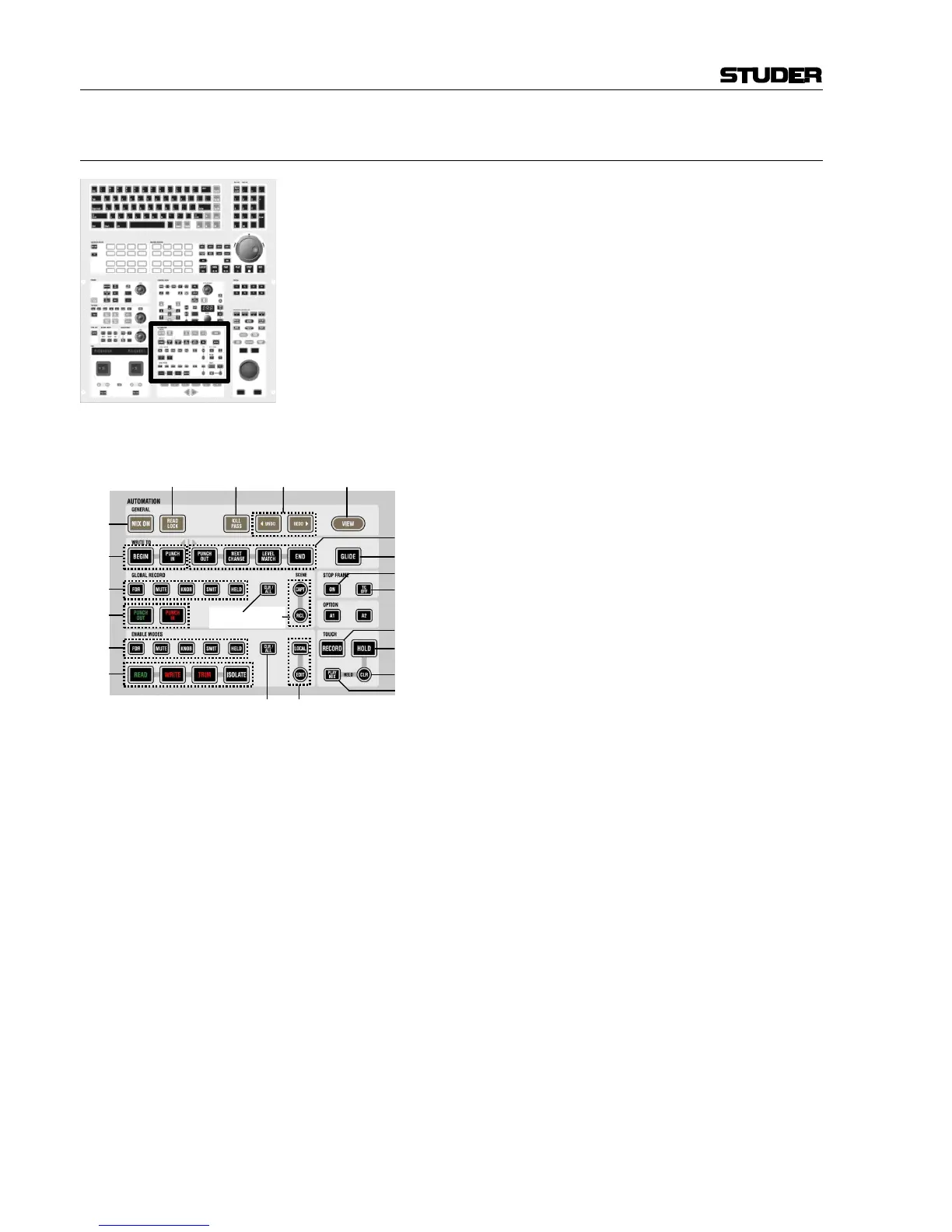
2.4.12 Area 11 – Dynamic Automation / Static Automation
Please note that in this paragraph the AutoTouch+ dynamic automation
system is touched only briefly for explanation of the keys; refer to
chapter 5 for more information.
Also note: The static automation system (filtering) cannot be active on a
console which has dynamic automation available. The decision which
functionality is available is made by an entry in an *.ini file in the con-
sole’s PC before the application is started, or by starting the application
by a special shortcut icon on the desktop.
[180] MIX ON
If a mix tree is open, this key will activate dynamic automation with this
mix tree.
Static automation: Makes Snapshot Filtering active, same as clicking on
the Snapshot Filter icon in the toolbar.
[181] READ LOCK
If lit, all control changes on the surface will be
ignored, and the current mix is played back.
(“layback mode”)
[182] KILL PASS
If pressed while doing a mix pass, there will be
no pass created upon TC stop.
[183] 3UNDO, REDO4
Moving backward and forward in the automation
stack, moving between the last mix passes.
[184] VIEW (dynamic)
While pressed, all dynamically automated ele-
ments on the desk will be indicated in magenta.
[185] WRITE TO: BEGIN
WRITE TO: PUNCH IN
(Default: both off)
Can only be activated if no mix pass is currently running. If activated, the
value at the punch-out point will be written back to the “Begin” address
(specified in the AutoTouch+ window), or the moment when the element
was punched into record.
[186] WRITE TO: PUNCH OUT
WRITE TO: NEXT CHANGE
WRITE TO: LEVEL MATCH
WRITE TO: END
(Default setting: PUNCH OUT)
These keys determine what happens when any recording element is
punching-out of record. It is defined whether it should stop recording at
that point in time (setting PUNCH OUT) or whether the last value should be
written to some point in the future (NEXT CHANGE, LEVEL MATCH, END). If
PUNCH OUT is not active, the value at the punch-out point will be written
further ahead up to the selected time:
• NEXT CHANGE: Up to the next recorded movement of this element
ahead of the current punch-out point.
• LEVEL MATCH: Ahead up to the point where the value at punch-out time
matches the value of previously recorded movements.
• END: Specified in the AutoTouch+ window.



 To Next Page