Vista Digital Mixing System
Date printed: 17.06.08 SW V4.0 Software V4.0 23
A.4.3 Panning Parameters
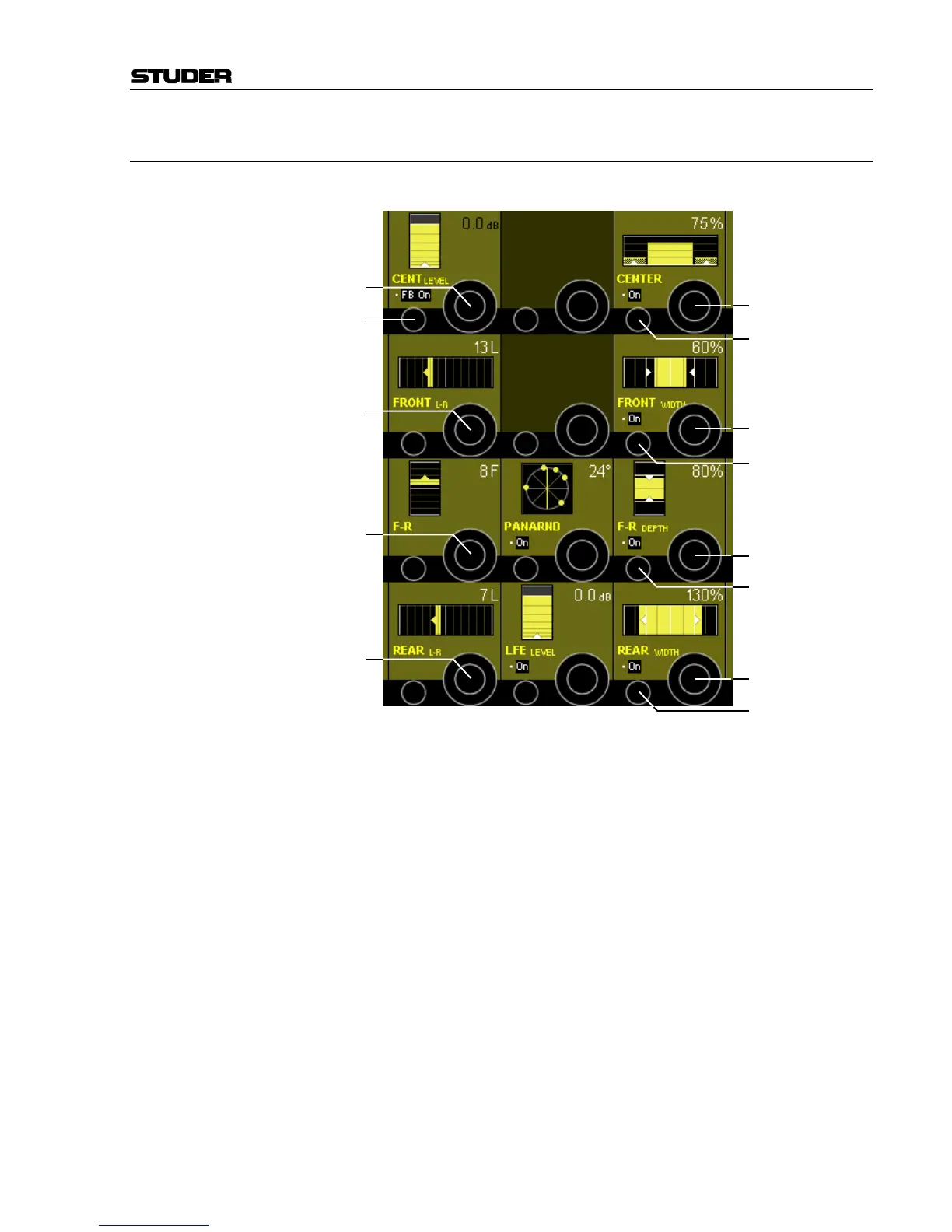
Touch the yellow Vistonics
TM
pan field.
PAN On/Off is selected with the PAN hardware key.
CENT LEVEL [1] Center level control from MUTE (i.e. –∞ dB) to +10 dB.
FB On/Off [2] On/off switch for center channel contribution to the F-R control [4].
FRONT L-R [3] Front panning between the left, (center) and right channels in 1° steps. The
contribution to the center channel is determined by the CENTER control.
F-R [4] This parameter allows variable blending from front to rear channels in 60
increments, either with a contribution from the center channel (FB On) or
without (FB Off).
REAR L-R [5] Panning between the left and right surround channels in 1° steps.
PANARND On/Off [6] Activates the Pan-Around function.
PANARND [7] Single-knob function, allows rotating the surround sound field by ±180°.
LFE On/Off [8] On/off selector for LFE channel use.
LFE LEVEL [9] LFE channel percentage control; 0% = no LFE channel use, 100% = LFE
channel fully active.
[2]
[3]
[4]
[5]
[13]
[11]
[17]
[16]
[8]
[1]
[7]
[9]
[15]
[12]
[10]
[14]
[6]



 To Next Page