Vista Digital Mixing System
Date printed: 28.04.04 SW V3.3 Parameters 3-23
0
–5
–10
–15
–20
–25
–30
–35
–40
–45
–50
–55
–60
–65
–70
–75
–80
–85
–90
–10–20–30–40–50–60–70–80–90 0
Input level
[dBFS]
Output level
[dBFS]
1
2
6
5
4
3
0
–5
–10
–15
–20
–25
–30
–35
–40
–45
–50
–55
–60
–65
–70
–75
–80
–85
–90
–10–20–30–40–50–60–70–80–90 0
Input level
[dBFS]
Output level
[dBFS]
2
3
4
5 6 71
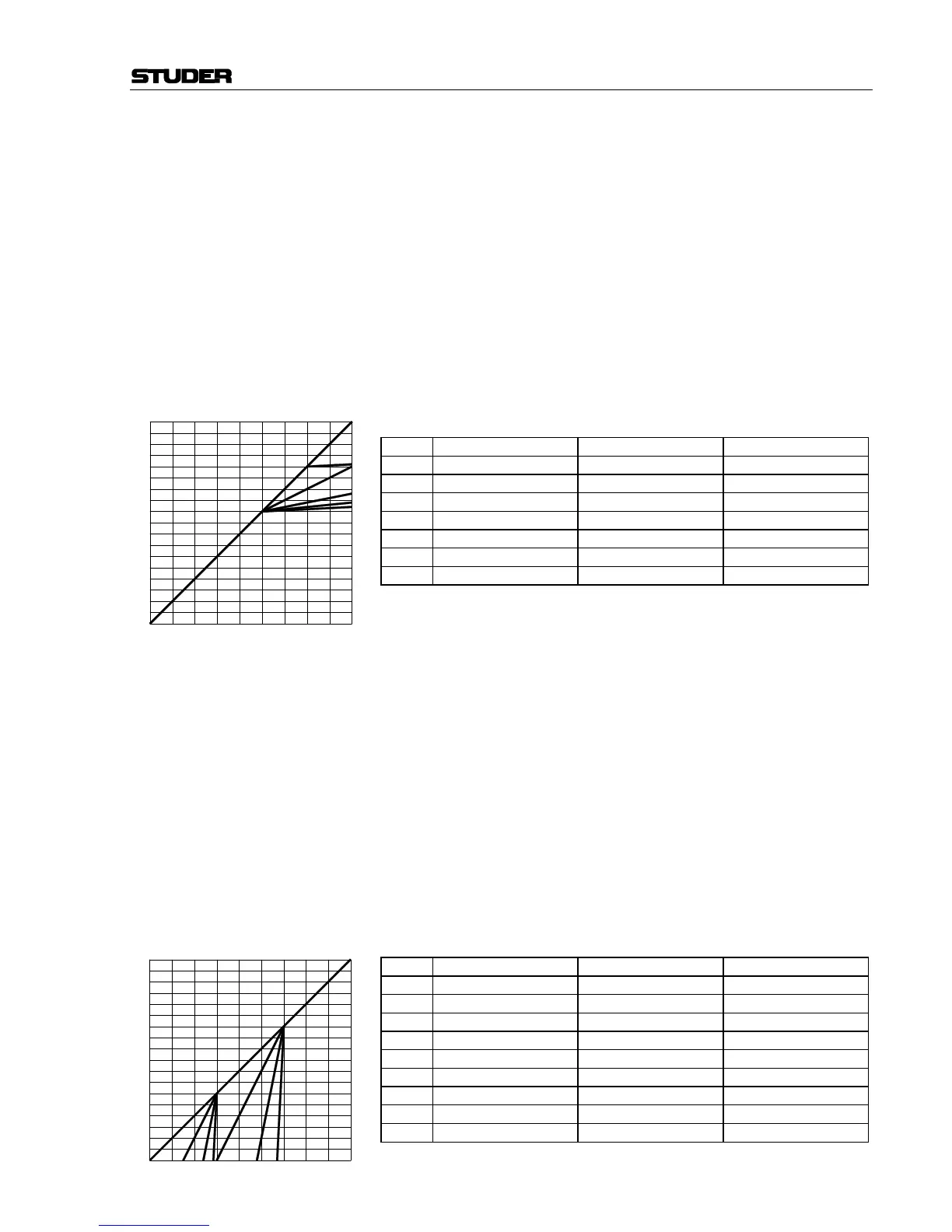
Compressor Parameters:
CMP On/Off [41] Compressor on/off.
CMP THRS [42] The compressor threshold level can be adjusted in 1 dB steps from 0 dB
FS
to –96 dB
FS
.
CMP REL [43] The compressor release time can be adjusted in 13 steps within a 10 ms to
10 s range (10 ms, 20 ms, 30 ms, 50 ms, 100 ms, 200 ms, 300 ms, 500 ms,
1 s, 2 s, 3 s, 5 s, and 10 s).
CMP hold on/off [44] Hold on = 150 ms, off = 0 ms.
CMP ATCK [45] The compressor attack time can be adjusted in 9 steps within a 200 µs to
20 ms range (0.2 ms, 0.3 ms, 0.5 ms, 1 ms, 2 ms, 3 ms, 5 ms, 10 ms, and
20 ms).
CMP RTIO [46] The compressor ratio can be adjusted from 1:1 (no compression) to 20:1
(heavy compression) in the following steps: 1:1, 5:4, 4:3, 3:2, 5:3, 2:1, 3:1,
5:1, 7:1, 10:1, and 20:1.
Curve Compressor Threshold [dB] Ratio
1
OFF any any
1
ON 0 1:1
2
ON –20 20:1
3
ON –40 20:1
4
ON –40 20:1
5
ON –40 5:1
6
ON –40 2:1
Expander Parameters:
EXP On/Off [47] Expander on/off.
EXP THRS [48] The expander threshold level can be adjusted in 1 dB steps from 0 dB
FS
to
–96 dB
FS
.
EXP REL [49] The expander release time can be adjusted in 13 steps within a 10 ms
through 10 s range (10 ms, 20 ms, 30 ms, 50 ms, 100 ms, 200 ms, 300 ms,
500 ms, 1 s, 2 s, 3 s, 5 s, and 10 s).
EXP hold on/off [50] Hold on = 150 ms, off = 0 ms.
EXP ATCK [51] The expander attack time can be adjusted in 9 steps within a 200 µs to
1 ms range (0.2 ms, 0.3 ms, 0.4 ms, 0.5 ms, 0.6 ms, 0.7 ms, 0.8 ms, 0.9 ms,
and 1 ms).
EXP RTIO [52] The expander ratio can be adjusted from 1:1 (no expansion) to 20:1 (heavy
expansion) in the following steps: 1:1, 5:4, 4:3, 3:2, 5:3, 2:1, 3:1, 5:1, 7:1,
10:1, and 20:1.
Curve Expander Threshold [dB] Ratio
1
OFF any any
1
ON –96 any
1
ON –30 1:1
2
ON –60 2:1
3
ON –60 5:1
4
ON –60 20:1
5
ON –30 2:1
6
ON –30 5:1
7
ON –30 20:1



 To Next Page