TLS-450 Setup and Operation Screens Manual
3
Front Panel Layout
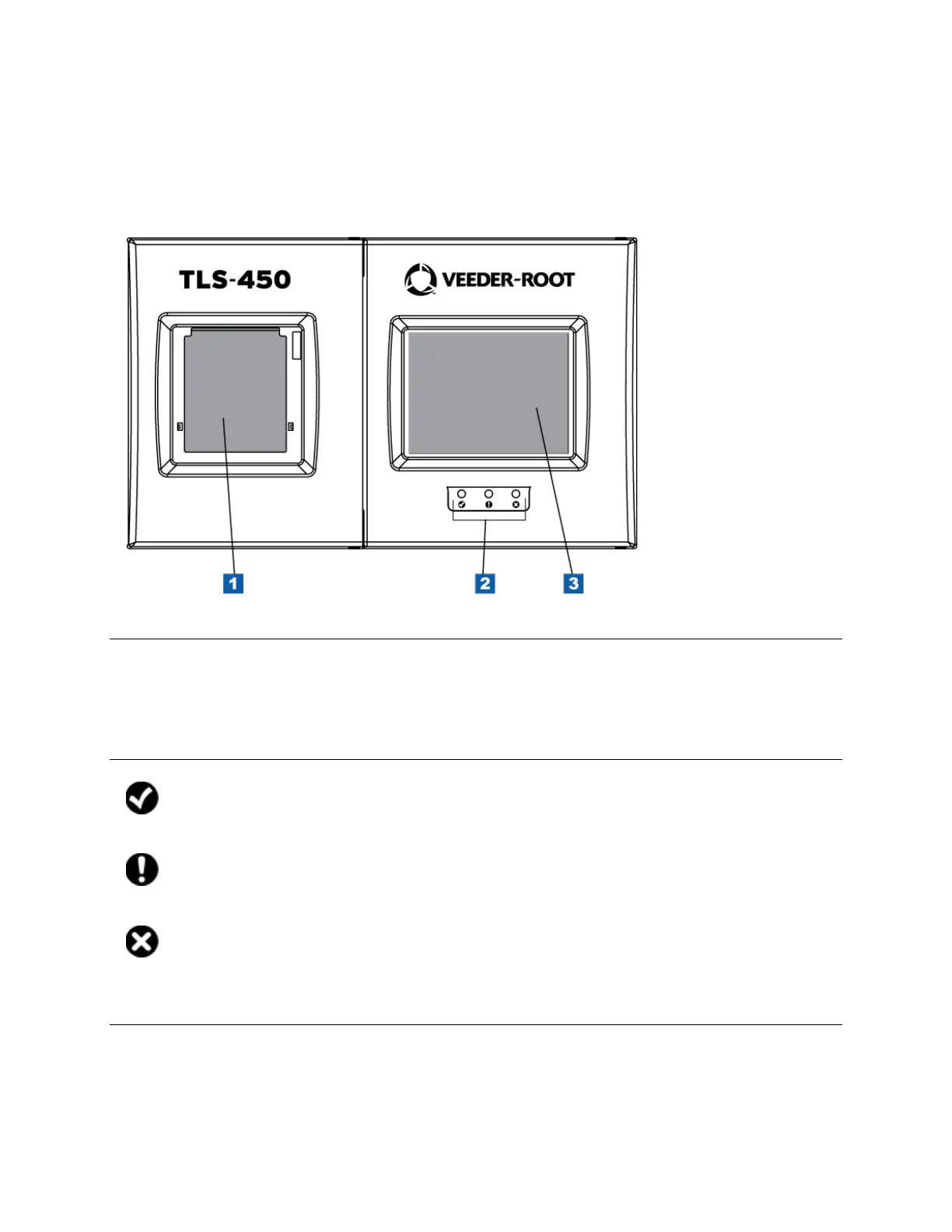
The TLS-450 Console front panel components are shown below:
Item 1 - Integral Printer
The integral printer is mounted in the left hand door of the console. The printer uses only V-R thermal
roll paper (P/N 514100-456) and it must be installed correctly so the thermal sensitive side faces the
print head. A red stripe will appear on the paper when it is time to change the roll.
Item 2 - System Visual Status LEDs
The check symbol is beneath a green LED. When the green LED is lit, there are no alarms active
(normal)
The exclamation symbol is beneath a yellow LED. When the yellow LED is lit, there is at least one
warning (minor) active.
The X symbol is beneath a red LED. When the red LED is lit, there is at least one alarm (major)
active.
Item 3 - Touch Screen
The TLS-450 graphical user interface is a touch sensitive screen providing quick access to operational
reports, setup parameters, diagnostic information for all configured devices (tanks, sensors, etc.) and
Online Help.



 To Next Page
 Loading...