3-48 PN: 10580-00343 Rev. H S820E UG
3-8 Trace Cable and Antenna Measurements
From the Trace menu you can Copy Trace to Display Memory. The copied trace
can be displayed on the Site Master and used for trace math. Trace Display
allows viewing of two traces at the same time to compare the trace stored in
memory to the live trace. Trace Math operations include Trace - Memory,
Trace + Memory and (Trc + Memory) / 2. Saved traces can also be recalled and
compared with the live trace.
Trace Overlay
The examples below illustrate how the trace overlay feature can be used to
compare the return loss measurements between two cables.
1. Connect the first cable and setup the measurement. Refer to
“Measurement Setup” on page 3-29 for additional information.
1. Press Trace (5) and then Copy Trace To Memory.
2. Remove the first cable and connect the second cable.
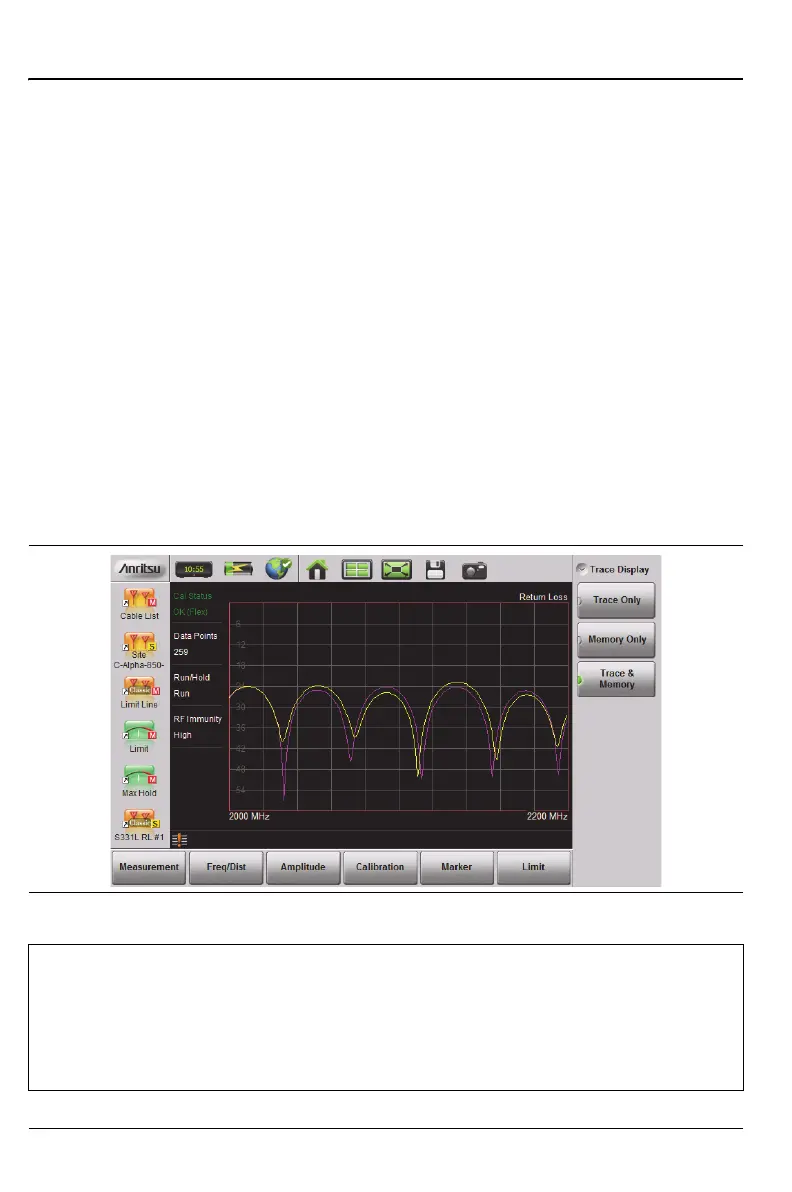
3. Press Trace Display and select Trace & Memory. The purple trace from
trace memory is displayed along with the live (yellow) trace.
Figure 3-30. Trace Overlay of Two Cables
Note
The trace from memory can be displayed only if the measurement
settings (except for Amplitude) have not changed since the trace
was copied to memory.
If one of the traces is cut off, then pressing Amplitude > Fullscale
adjusts the reference level to display both traces.











 To Next Page