2-14 PN: 10580-00343 Rev. H S820E UG
2-5 Touchscreen Display Overview Instrument Overview
2-5 Touchscreen Display Overview
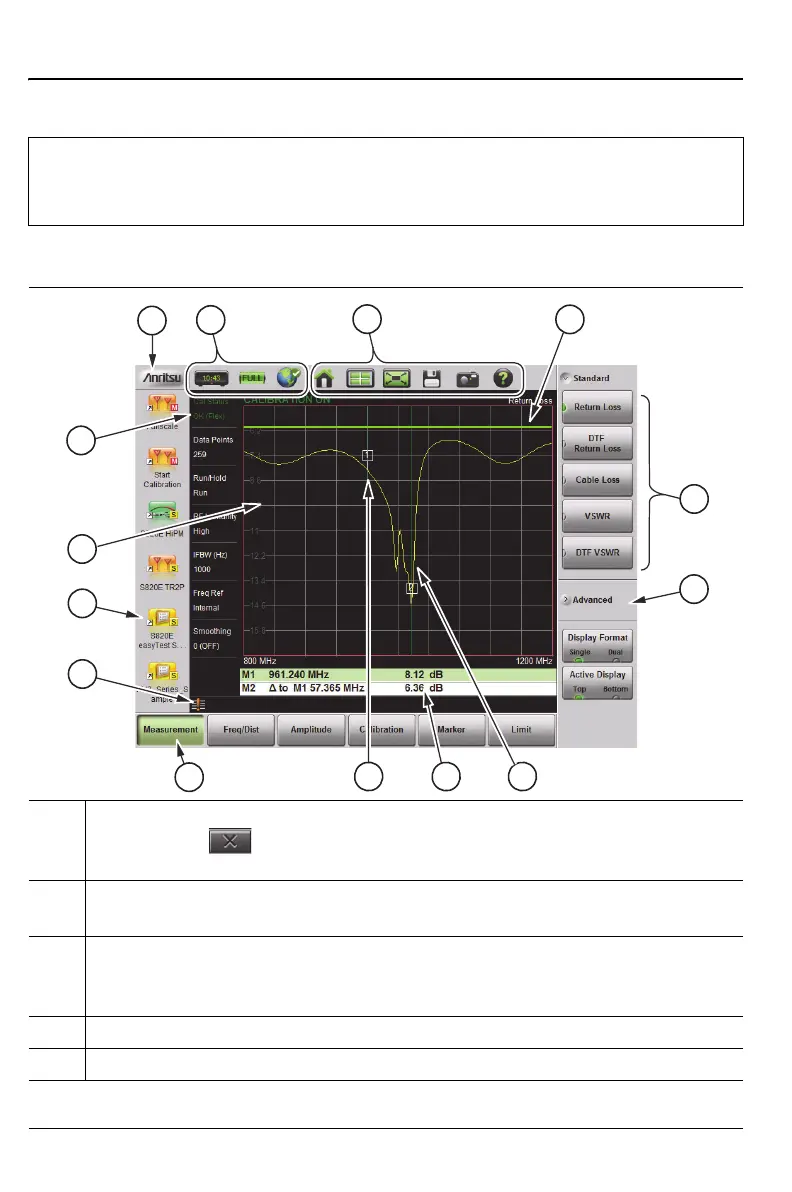
Figure 2-6 illustrates some of the Site Master user interface features.
Note
Screen captured images are provided as examples. The image
and measurement details shown on your instrument may differ
from the examples in this measurement guide.
1. Anritsu Logo. Displays the System Status dialog screen when pressed.
Press Esc or to close. Refer to the “Status Menu” on page 11-18 for
additional information.
2. Status Tool Bar. Refer to “Status Tool Bar” on page 2-19 for information on
each icon.
3. System Function Tool Bar. Shortcuts to various system functions. See
“System Function Tool Bar” on page 2-23 for information on each icon.
Not displayed in Classic Mode.
4. User-defined Limit Line.
5. Expanded submenu. Expanded submenus display the function buttons.
Figure 2-6. Site Master Display Overview (1 of 2)











 To Next Page