11-26 PN: 10580-00343 Rev. H S820E UG
11-8 System Menu System Operations
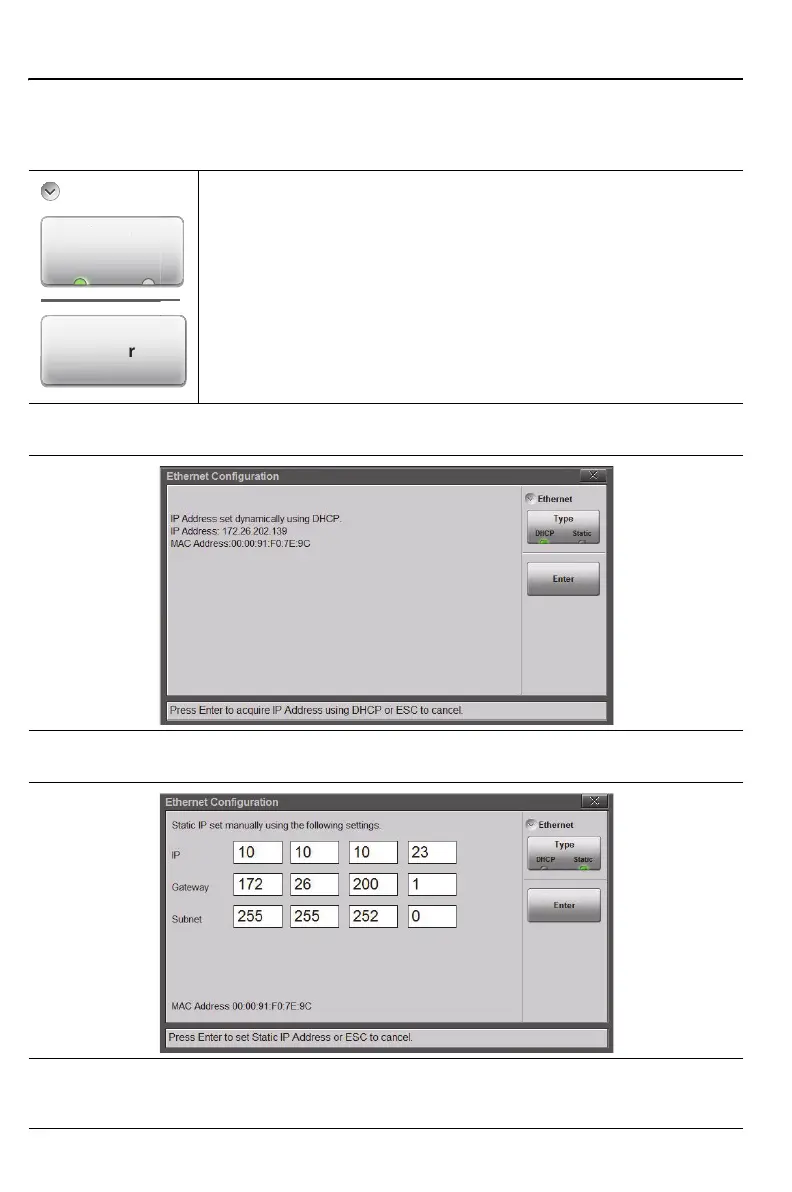
Ethernet Configuration Menu
Key Sequence: System (8) > Connectivity > Ethernet Configuration
Ethernet
Type: Press this key to select the type of IP Address setting:
DHCP or Static. When set to DHCP, the instrument
dynamically sets the IP Address and displays it, as shown in
Figure 11-24. When set to Static, the user must manually
enter the IP, Gateway, and Subnet addresses, as shown in
Figure 11-25. The settings are saved once the Enter button
is pressed.
Figure 11-23.Ethernet Configuration Menu
Figure 11-24.Ethernet Configuration Dialog - DHCP
Figure 11-25.Ethernet Configuration Dialog - Static
Ethernet
pe











 To Next Page