10-4 PN: 10580-00343 Rev. H S820E UG
10-4 Save Files File Management
10-4 Save Files
Press the File (7) key on the numeric keypad to display the File main menu,
then press Save or the icon in the System Function Tool Bar at the top of
the display.
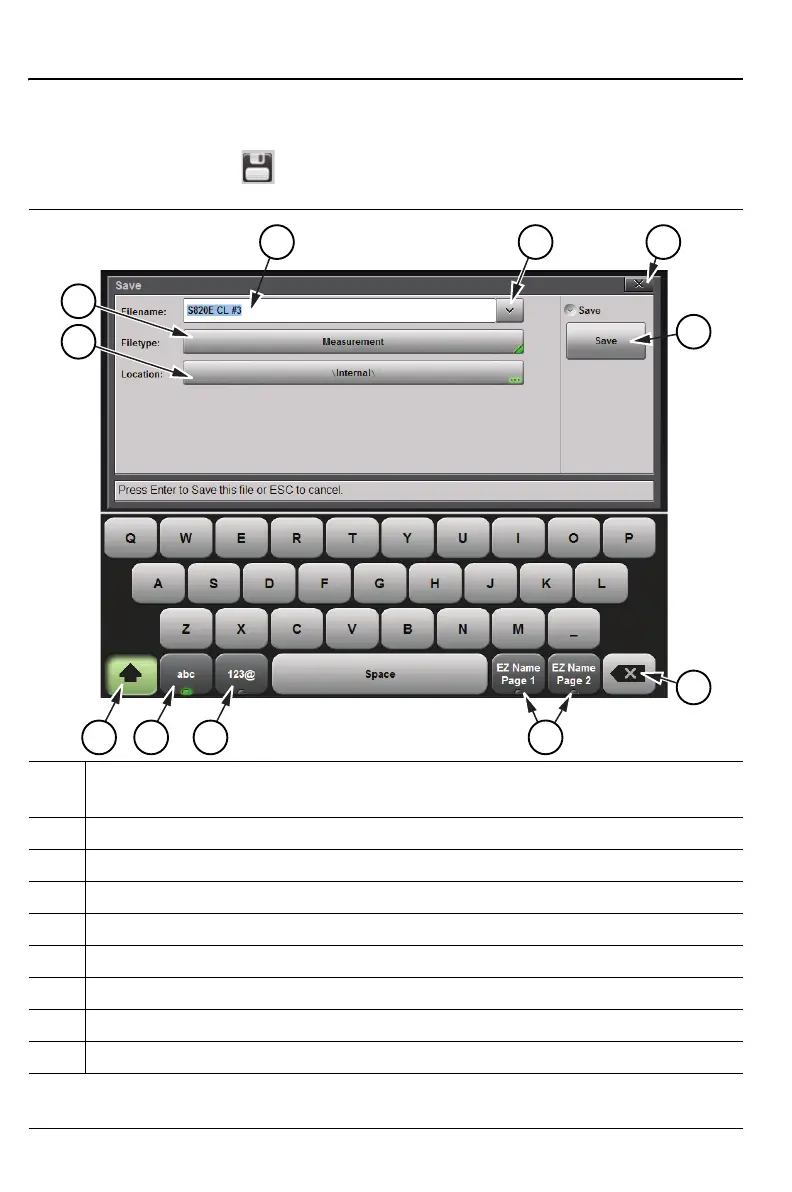
1. Current Filename (ready for editing). Refer to “Choose the File Name”
on page 10-9.
2. Recent Filenames (tap to view)
3. Close Dialog Box Without Saving File
4. Save File and Close
5. Delete Filename Character Key
6. EZ Name Keys. Refer to “EZ Name Matrix” on page 10-10.
7. Symbols and Numbers Keyboard
8. Letters Keyboard
9. Shift Key
Figure 10-1. Save Dialog Box (1 of 2)
11
10
4
2
3
5
9
78
1
6











 To Next Page