2-18 PN: 10580-00343 Rev. H S820E UG
2-5 Touchscreen Display Overview Instrument Overview
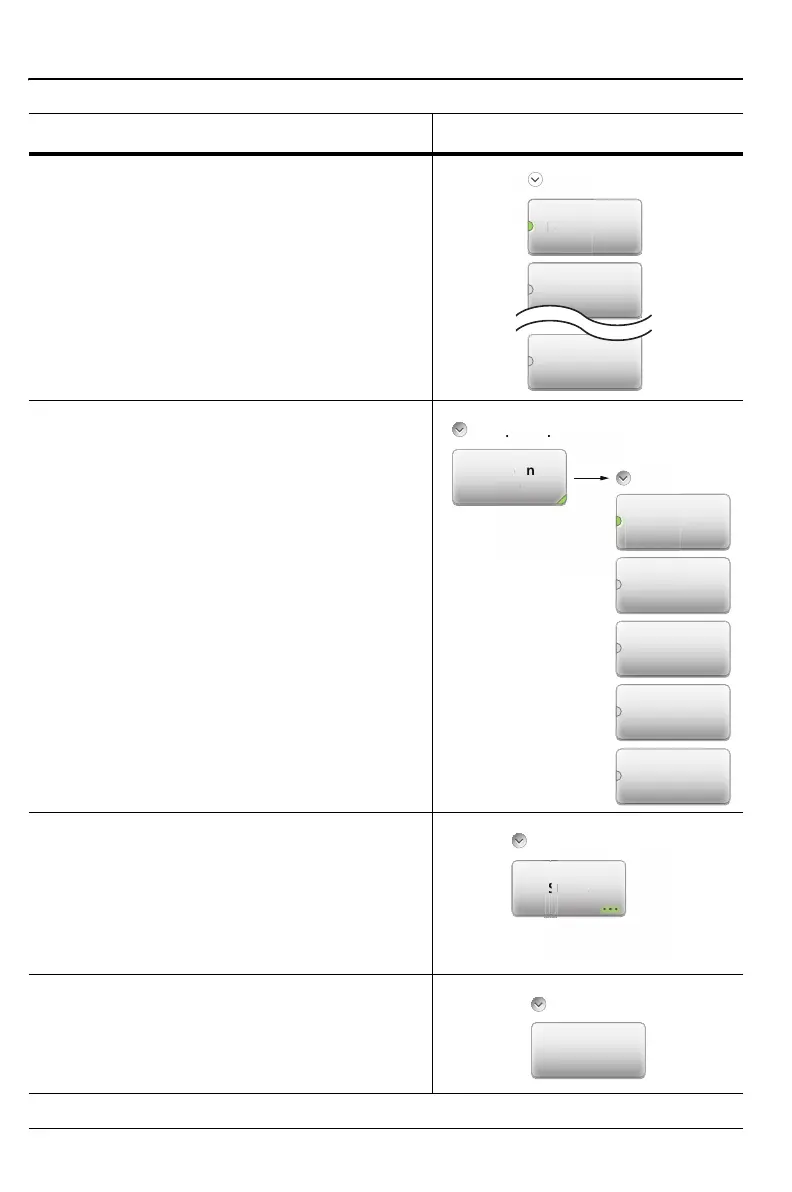
3. Parameter Value
example: Measurement main menu.
This button type is used when several
options are available for the parameter. The
current selection is indicated by the glowing
green semicircle at the left of a button.
4. Submenu Selection
example:
Data Points button in the Sweep (3) menu.
The current value is displayed below the
button name. Pressing the button displays a
submenu of the available values. Press one
of the buttons to select a new value. Press
Esc to cancel. Submenu Selection buttons
are indicated by the glowing green triangle
in the lower-right corner of the button.
5. Dialog
Pressing this button displays a dialog box or
a list box. Press Esc to clear the dialog or
list box. Dialog buttons are indicated by the
3 dots within a glowing green background in
the lower-right corner of the button.
6. Action
Pressing an Action button triggers the
function that is displayed on the submenu
button.
Table 2-2. Submenu Button Examples (2 of 2)
Button Description Button Example
Standard Display
Return Loss
n
e
rn
1
Sweep Setup
1
Marker to
Peak
Marker Search











 To Next Page