Section 9: Dynamics
9 - 8 Euphonix CS3000/2000 Operation Manual
Lithium
Battery
DSP STATUS
863-0338 cs=2349
PAL-913-03008U13-B
863-03339 cs=429C
PAL-913-03008U14-B
863-03340 cs=1649
DM.LO V2.4.N
EP-913-03008U19-2.4.N
A
B
J1 J2 J3
1-8
9-16
17-24
25-32
33-40
41-48
49-56
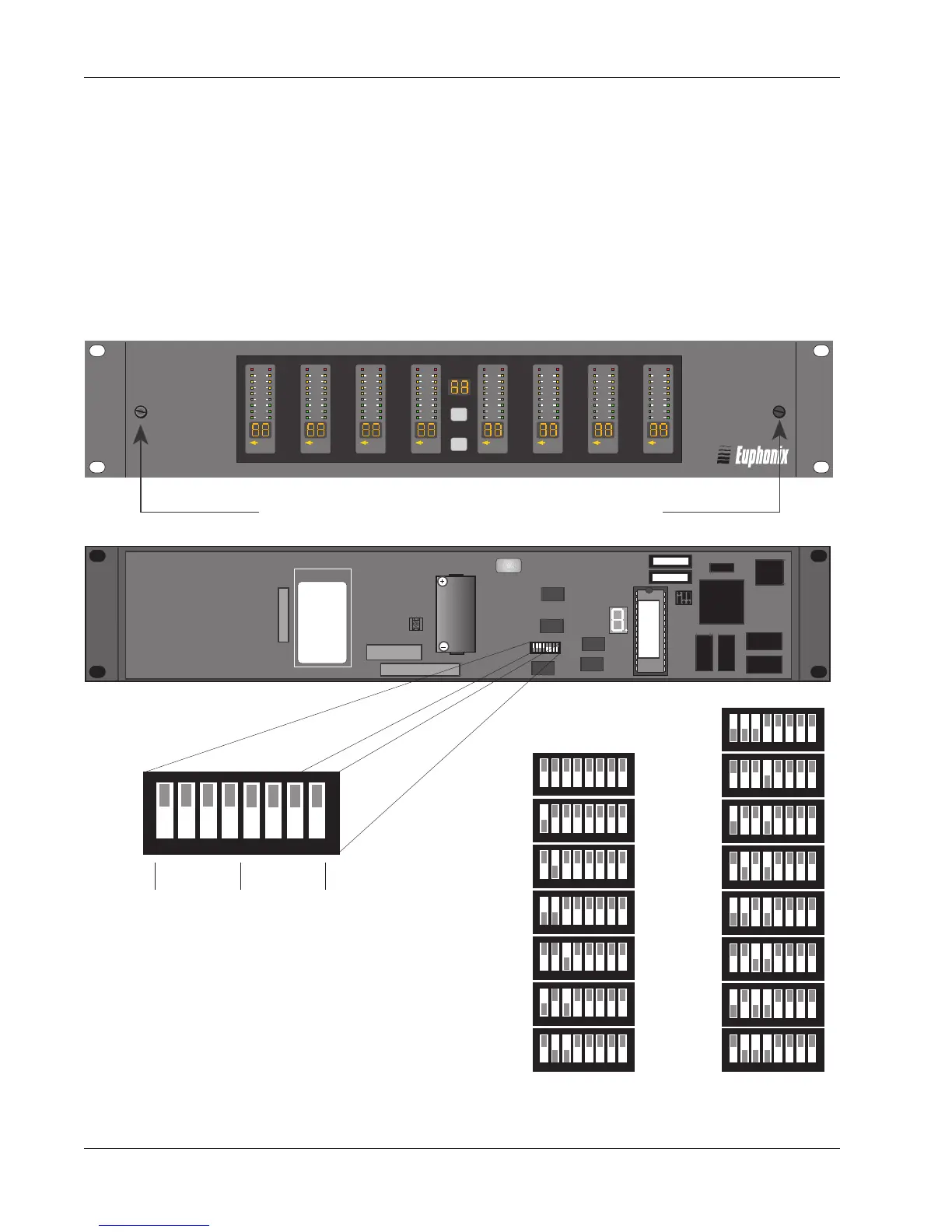
Important Technical Information
Please Read Before Installing Your ES108A
Each ES108A unit is configured at the factory to operate as specific channel numbers
within an installation of multiple units. To re-configure the ES108A's channel range,
remove the front panel as shown below and reset the DIP switch, located on the Host
Processor board, to the proper position. See illustration below.
Note: If you are installing only one ES108A unit, the DIP switch should be set for
channels 1-8.
Set switches
1-4 to configure
channel range
Leave these
4 switches up
1 2 3 4 5 6 7 8
1 2 3 4 5 6 7 8
1 2 3 4 5 6 7 8
1 2 3 4 5 6 7 8
1 2 3 4 5 6 7 8
1 2 3 4 5 6 7 8
1 2 3 4 5 6 7 8
1 2 3 4 5 6 7 8
1 2 3 4 5 6 7 8
1 2 3 4 5 6 7 8
1 2 3 4 5 6 7 8
1 2 3 4 5 6 7 8
1 2 3 4 5 6 7 8
1 2 3 4 5 6 7 8
57-64
65-72
73-80
81-88
89-96
97-104
105-112
113-120
1 2 3 4 5 6 7 8
Dynamics Channel Range
Use a small pointed object
to set the switches
Dynamic Range
Dynamic Range
Processor/Emulator
Processor/Emulator
ES108
ES108
A
A
MIDI
Key Mon
2
4
6
9
12
15
21
30
MIDI
Key Mon
2
4
6
9
12
15
21
30
MIDI
Key Mon
2
4
6
9
12
15
21
30
MIDI
Key Mon
2
4
6
9
12
15
21
30
MIDI
Key Mon
2
4
6
9
12
15
21
30
MIDI
Key Mon
2
4
6
9
12
15
21
30
MIDI
Key Mon
2
4
6
9
12
15
21
30
MIDI
Key Mon
2
4
6
9
12
15
21
30
Loosen 2 screws and remove panel for EPROM access
1 2 3 4 5 6 7 8



 To Next Page