GE HEALTHCARE
DIRECTION FC091194, REVISION 11 VIVID 7 SERVICE MANUAL
3 - 50 Section 3-9 - Connectivity Setup - Software v7.x (BT’08), v6.x, v5.x and v4.x
3-9-7 Set the Scanner’s Network Information - S/W v4.0/v4.1/v5.0/v5.1/v6.0
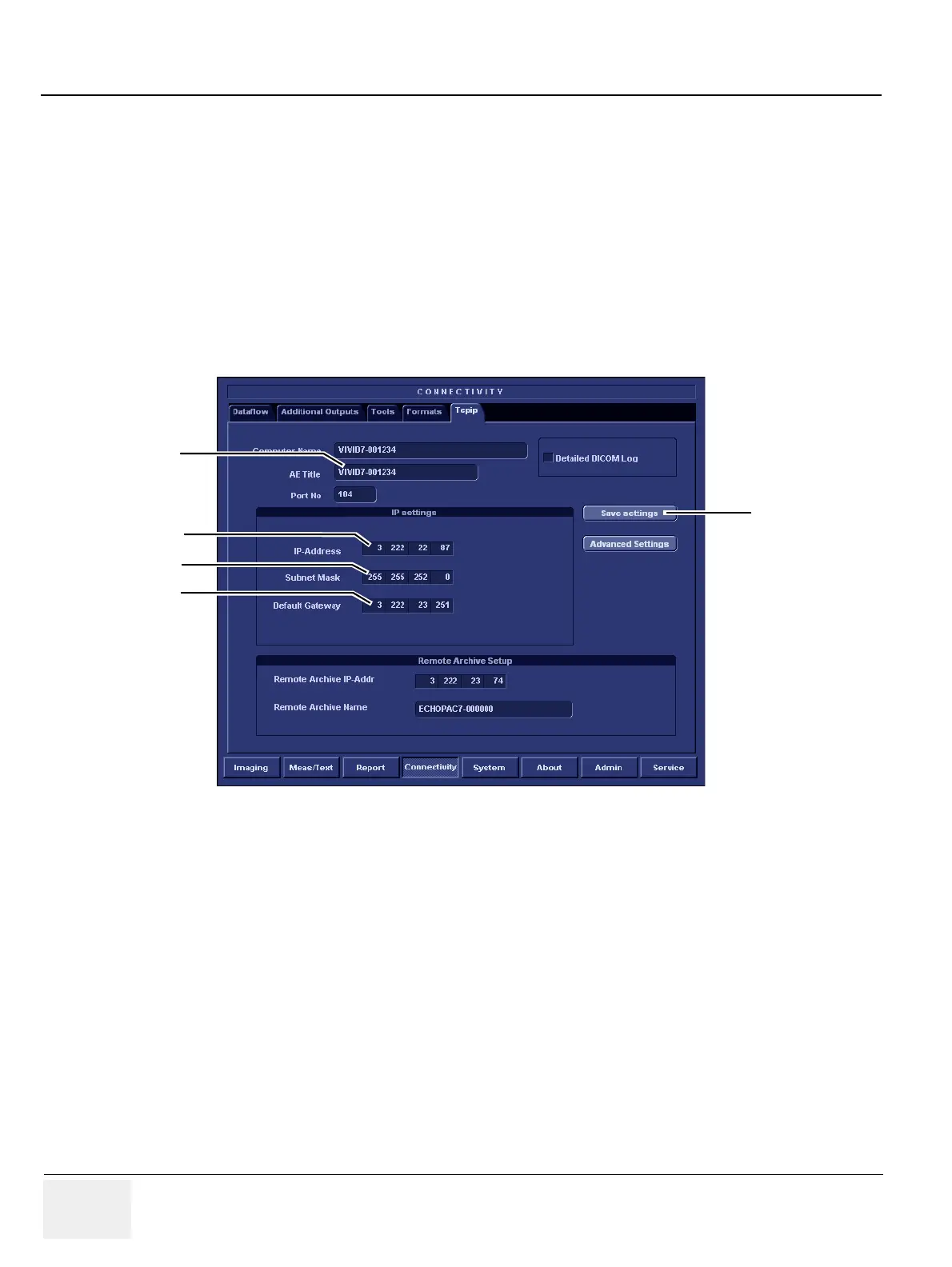
In the IP settings area of the screen, enter the:
1.) IP Address for scanner. (Default IP Address setting from factory: 10.0.0.3).
2.) Subnet Mask for scanner. (Default Subnet Mask setting from factory: 255.255.255.0).
3.) IP address for Default Gateway. (Default Gateway setting from factory IP address: 0.0.0.0).
4.) Select Save Settings to save any changes you have entered.
5.) In addition, AE Title for the scanner must be entered in the DICOM server’s setup.
NOTE: The use of DHCP is not supported by the Service Platform, so if DHCP is enabled, the Common Service
Platform must be disabled.
.
Figure 3-42 TCP/IP Set-up for Vivid 7
IP ADDRESS
SUBNET MASK
DEFAULT GATEWAY
AE TITLE
SAVE SETTINGS


 To Next Page