Set ETH Function 8-37
iPASOLINK EX Advanced: SET NETWORK AND SYSTEM PROVISIONING GGS-000547-01E
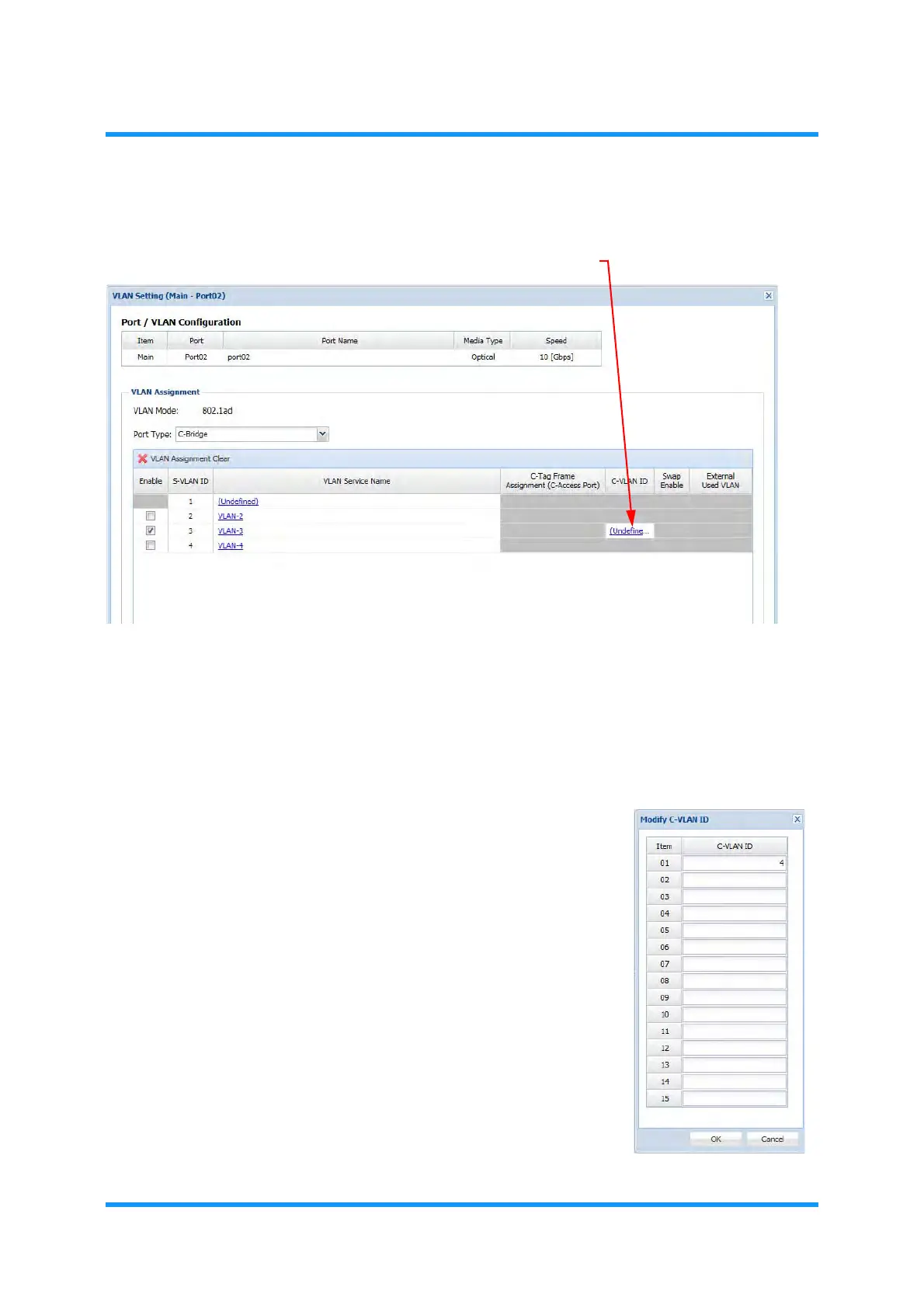
Port Type: C-Bridge
Figure 8-44 VLAN Setting Option Window — C-Bridge
Tick the check boxes of the VLANs that are to configure the port type: C-Bridge.
At the ports selected here, tagged frames with S-VLAN ID that are checked in the
list will be allowed to pass through.
The C-Tagged frames will be assigned with an S-VLAN ID of the selected
VLAN in C-tagFrame Assignment column.
The other frames will be discarded.
Figure 8-45 Modify C-VLAN ID Option Window
i) To enter the C-VLAN ID, click the
Undefined link under the C-VLAN ID.
The C-VLAN ID option window
appears.
ii) Enter the ID or the appropriate value.
iii) Click the
OK button. The VLAN Setting
option window updates the
C-VLAN ID
Information.


 To Next Page