¾ 7-2-1-2 ¾
Installation of NX7E-3FAXU-A1 Card
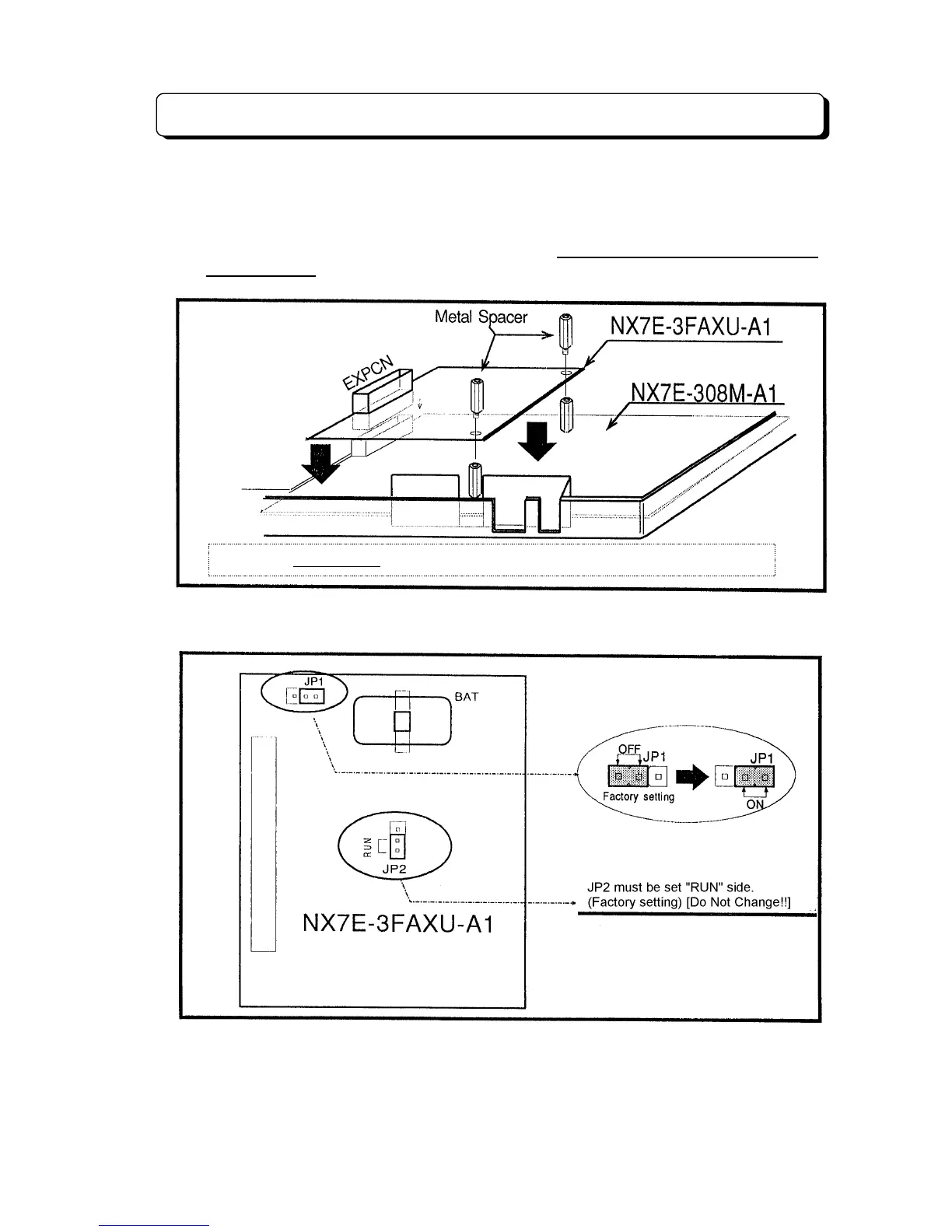
To install 3FAXU card in the Main Equipment :
1. Mount the 3FAXU card to the connector labeled EXPCN.
2. Secure the 3FAXU card with Metal Spacer (included).
Note :
Up to 4 optional cards such as 3DHEXU, 3SMDR, 3CIDU (for Caller-ID) and 3FAXU
are provided for TX-Z 308 system. However, maximum 2 optional cards can be
accommodated into the system due to height of Main Equipment.
3. After installing the 3FAXU card, “JP1” switch should be changed from “OFF” side (Factory
setting) to “ON” side to activate Back-up Battery.
4. Put the Housing and cover back and secure the screws.
NOTICE
:
Maximum 2
optional cards can be accommodated into the system.



 To Next Page