¾ 3-3-16 ¾
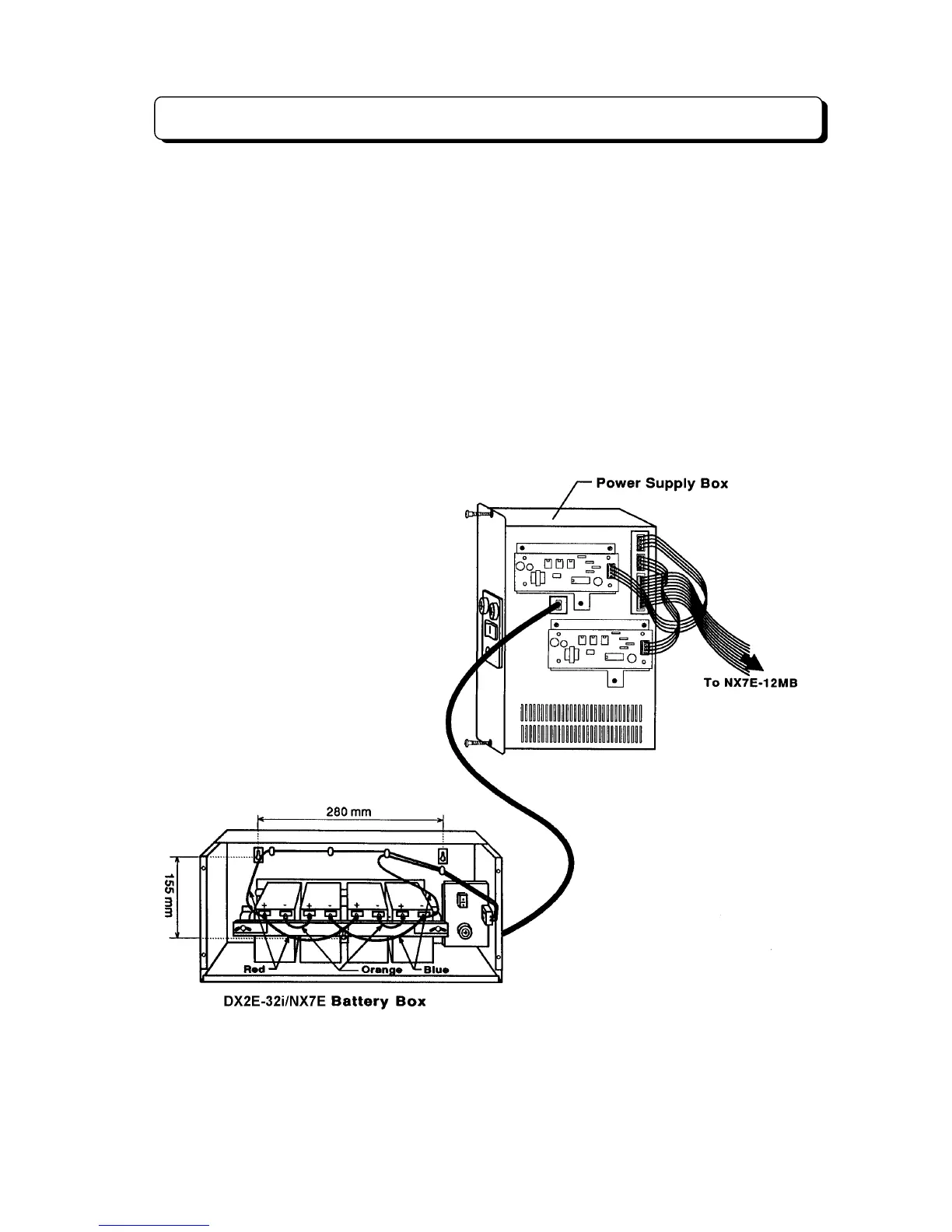
TX-Z 1232/2464 Backup Battery Connection
The Battery Backup Box provides power during a power failure.
Backup Duration:
1232......Approximately 1 hr. (depending on traffic)
2464......Approximately 0.5 hr. (depending on traffic)
Battery:
Yuasa NP2.6-12 (rated at 12 volts, 2.6 amp-hours)
The Battery Backup Box may be wall- or floor-mounted. After mounting Battery Backup Box, follow these
steps to install batteries and connect the cable:
Step 1:
Insert four batteries. (Batteries should always be installed and replaced in fours).
Step 2:
Secure batteries with tie-wraps supplied.
Step 3:
Using battery terminal screws, connect the wiring to the battery terminals. Use the red wire to
connect the positive terminal of one battery to the negative terminal of the other battery. (see illustration
below)
Step 4:
With 2-wire connecting cable, connect Battery Backup Box to the connector marked "BAT1" on
the NX7E-24POWU-A PCB installed in the Power Supply Box.



 To Next Page