¾
3-3-7
¾
Installing the Expansion Power Supply Unit
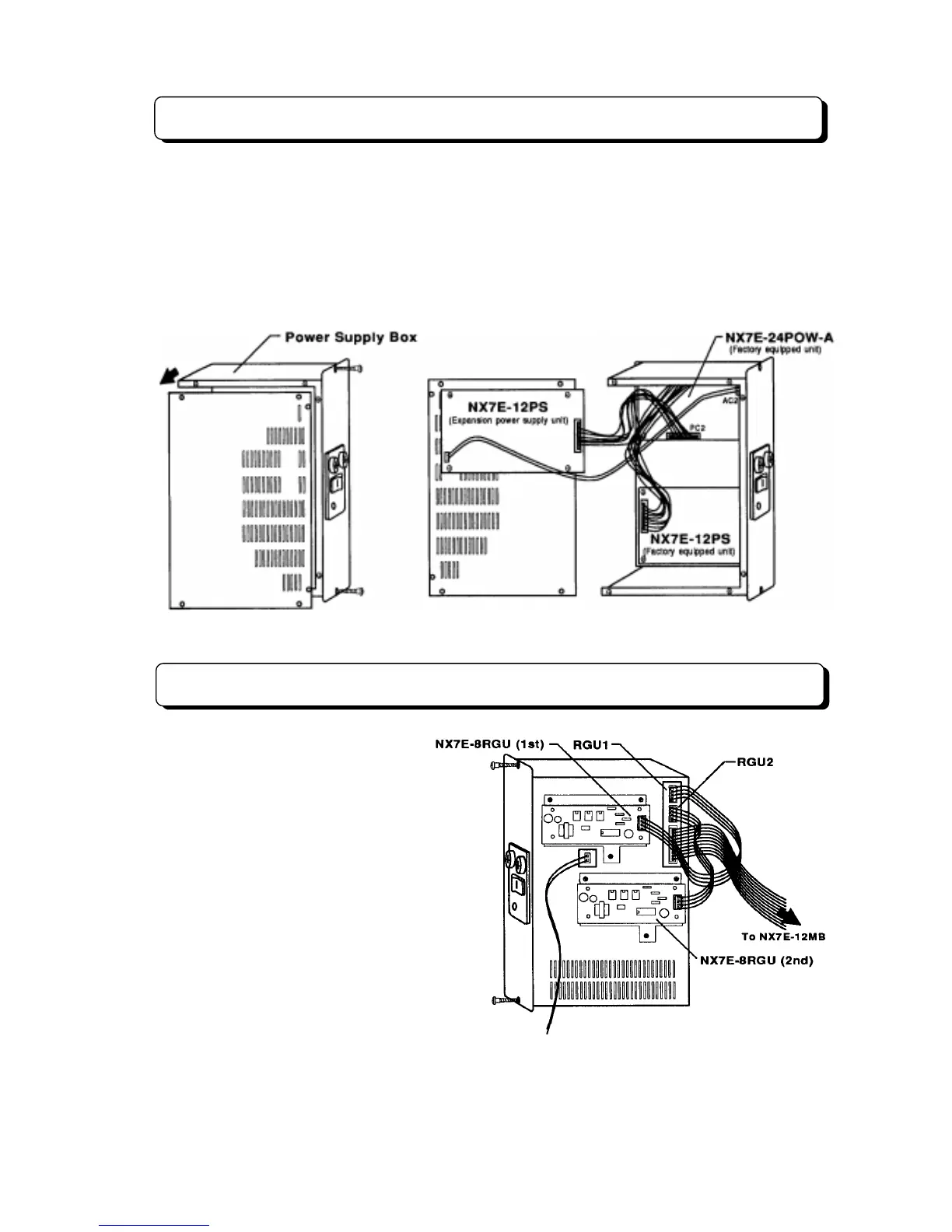
The NX7E-12PS (Expansion power supply unit) is required when the expansion mother board (NX7E-
24EPMB) is installed in the system.
Step 1:
Loosen the two screws and pull the Power Supply Box out of the Main Equipment.
Step 2:
Loosen the six screws and remove the left side panel.
Step 3:
Mount the NX7E-24PS unit on the removed panel, and screw the unit as illustrated below.
Step 4:
Connect the cables as illustrated below.
Installing the Ringer Unit
The ring generator source unit (NX7E-
8RGU-A1 PCB) must be installed in the
system when connected the Single Line
Telephone as system extension.
The unit connected with RGU1
connector is needed for Basic System.
When expansion mother board is
installed, 2nd unit connected with RGU2
is required for single line telephone.
To install NX7E-8RGU-A1 PCB, loosen
the two screws and pull the Power
Supply Box out of the Main Equipment,
then mount the PCB on the Power
Supply Box, and connect an attached
cable to the connector mounted on the
NX7E-24POWU PCB labeled RGU1 or
RGU2. (See the following illustration.)
Back side view
To Backup Battery Box



 To Next Page