CS193/CS173/CS163 3-41
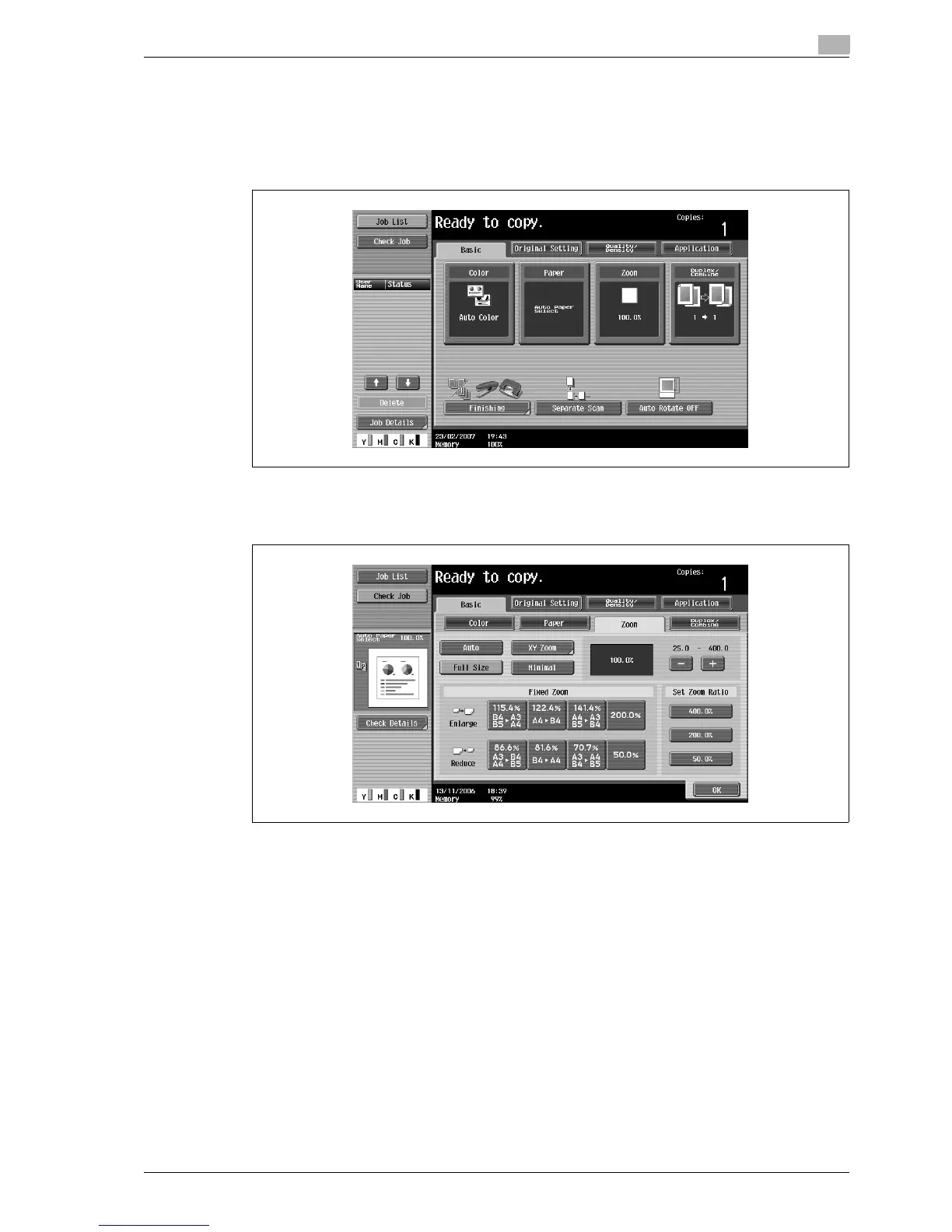
Basic copy operations
3
3.7.2 Specifying the zoom ratio of the original ("Full Size" setting)
A copy that is the same size as the original (100%) is produced.
0 Touch [+] to enlarge the zoom ratio, and touch [-] to reduce the zoom ratio in 0.1% increments.
1 In the Basic screen, touch [Zoom].
The Zoom screen appears.
2 Touch [Full Size].
3 Touch [OK].
The Basic screen appears again.
3.7.3 Typing in the zoom ratio (XY Zoom setting)
By using the keypad, a zoom ratio between 25.0% and 400.0% can be typed in directly without changing the
height-to-width ratio.
0 If a value outside the allowable range is specified, the message "Input error" appears. Type a value
within the allowable range.
If the value was incorrectly entered, press the [C] (clear) key to erase the value, and then specify the
correct value.
0 The entered zoom ratio can be stored. For details on storing zoom ratios, refer to "Storing the desired
zoom ratio" on page 3-48.



 To Next Page