12
Utility mode
12-28 CS193/CS173/CS163
User Box Settings
Stamp Settings
Blank Page Print Settings
12.4.2 Administrator/Machine Settings
2
Note
When entering the device name while registering the machine address, do not use characters that
cannot be used by the operating system.
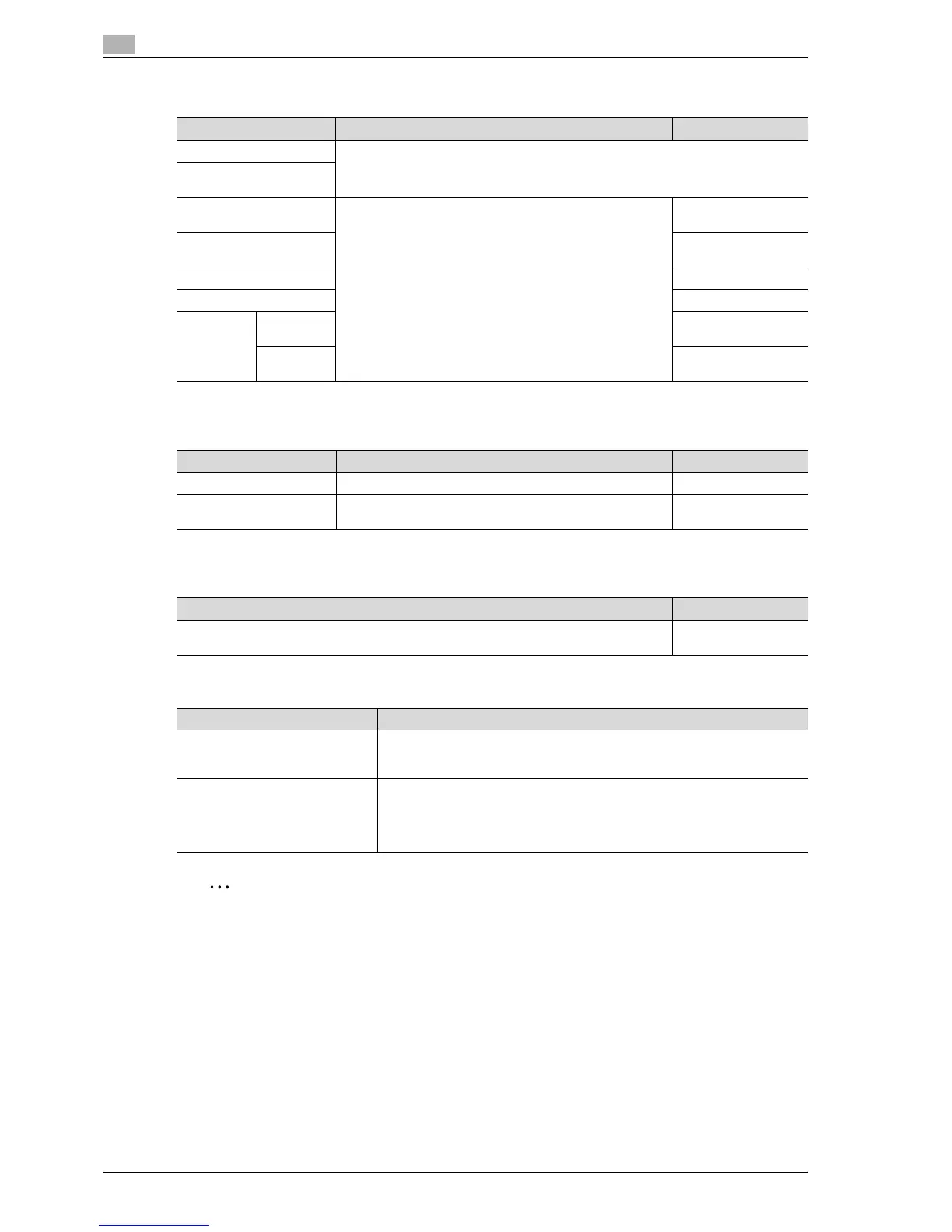
Parameter Description Default Setting
Delete Unused User Box Specify settings for using boxes. For details, refer to the User manual – Box Operations.
Delete Secure Print Docu-
ments
Auto Delete Secure Docu-
ment
Specify settings for using boxes. For details, refer to the User
manual – Box Operations.
1 day
Encrypted PDF Delete
Time
1 day
Touch & Print Delete Time 1 day
Document Hold Setting ON
External
Memory
Function
Settings
Save Doc-
ument
OFF
Print Docu-
ment
ON
Parameter Description Default Setting
Header/Footer Settings Program or delete header/footer settings. -
Fax TX Settings Select whether or not the stamp settings are canceled when
a fax is sent.
Cancel
Description Default Setting
Select whether or not stamps and overlays are printed on blank pages when a Stamp/Com-
position function is set.
Do Not Print
Parameter Description
Administrator Registration Specify the administrator information displayed in the Service Representa-
tive/Administrator Information screen of the Help screen and the From address
for sending e-mail from the machine.
Input Machine Address Register the name of the machine and its e-mail address. The registered ma-
chine name is added to the names of files that are sent and to originals saved
in user boxes. As the factory default, the machine name is specified as
"KMBT_C203/C253/C353". The registered e-mail address is used with Internet
faxing.



 To Next Page