12
Utility mode
12-18 CS193/CS173/CS163
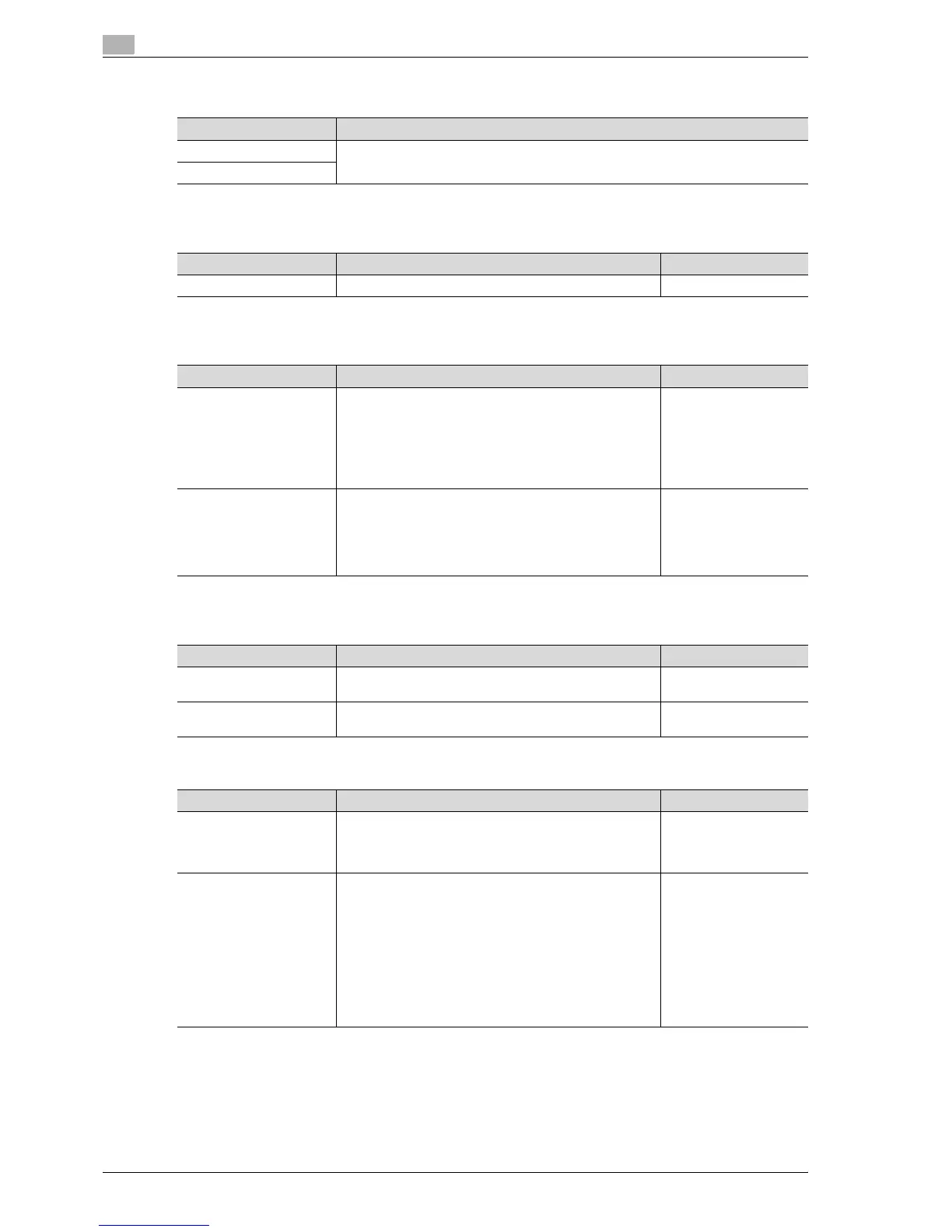
Fax Active Screen
Color Selection Settings
Left Panel Display Default
Search Option Settings
12.3.3 Copier Settings
Parameter Description
TX Display Specify settings for faxing. For details, refer to the User manual – Network
Scan/Fax/Network Fax Operations.
RX Display
Parameter Description Default Setting
Select Color Select the color that indicates that the button is selected. Green
Parameter Description Default Setting
Left Panel Display Default Select the information displayed as the default in the left
panel.
•Job List:
A list of the jobs that are being performed and queued
to be performed is displayed.
• Check Job Settings:
The currently specified copy settings are displayed.
Job List
Job Display Setting Select the job list information displayed in the left panel.
• List Display:
A list of the jobs that are being performed and queued
to be performed is displayed.
• Status Display:
The progress of the job being performed is displayed.
List Display
Parameter Description Default Setting
Uppercase and Lowercase
Letters
Select whether or not to differentiate between uppercase
and lowercase letters.
Differentiate
Search Option Screen Select whether or not to display [Uppercase and Lower-
case Letters] setting in the advanced search.
OFF
Parameter Description Default Setting
Auto Booklet ON when
Fold & Staple
Select whether or not the "Booklet" function is selected au-
tomatically when the "Center Staple & Fold" setting is se-
lected. This parameter is available only if optional finisher is
installed.
Auto Select Booklet
Auto Zoom For Combine/
Booklet
Select whether or not the preset zoom ratios are automati-
cally selected when the "Auto" Paper setting is selected
and a combined copy setting or the "Booklet" function is
selected.
• Auto Display Zoom Ratio:
The following zoom ratios are specified.
2in1, Booklet: 70.7%
4in1: 50.0%
8in1: 35.3%
•Off:
The zoom ratio is not selected automatically.
Auto Display Zoom Ra-
tio



 To Next Page