CS193/CS173/CS163 12-15
Utility mode
12
12.3 Specifying user settings
This section describes the function and main registration parameters that can be specified after pressing the
[Utility/Counter] key, then touching [User Settings].
12.3.1 System Settings
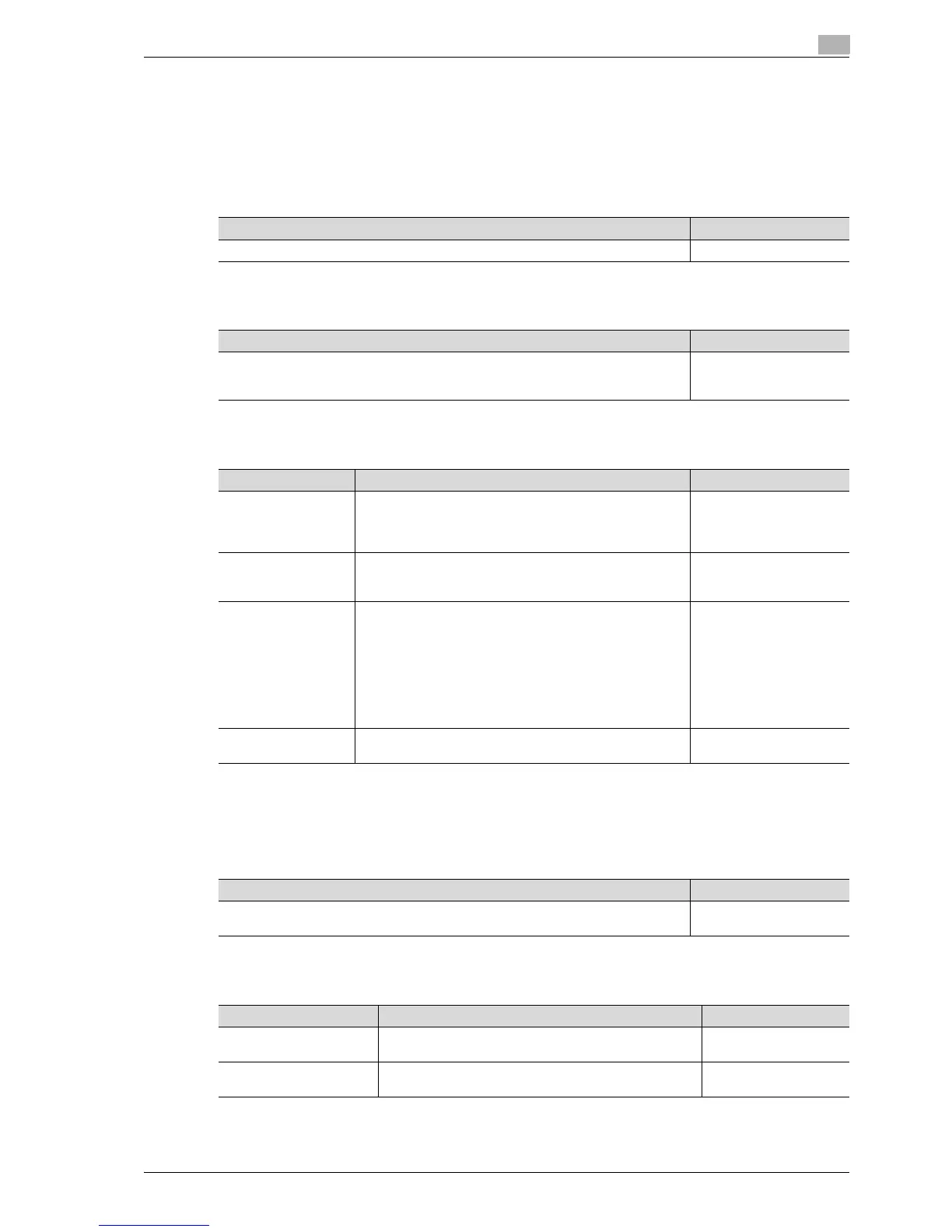
Language Selection
Measurement Unit Settings
Paper Tray Settings
*
1
Appears when optional double paper feed cabinet.
*
2
Appears when optional single paper feed cabinet or LCT.
Auto Color Level Adjustment
Power Save Settings
Description Default Setting
Select the language of the touch panel message. English
Description Default Setting
Select one of the following as the measurement units in which values are displayed in
the touch panel.
mm (Numerical Value), inch (Numerical Value), inch (Fraction)
mm (Numerical Value)
Parameter Description Default Setting
Auto Tray Selection
Settings
Select the paper trays that are selected automatically when
the "Auto" Paper setting is specified. In addition, specify the
priority of the paper trays when the auto tray switch operation
is performed.
Tray priority order: Tray 1
% Tray 2 % Tray 3*
1
*
2
%
Tray 4*
1
Auto Tray Switch
ON/OFF
Select whether or not a paper tray loaded with paper of the
same size is selected automatically when a paper tray that
was selected manually becomes empty while printing copies.
Restrict
No Matching Paper in
Tray Setting
Select the operation that is performed when there is no paper
of the corresponding size in the specified paper tray.
• Stop Printing (Tray Fixed):
The machine stops operating.
• Switch Trays (Tray Priority):
Whether or not the specified paper tray contains paper of
the corresponding size is determined and, if it does not,
a different paper tray is selected if it contains paper of the
corresponding size.
Stop Printing (Tray Fixed)
Print Lists Select the paper tray used for printing lists, such as the sales
counter and consumables indicators.
Tray1, 1-Sided
Description Default Setting
Adjust the reference level for detecting a color or black-and-white original when the "Au-
to Color" setting is selected. The reference level can be set to one of 5 settings.
Standard (3)
Parameter Description Default Setting
Low Power Mode Settings Specify the desired length of time (between 2 and 240 min-
utes) until the machine enters Power Save mode.
15 minutes
Sleep Mode Settings Specify the desired length of time (between 2 and 240 min-
utes) until the machine enters Sleep mode.
20 minutes



 To Next Page