CS193/CS173/CS163 12-3
Utility mode
12
12 Utility mode
12.1 Overview of Utility mode parameters
12.1.1 List of registration information and parameters
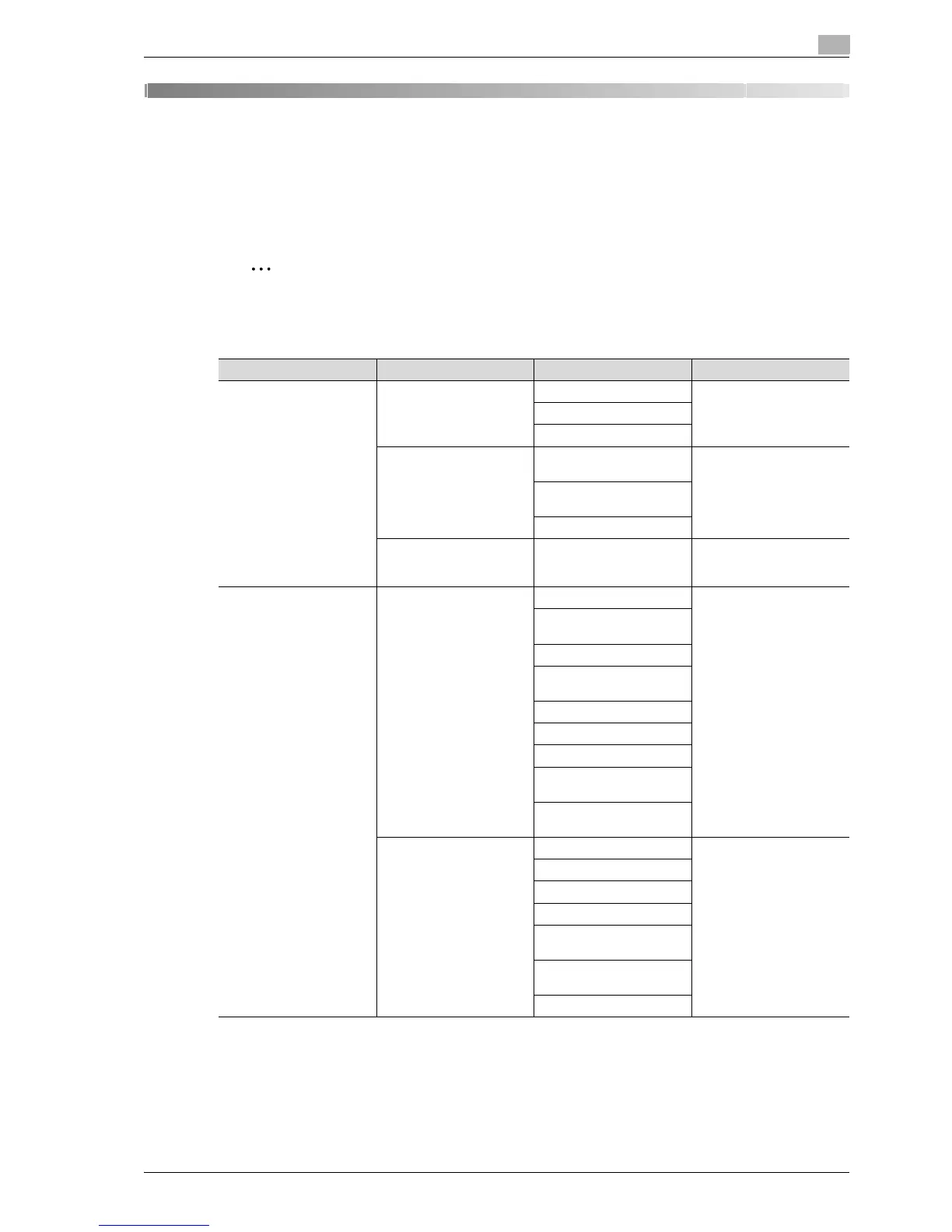
This section describes the buttons available when the [Utility/Counter] key is pressed.
2
Note
The buttons that appear in the Utility mode parameters differ depending on the specified settings.
List of Utility mode parameters
First-level menu Second-level menu Third-level menu Details
[1] One-Touch/User Box
Registration
[1] Create One-Touch
Destination
[1] Address Book Refer to "Create One-
Touch Destination" on
page 12-7.
[2] Group
[3] E-mail Settings
[2] Create User Box [1] Public/Personal User
Box
Refer to"Create User Box"
on page 12-7.
[2] Bulletin Board User
Box
[3] Relay User Box
[3] Limiting Access to Des-
tinations
[1] Apply Levels/Groups to
Destinations
Refer to "Limiting Access
to Destinations" on
page 12-7.
[2] User Settings [1] System Settings [1] Language Selection Refer to "System Settings"
on page 12-15.
[2] Measurement Unit Set-
tings
[3] Paper Tray Settings
[4] Auto Color Level Ad-
just.
[5] Power Save Settings
[6] Output Settings
[7] AE Level Adjustment
[8] Auto Paper Select for
Small Original
[9] Blank Page Print Set-
tings
[2] Custom Display Set-
tings
[1] Copier Settings Refer to "Custom Display
Settings" on page 12-17.
[2] Scan/Fax Settings
[3] Copy Screen
[4] Fax Active Screen
[5] Color Selection Set-
tings
[6] Left Panel Display De-
fault
[7] Search Option Settings



 To Next Page