CS193/CS173/CS163 11-13
Managing jobs
11
11.2.6 Printing a proof copy of a stored job
A single copy of a stored job can be printed in order to be checked.
The Held Jobs list contains jobs such as those for which a proof copy was being printed when the automatic
system reset operation was performed.
2
Note
For details on displaying the screen, refer to "Displaying the Current Jobs list (stored jobs and active
jobs)" on page 11-11.
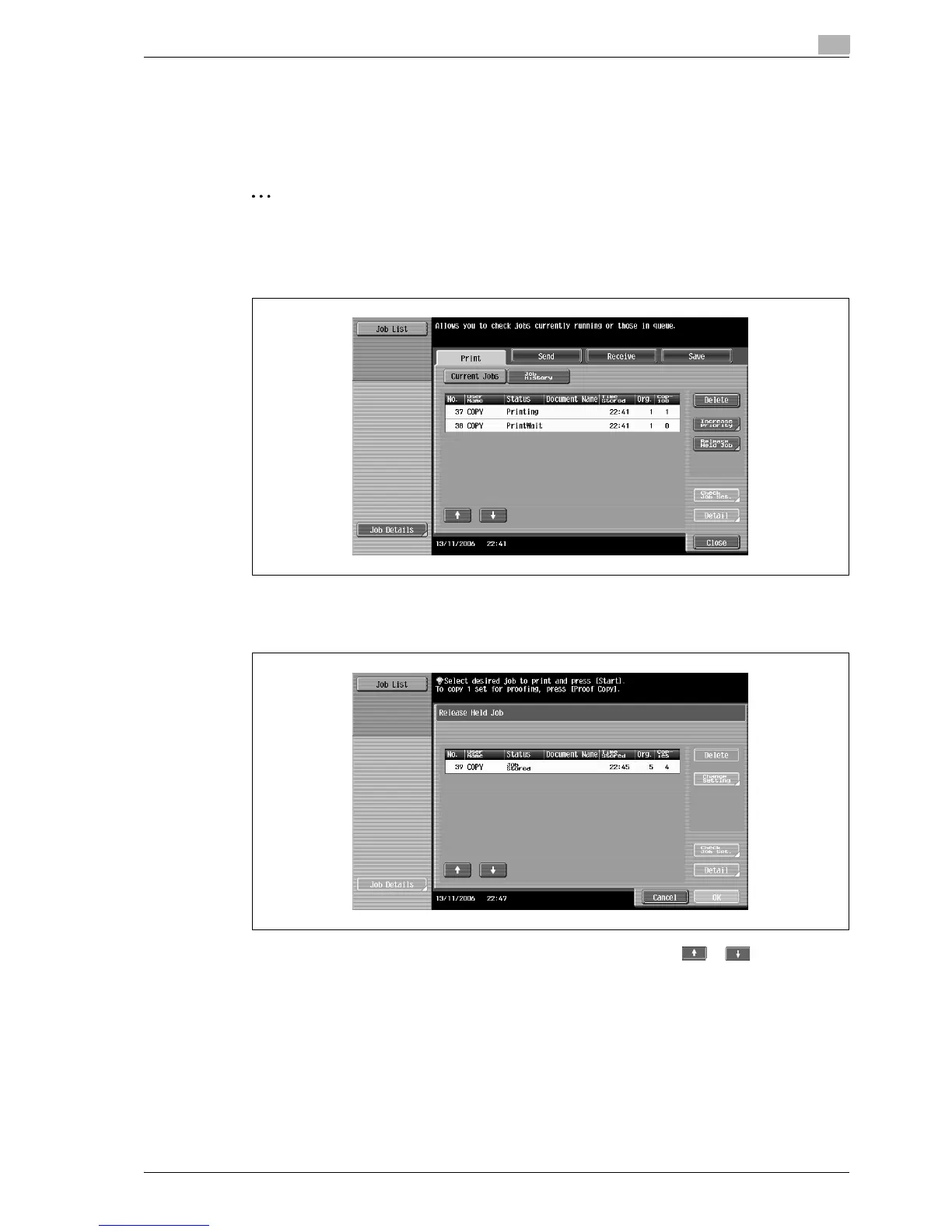
1 In the Current Jobs list of the Print tab, touch [Release Held Job].
The Release Held Job screen appears.
2 From the job list, select the job whose proof copy is to be printed, and then touch [Proof Copy] key.
– If the job to be removed from the Held Jobs list is not displayed, touch or until the desired
job is displayed.
– If an incorrect job was selected, touch the button for the selected job again to deselect it.
– After the single proof copy is printed, check the print result.
?
How is printing of a proof copy stopped?
% Press the [Stop] key.
!
Detail
To change the settings, touch [Check Job Set.] in the Release Held Job screen. For details, refer to
"Printing a stored job" on page 11-14.



 To Next Page