3
Basic copy operations
3-72 CS193/CS173/CS163
The Basic screen appears again.
3.12.4 Stapling copies (Staple settings)
Copies can be fed out stapled either in the corner or at two places.
2
Reminder
Copies can be fed out stapled either in the corner or at two places only when the finisher is installed.
!
Detail
In order for the copies to be stapled, all of the following conditions must be met.
- The paper width must be between 182 mm and 297 mm.
- The paper length must be between 148.5 mm and 431.8 mm.
- If the "Mixed Original" setting is selected, all copies must have the same paper width.
When Finisher FS-519 is installed
Number of Bound Pages
Examples of the possible number of bound pages are listed below.
- 50 sheets of 90 g/m
2
paper
- 2 sheets of 209 g/m
2
paper + 48 sheets of 90 g/m
2
paper
- Maximum of 30 sheets of 91 to 120 g/m
2
paper
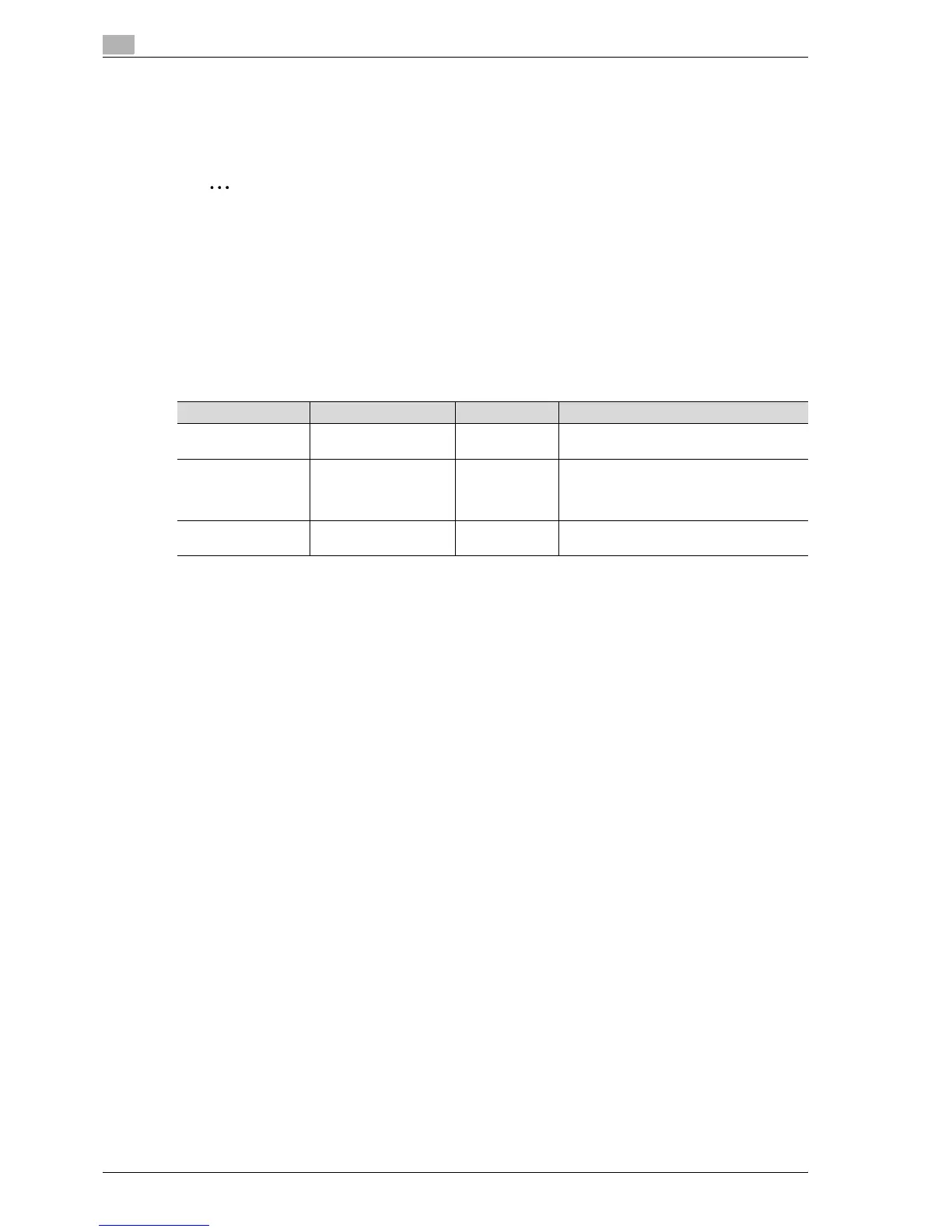
Tray Paper Weight Paper Size Loading Capacity
Finishing tray 1 60 g/m
2
to 90 g/m
2
(Plain paper)
A3 w to A5 v When the stack is 32 mm high or contains
200 sheets or 20 sets
Finishing tray 2 60 g/m
2
to 90 g/m
2
(Plain paper)
A3 w to A5 v A4 w or smaller: 132 mm high, 1,000 sheets
or 100 sets
B4 w or larger: When the stack is 64.5 mm
high or contains 500 sheets or 50 sets
Optional finishing tray 60 g/m
2
to 90 g/m
2
(Plain paper)
A3 w to A5 v When the stack is 24 mm high or contains
200 sheets or 20 sets



 To Next Page