CS193/CS173/CS163 12-23
Utility mode
12
12.4 Specifying administrator settings
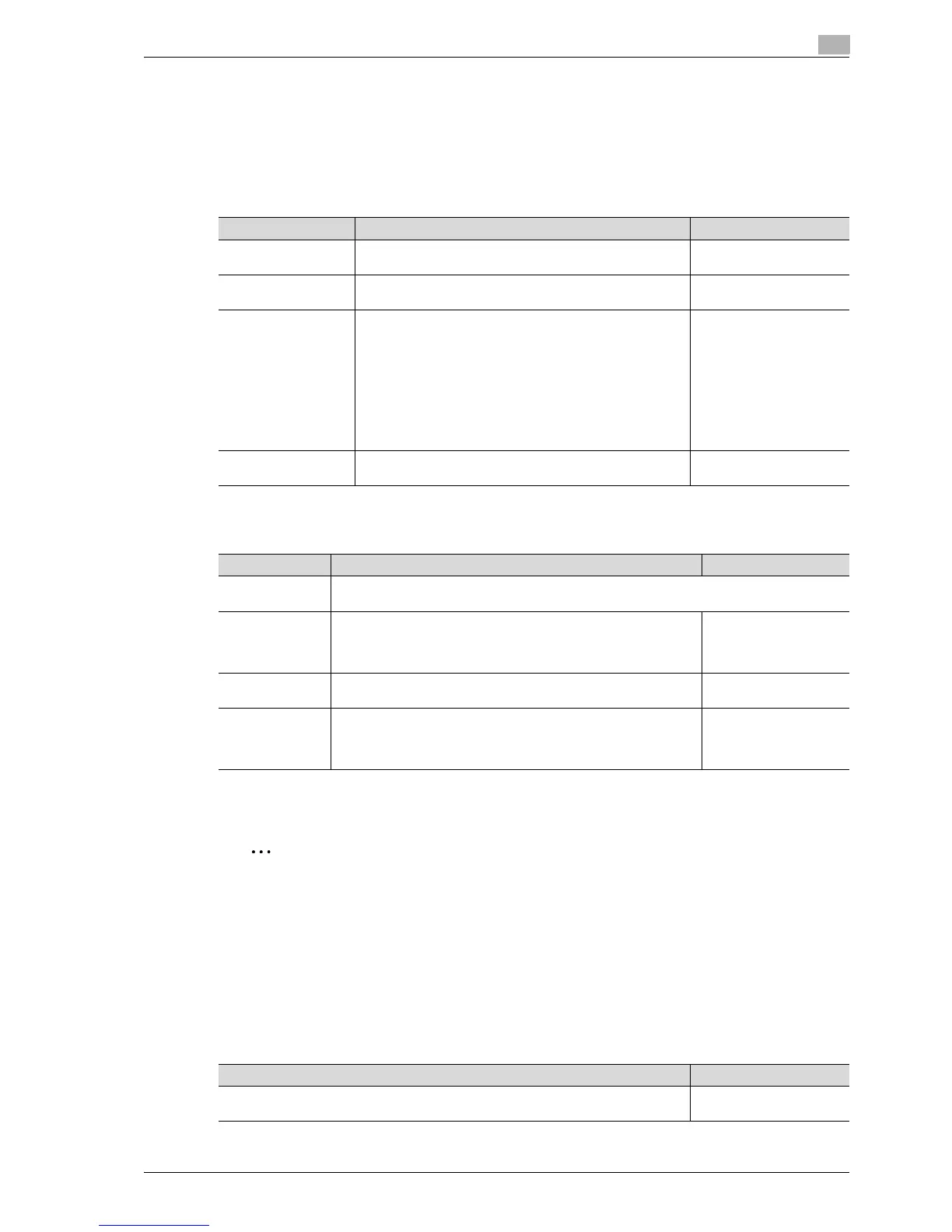
This section describes the function and main registration parameters that can be specified after pressing the
[Utility/Counter] key, then touching [Administrator Settings].
12.4.1 System Settings
Power Save Settings
Output Settings
*
1
If optional separator is installed, "Tray 2" is selected as the factory default.
*
2
If optional separator is installed, "Tray 1" is selected as the factory default.
2
Reminder
The "Output Tray Settings" parameter is available only if the optional finisher or separetor is installed.
When an additional output tray is installed optionally, the additional output tray is assigned as Tray 2,
and Tray 2 is assigned as Tray 3, in "Output Tray Setting".
[Bin Assignment] only appears if the optional mailbin kit is installed.
The "Bin Assignment" parameter is set to "Tray 2" only if the optional output tray is installed.
Date/Time Settings
Parameter Description Default Setting
Low Power Mode Set-
tings
Specify the desired length of time (between 2 and 240 min-
utes) until the machine enters Power Save mode.
15 minutes
Sleep Mode Settings Specify the desired length of time (between 2 and 240 min-
utes) until the machine enters Sleep mode.
20 minutes
Power Save Key Select which low power mode is entered when the [Power
Save] key is pressed.
•Low Power:
The touch panel goes off and the machine enters a mode
where it conserves energy.
• Sleep:
Although the machine conserves more energy in Sleep
mode than in Power Save mode, the machine must warm
up when Sleep mode is canceled, therefore taking more
preparation time than Power Save mode.
Low Power
Enter Power Save
Mode
Specify settings for faxing. For details, refer to the User man-
ual – Network Scan/Fax/Network Fax Operations.
Normal
Parameter Description Default Setting
Print/Fax Output
Settings
Specify settings for faxing and printing. For details, refer to the User manual – Network
Scan/Fax/Network Fax Operations and the User manual – Print Operations.
Output Tray Set-
tings
Select the finishing tray for each type of job (copies, printouts, re-
ports and faxes).
Copy: Tray 1*
1
Printer: Tray 1*
1
Print Reports: Tray 3*
2
Fax: Tray 3*
2
Bin Assignment Select whether or not Tray 1 is specified as mailbin 5 and the option-
al output tray is specified as mailbin 6.
Not Set
Shift Output Each
Job
Select whether or not printed copies are fed out shifted when "Off-
set" is selected while a finisher is installed.
• Yes: Pages are fed out shifted.
• No: Pages are fed out without being shifted.
Yes
Description Default Setting
Specify the current date and time. In addition, the time zone can be set between -12:00
and 13:00 (in 30-minute increments).
Time Zone: +00:00



 To Next Page