12
Utility mode
12-16 CS193/CS173/CS163
2
Note
[Low Power Mode Settings] appears only if the "Administrator Security Levels" parameter in
Administrator mode is set to [Level 1], [Level 2].
!
Detail
For details on the "Administrator Security Levels" parameter, refer to "Security Settings" on
page 12-34.
Output Settings
*
1
If optional separator is installed, "Tray 2" is selected as the factory default.
*
2
If optional separator is installed, "Tray 1" is selected as the factory default.
2
Note
The "Output Tray Settings" parameter is available only if the optional finisher or separetor is installed.
When an additional output tray is installed optionally, the additional output tray is assigned as Tray 2,
and Tray 2 is assigned as Tray 3, in "Output Tray Setting".
[Bin Assignment] only appears if the optional mailbin kit is installed.
The "Bin Assignment" parameter is set to "Tray 2" only if the optional output tray is installed.
AE Level Adjustment
Auto Paper Select for Small Original
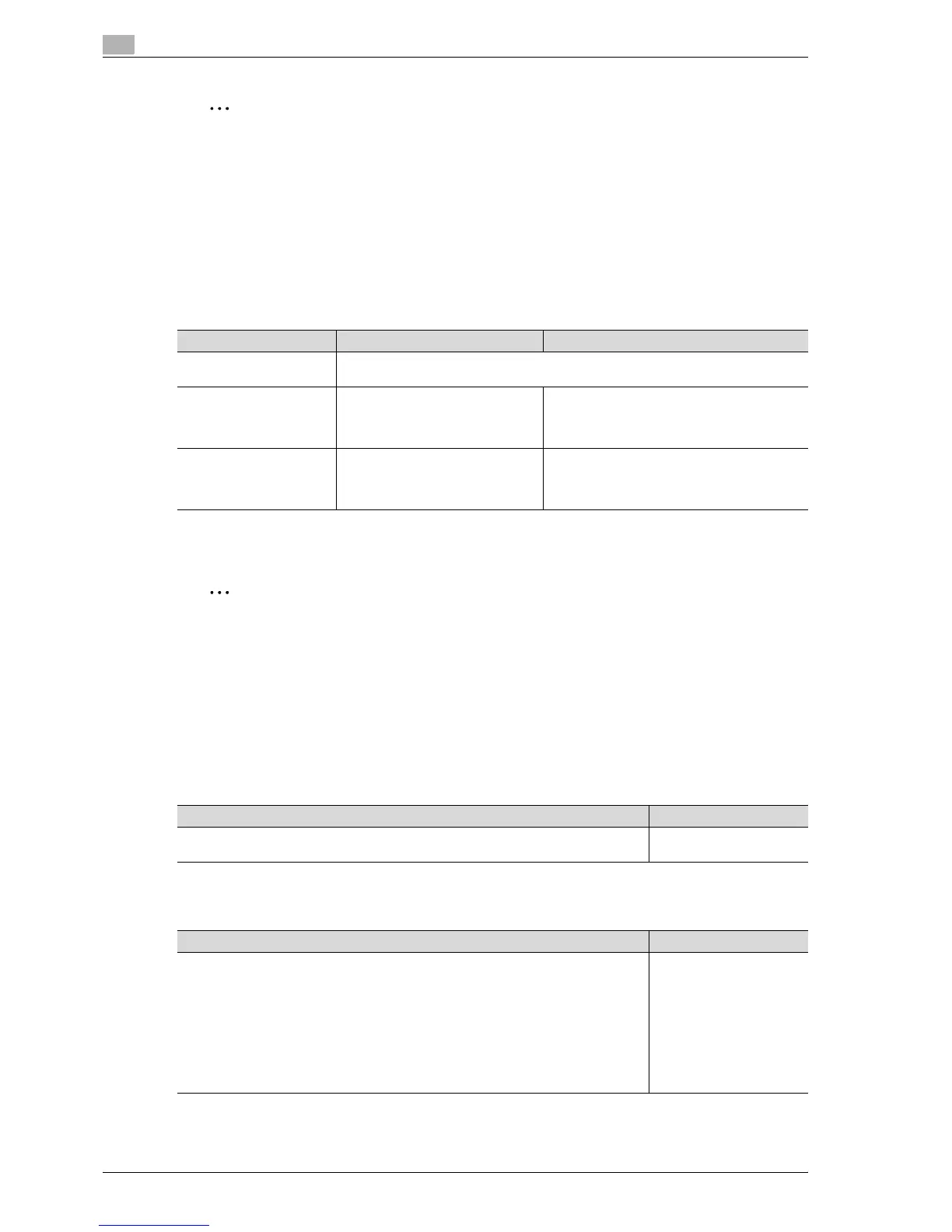
Parameter Description Default Setting
Print/Fax Output Settings Specify settings for faxing and printing. For details, refer to the User manual – Network
Scan/Fax/Network Fax Operations and the User manual – Print Operations.
Output Tray Setting Select the copy output tray for each
type of job (copies, printouts, re-
ports and faxes).
Copy: Tray 1*
1
Print: Tray 1*
1
Print Reports: Tray 3*
2
Fax: Tray 3*
2
Bin Assignment Select whether or not Tray 1 is
specified as mailbin 5 and the op-
tional output tray is specified as
mailbin 6.
Not Set
Description Default Setting
Specify the initial value for auto exposure. The higher the setting, the more that the orig-
inal background is emphasized.
Standard (2)
Description Default Setting
Select whether copying is permitted when the "Auto" Paper setting is selected and ei-
ther no original is placed on the original glass or the original placed on the original glass
is too small for its size to be detected.
• Copy on Small Size:
The original size is determined to be A5, and copies are produced on A5-size paper.
•Copy on A4:
The original size is determined to be A4, and copies are produced on A4-size paper.
• Prohibit Copy:
Copies cannot be produced since the original size cannot be detected. Before
pressing the [Start] key, the paper tray (paper to be printed on) must be selected.
Prohibit Copy



 To Next Page