3
Basic copy operations
3-68 CS193/CS173/CS163
The following procedures describe how to select Finishing settings.
2
Reminder
The Staple settings are available only if the optional finisher is installed.
The Punch settings are available only if the punch kit is installed on the optional finisher.
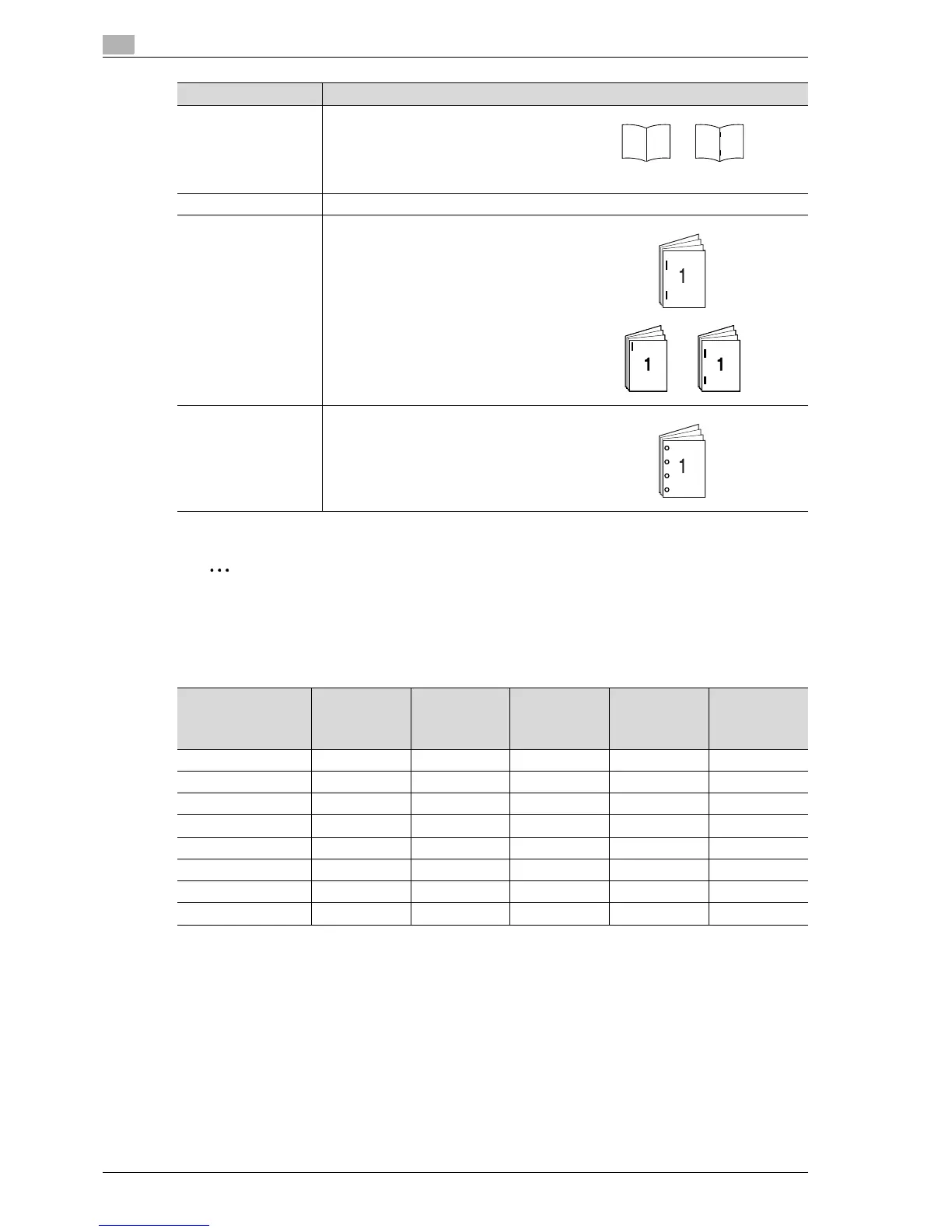
Available Finishing Settings
Center Staple/Fold Select this setting to fold copies. The copies
can also be bound with staples at the same
time.
The "Center Staple & Fold" setting can be
used if the saddle stitcher is installed on op-
tional finisher.
Output Tray Select the output tray where the finished copies are to be fed.
Staple Select one of these settings to bind the cop-
ies with a staple in the corner or with two
staples.
Punch Holes are punched (4 holes) in the copies for
filing them.
Setting Description
Finisher Finisher
+ Punch kit
Finisher
+ Punch kit
+ Saddle
stitcher
Finisher
+ Punch kit
+ Mailbin
Separator
Sort ooooo
Group ooooo
Offset ooooo
Staple ooooe
Punch e oooe
Center Staple & Fold eeoee
Half-Fold eeoee
Select Output Tray ooooo
o: Possible
e: Not possible



 To Next Page