CS193/CS173/CS163 7-11
Copy paper/originals
7
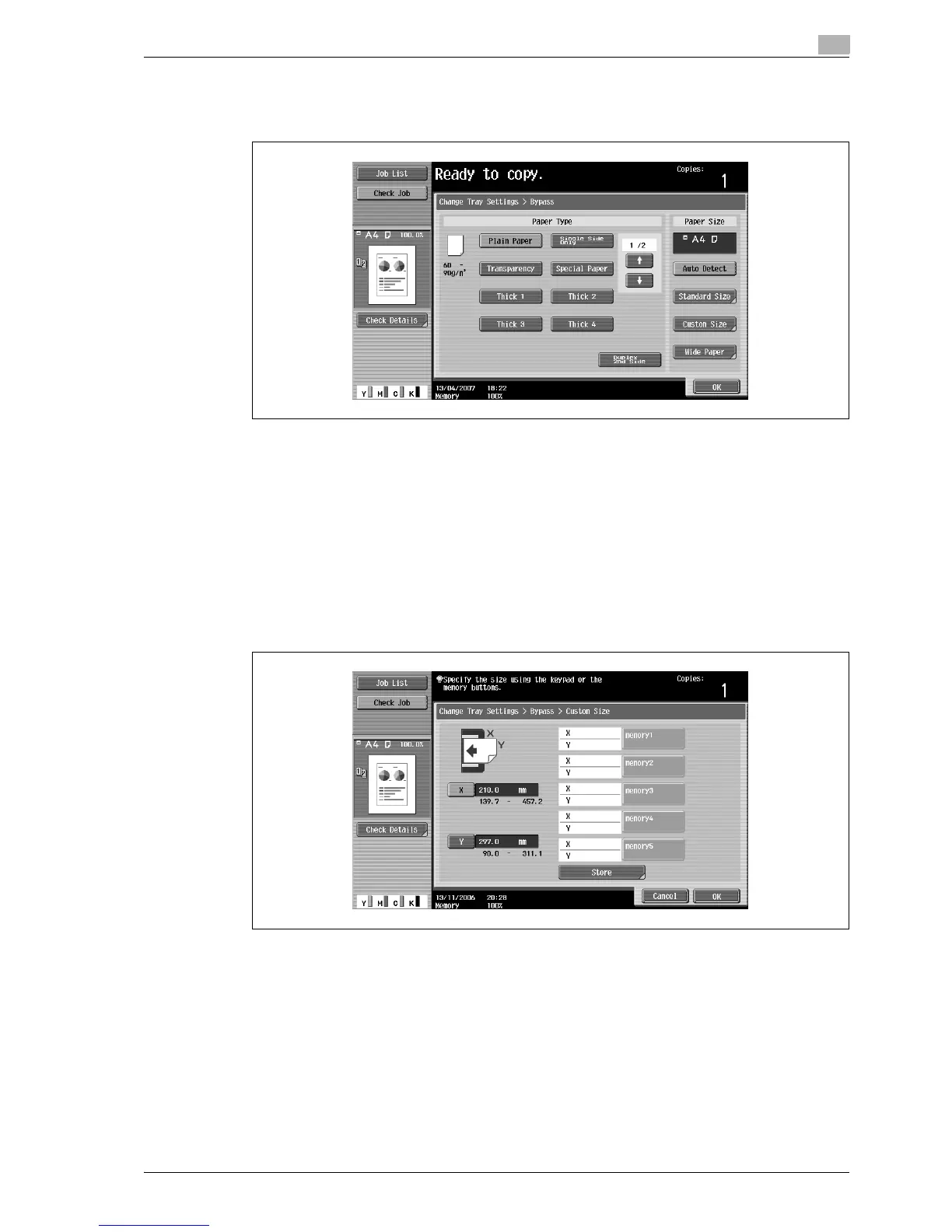
3 Touch [Change Tray Settings].
4 Touch [Custom Size].
The Custom Size screen appears.
5 Type in the length (X) and width (Y) of the paper.
– Make sure that [X] is selected, and then use the keypad to type in the length of side X (between 139.7
mm and 457.2 mm).
– Touch [Y] to select it, and then use the keypad to type in the length of side Y (between 90.0 mm and
311.1 mm).
– If a value outside the allowable range is specified, the message "Input error" appears. Type a value
within the allowable range.
– If the value was incorrectly entered, press the [C] (clear) key in the keypad to erase the value, and
then specify the correct value.
To cancel changes to the settings, touch [Cancel].
?
Can paper sizes be stored?
% Five non-standard paper sizes can be stored.
% To recall a stored paper size, touch the corresponding memory key.
% The names "memory1" through "memory5" can be changed. For details on changing the names,
refer to "Storing a non-standard paper size (Custom Size settings)" on page 7-12.
% For details on storing paper sizes, refer to "Storing a non-standard paper size (Custom Size
settings)" on page 7-12.
6 Touch [OK], and then touch [OK] in the next two screens that appear.
The Basic screen appears again.



 To Next Page