12
Utility mode
12-6 CS193/CS173/CS163
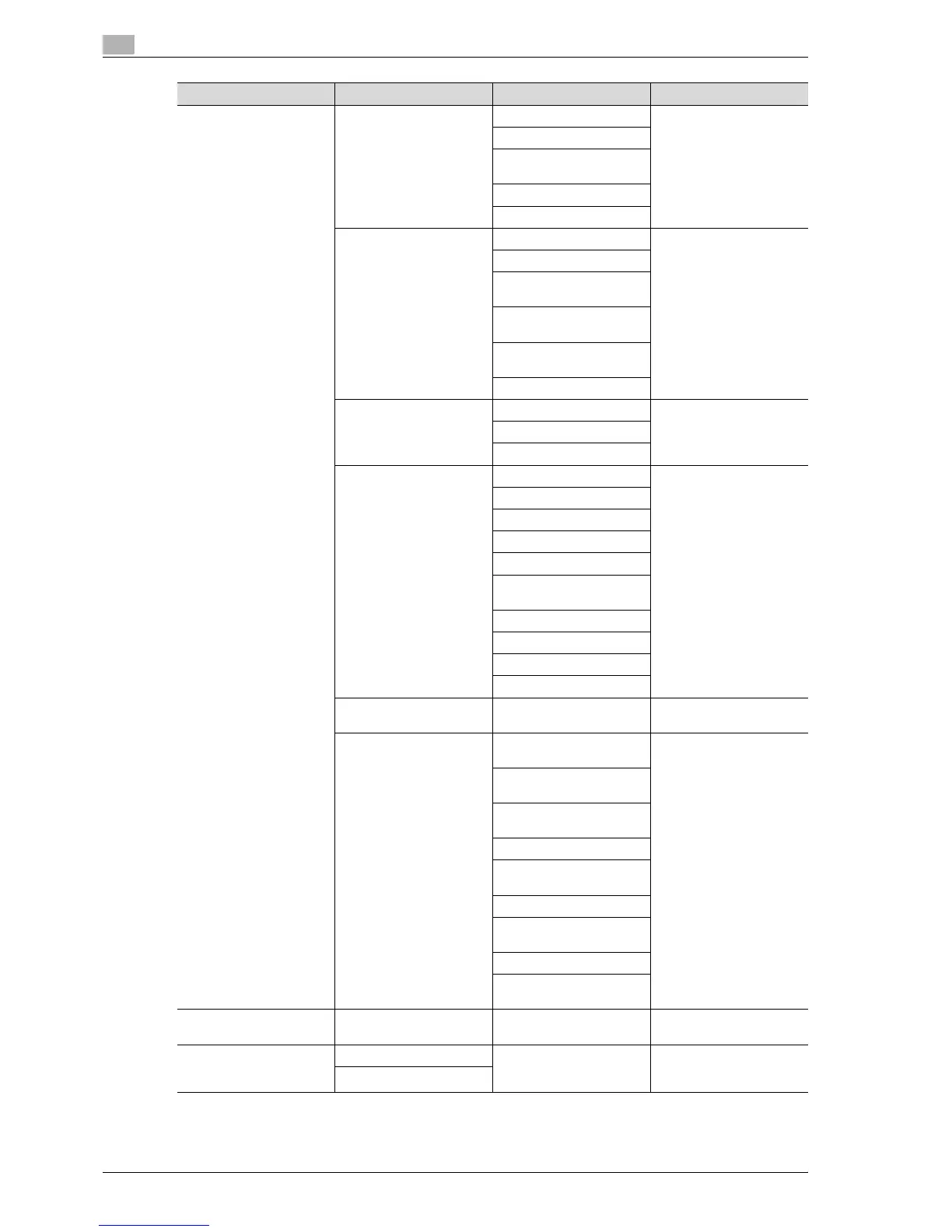
[3] Administrator Settings [5] Network Settings [1] TCP Socket Settings Refer to "Network Set-
tings" on page 12-32.
[2] Network Fax Settings
[3] WebDAV Client Set-
tings
[4] Web Service Settings
[5] Detail Settings
[6] Copier Settings Auto Zoom (Platen) Refer to "Copier Settings"
on page 12-18.
Auto Zoom (ADF)
Specify Default Tray when
APS Off
Select Tray for Insert
Sheet
Print Jobs During Copy
Operation
Automatic Image Rotation
[7] Printer Settings USB Timeout Refer to "Printer Settings"
on page 12-21.
Network Timeout
Print XPS Errors
[8] Fax Settings [1] Header Information Refer to "Fax Settings" on
page 12-33.
[2] Header/Footer Position
[3] Line Parameter Setting
[4] TX/RX Settings
[5] Function Settings
[6] PBX Connection Set-
ting
[7] Report Settings
[8] Job Settings List
[9] Multi Line Setting
[0] Network Fax Setting
[9] System Connection [1] Open API Settings Refer to "System Connec-
tion" on page 12-33.
[0] Security Settings [1] Administrator Pass-
word
Refer to "Security Set-
tings" on page 12-34.
[2] User Box Administrator
Setting
[3] Administrator Security
Levels
[4] Security Details
[5] Enhanced Security
Mode
[6] HDD Settings
[7] Function Management
Settings
[8] Stamp Settings
[0] Diver Password En-
cryption Setting
[4] Check Consumable
Life
Print List Refer to "Check Consum-
able Life" on page 12-39.
[6] Banner Printing Allow For details on the banner
printing, refer to the User
manual – Print Operations.
Restrict
First-level menu Second-level menu Third-level menu Details



 To Next Page