CS193/CS173/CS163 12-51
Utility mode
12
1 Display the Administrator Settings screen.
– For details on displaying the Administrator Setting screen, refer to "Displaying the Administrator
Settings screen" on page 12-37.
2 Touch [1 System Settings].
The System Settings screen appears.
3 Touch [7 Expert Adjustment].
The Expert Adjustment screen appears.
4 Touch [3 Finisher Adjustment].
The Finisher Adjustment screen appears.
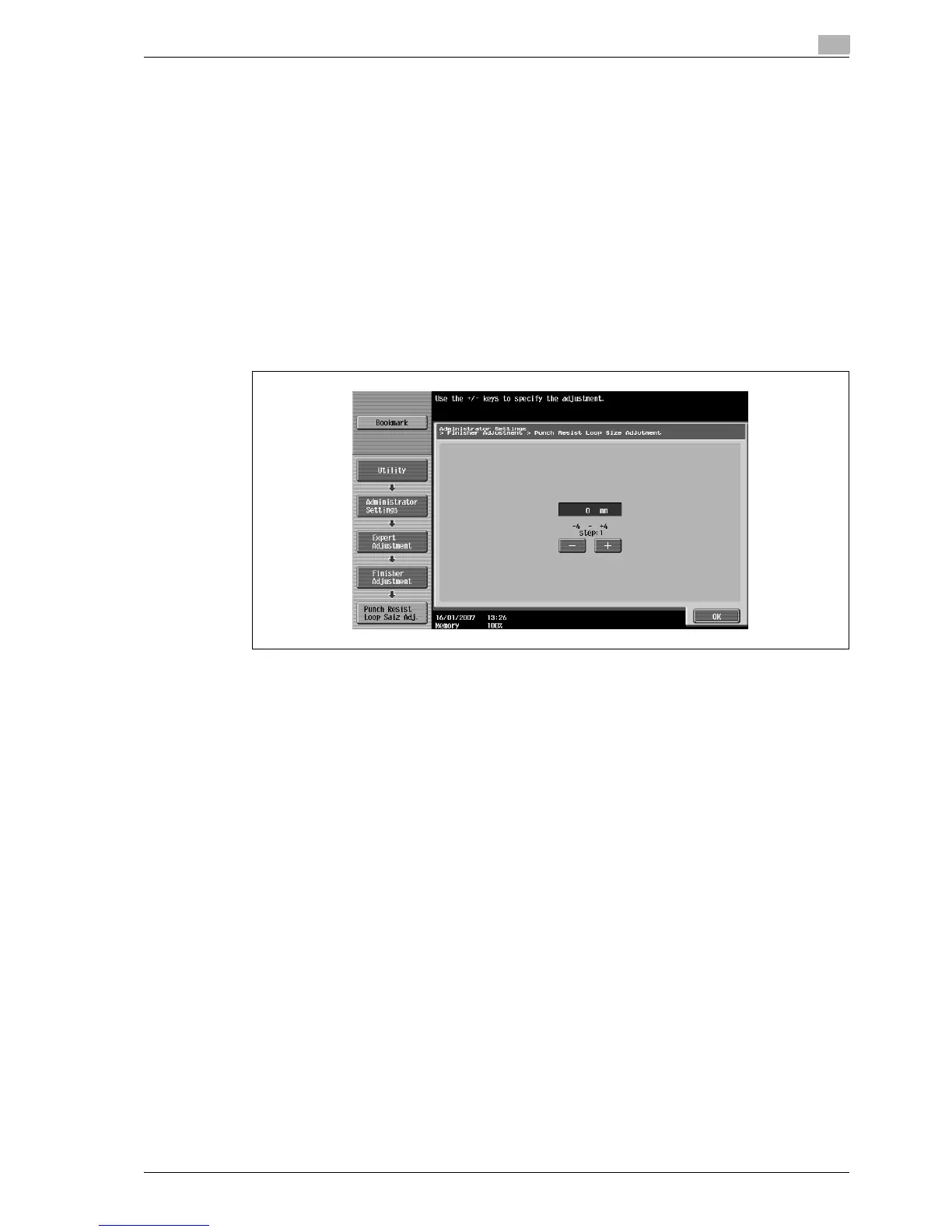
5 Touch [4 Punch Regist Loop Size Adjustment].
The Punch Regist Loop Size Adjustment screen appears.
6 Check the angle of the punched holes.
– If the punched holes are angled, touch [+] to change the adjustment. If the angle cannot be adjusted
by touching [+] or if the paper is wrinkled, touch [-] to change the adjustment.
– Each time [+] or [-] is touched, the value is increased or decreased by one increment.
7 Touch [OK].
– To cancel the setting and select the default, press the [Reset] key.
The angle of the punched holes is adjusted.
If no adjustment of the angle of the punched holes was necessary in step 6, this completes the
procedure.
8 Use a Punch setting to print another sample copy.
9 Check the print result.
– Check that the angle of the punched holes was adjusted.
– If more adjustment is necessary, repeat steps 6 and 7.



 To Next Page