Operation
R-Concept
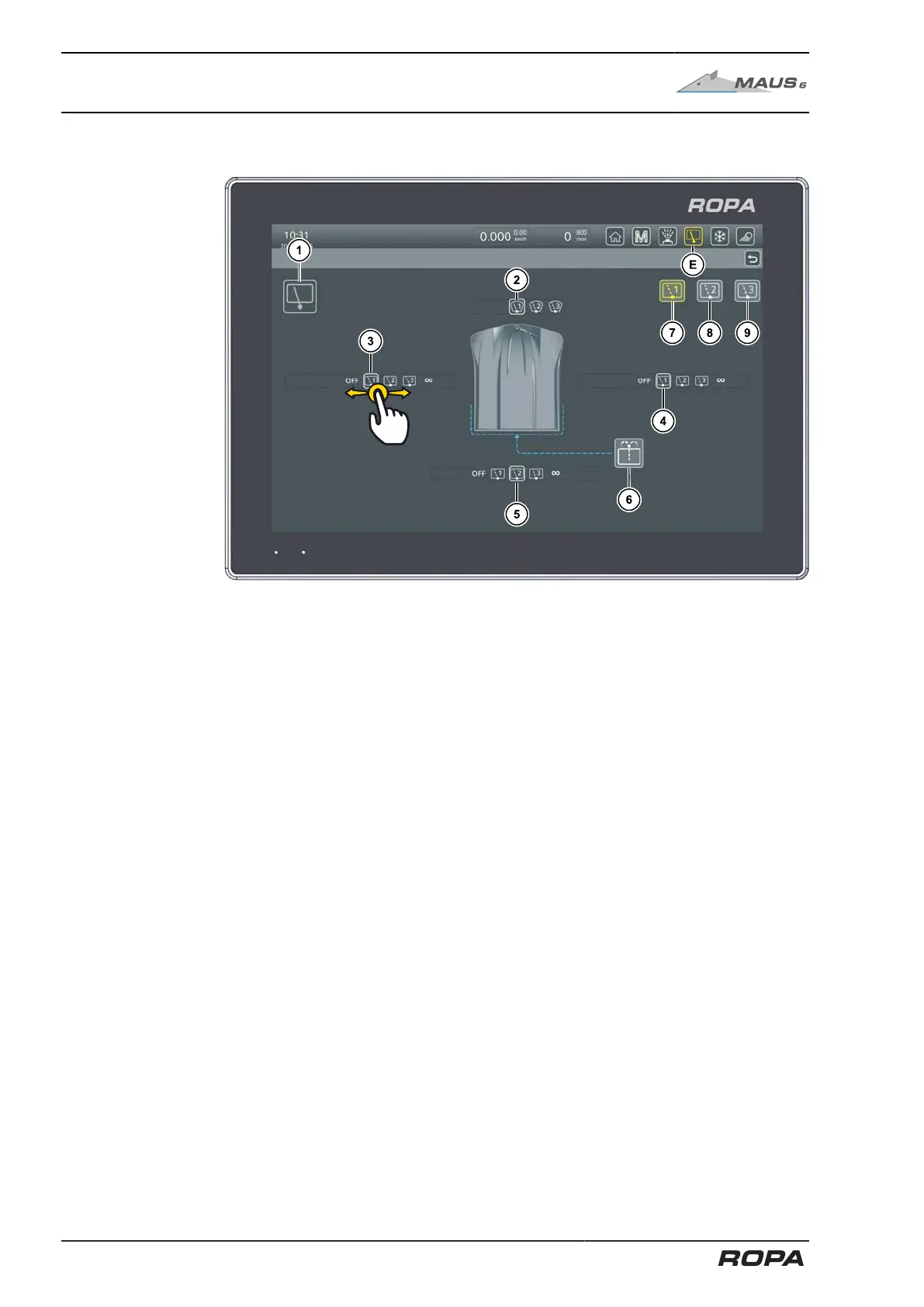
Similarly, the menu can be accessed by touching the symbol (E) on the R-Direct func-
tional area.
(1) Switch selected window wiper on/off
(2) Adjustment of front window wiper interval
(3) Adjustment of left window side wiper
(4) Adjustment of right window side wiper
(5) Adjustment of rear window wiper interval (incl. cabin door wiper)
(6) Side and rear window washer system
(7) Window wiper program 1
(8) Window wiper program 2
(9) Window wiper program 3
The window wipers can be adjusted by swiping the respective line to the left and right
on the terminal.
Only the interval period can be switched on for the windscreen wiper (2) in this menu.
The window wiper and the window washer system for the front window are operated
from the steering column switch (See Page 73).
The left (3) and right (4) side window wipers as well as the rear window wiper (5) can
be switched to one of three interval periods or to continuous operation. They can
be switched off if not needed. By touching the screen button (1), you can switch the
selected settings on or off.
Touching the screen button (6) activates the window washer system for the side and
rear windows.
130 / 546



 To Next Page