Operation
R-Concept
6.3.2.5 Climate control
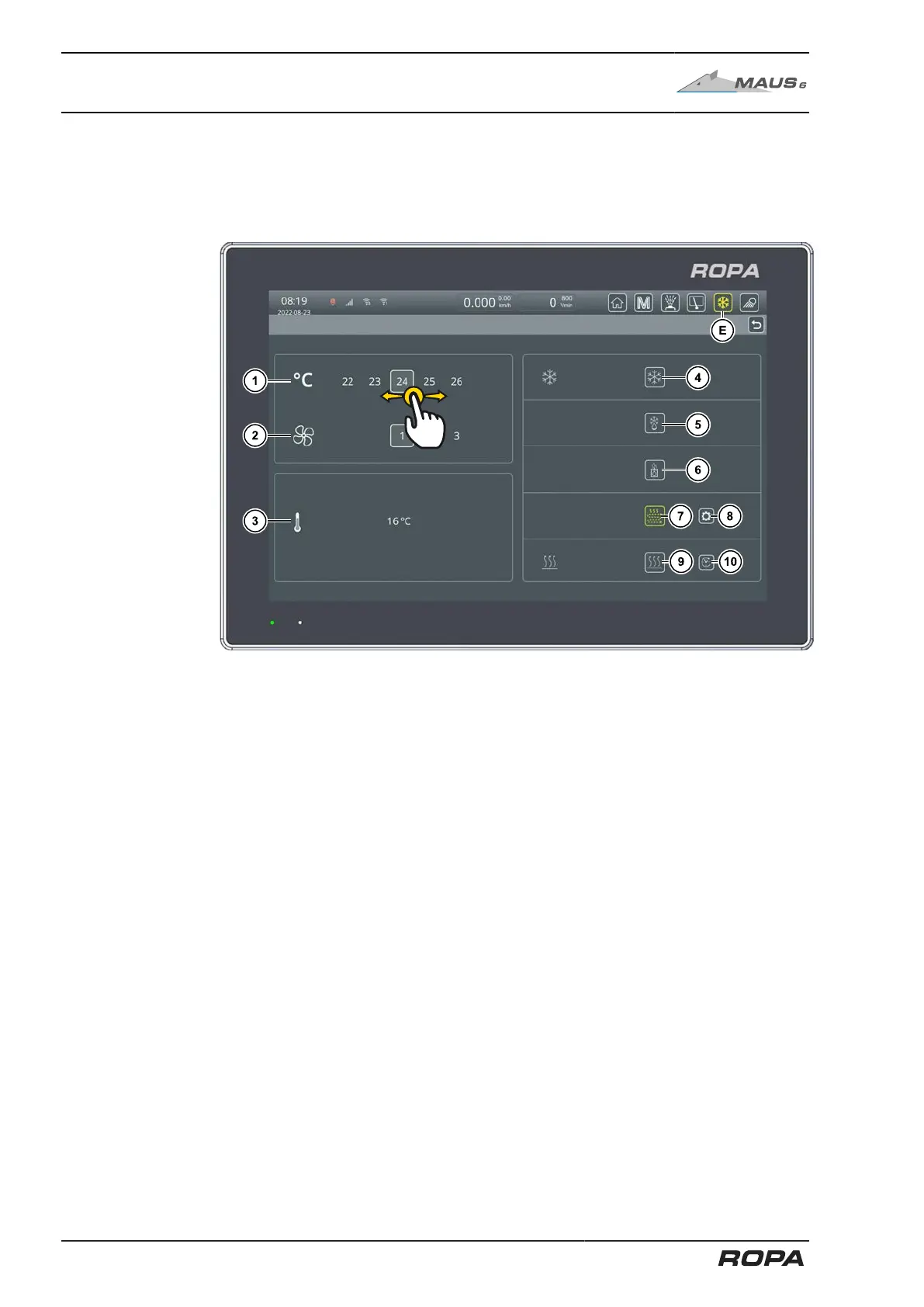
The air conditioning system always ensures optimum climate conditions in the dri-
ver‘s cabin. The setting range is between 16 and 30°C. Similarly, the menu can be
accessed by touching the symbol (E) on the R-Direct functional area.
In the climate control menu, the set temperature (1) and the fan speed (2) can be set
by swiping left and right on the colour terminal.
If the fan stage is set to "Auto", the fan speed is automatically reduced when the set
temperature is reached.
In addition, this menu displays the current outdoor temperature (3).
The air conditioning can be switched on and off with the screen button (4).
The defroster function for clearing the windows can be switched on and off with the
screen button (5). Fan and heating system run at maximum power; simultaneously,
the air is dried at maximum power.
The oil tank heating can be switched on and off with the screen button (6). (See
Page 134)
The underfloor heating can be switched on and off with the screen button (7). The
screen button (8) opens a menu for setting the stage of the underfloor heating. (See
Page 135)
The park heating can be switched on and off with the screen button (9). The screen
button (10) opens a menu for preselecting the parking heating. (See Page 137)
132 / 546



 To Next Page