Operating Components
Operating console R-Concept
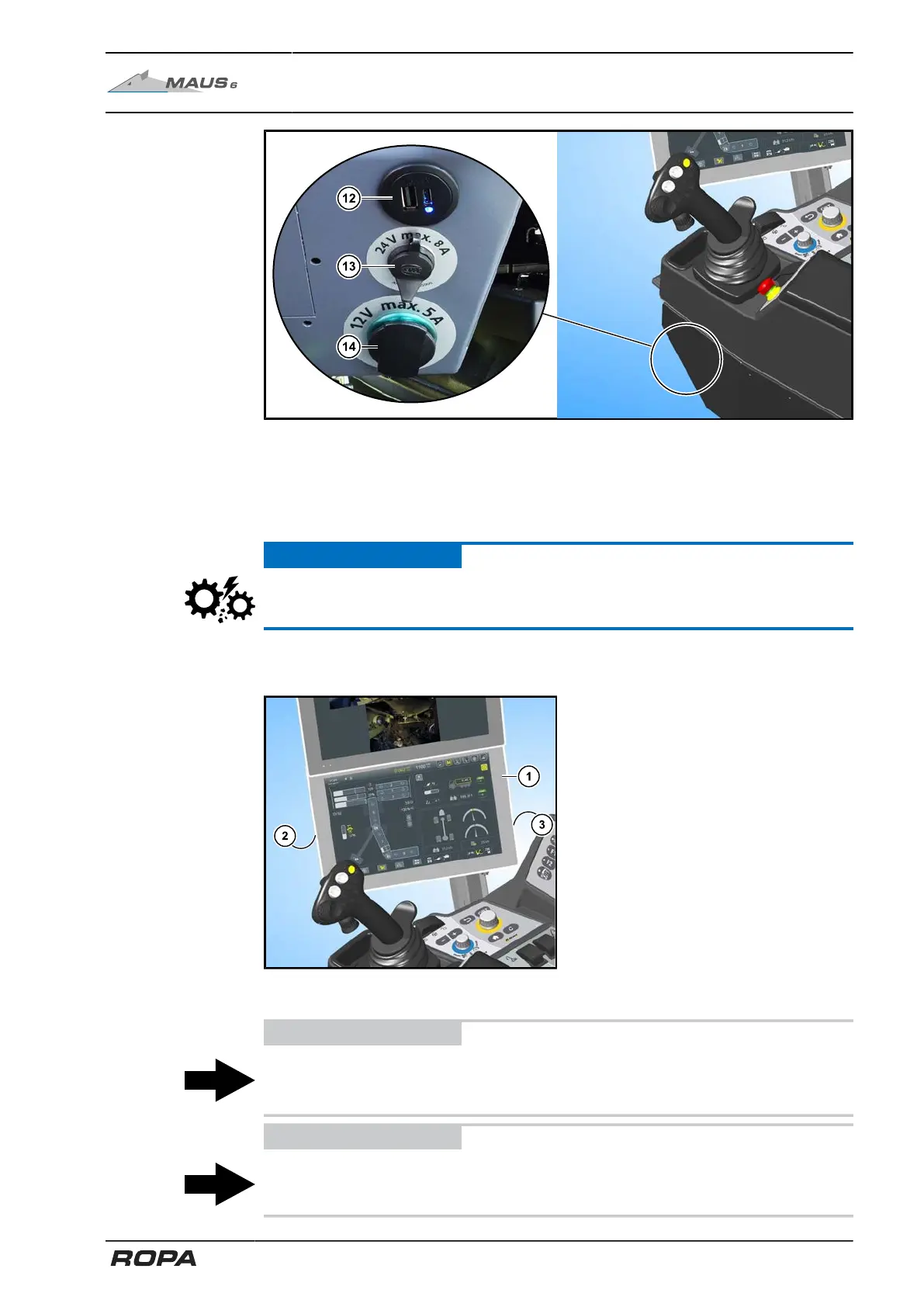
Outlets at the front side of the operating console
(12) USB double socket 5V / 3.6A (USB-A and USB-C)
(13) Outlet 24V/8A maximum
(14) Outlet 12V/5A maximum
ATTENTION
The voltage transformer could be damaged if this 12 V outlet (14) is overloaded.
5.9.1 R-Touch main terminal
Various settings can be adjusted by
touching (tapping) the screen of the R-
Touch main terminal (1). Since it is a
capacitive touch screen (PCAP), the
screen also reacts to touches with sty-
lus or gloves. Almost all functions which
can be performed by turning/pressing R-
Select and R-Direct, can be made as well
by touching tempered glass surface of the
R-Touch. In Chapter 6 therefore, the oper-
ation of all functions with the both oper-
ating sections R-Select and R-Direct is
described.
A USB-port is located on the left side of the terminal (2).
ADVICE
A key to restart the terminal (3) is located at the rear right side of the terminal.
Use this key only in emergency cases, e.g. if there is no response from the terminal.
ADVICE
Use only the USB stick supplied by ROPA or a similar stick formatted in FAT 32.
83 / 546



 To Next Page