Operation
Water spray system (option)
Similarly, the menu can be accessed by touching the symbol (E) on the R-Direct func-
tional area.
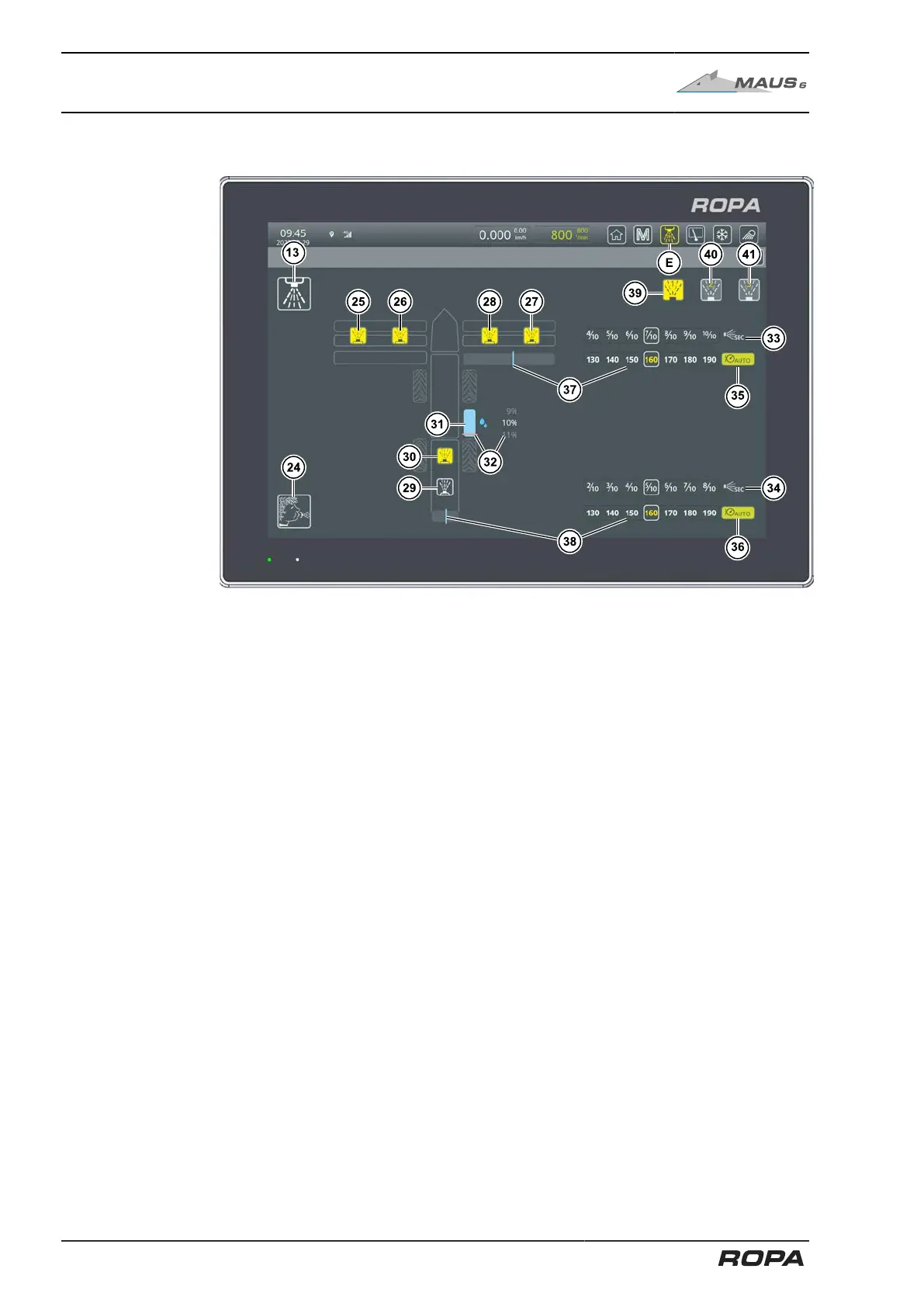
Overview of water spray system menu (with optional DUO water spray system)
(E) Opens the water spray system menu
(13) Activate/deactivate water spray system
(24) Switch on/off blowing out of spray nozzles and pressure lines (See
Page 289)
(25) Activate/deactivate spray nozzles pickup left
(26) Activate/deactivate spray nozzles pickup left (Duo water spray system option)
(27) Activate/deactivate spray nozzles pickup right
(28) Activate/deactivate spray nozzles pickup right (Duo water spray system
option)
(29) Activate/deactivate recleaner spray nozzles
(30) Activate/deactivate recleaner spray nozzles (Duo water spray system option)
(31) Water tank fill level indicator in 20%-steps
(32) Adjustable warning threshold for water tank filling level
(33) Adjusting timer control (4-part pinch rollers) See Page 293
(34) Adjusting timer control (recleaning) See Page 293
(35) Activate/deactivate water spray system automatic pressure control
(4-part pinch rollers)
(36) Activate/deactivate water spray system automatic pressure control (reclean-
ing)
(37) Adjusting pressure control (4-part pinch rollers) See Page 294
(38) Adjusting pressure control (recleaning) See Page 294
(39) Water spray program 1
(40) Water spray program 2
(41) Water spray program 3
The adjustable warning threshold (32) for the message "Refill water tank" is set in %.
We recommend the 0 % setting if the function of water spray system is not required.
This setting deactivates the warning.
292 / 546



 To Next Page