Rovema CMK Operator’s Manual
Section 7: Working with Components
200246 CMK Operators Manual (02/06/2006) 7-34
Glue Device
Glue Heads Height Adjustment
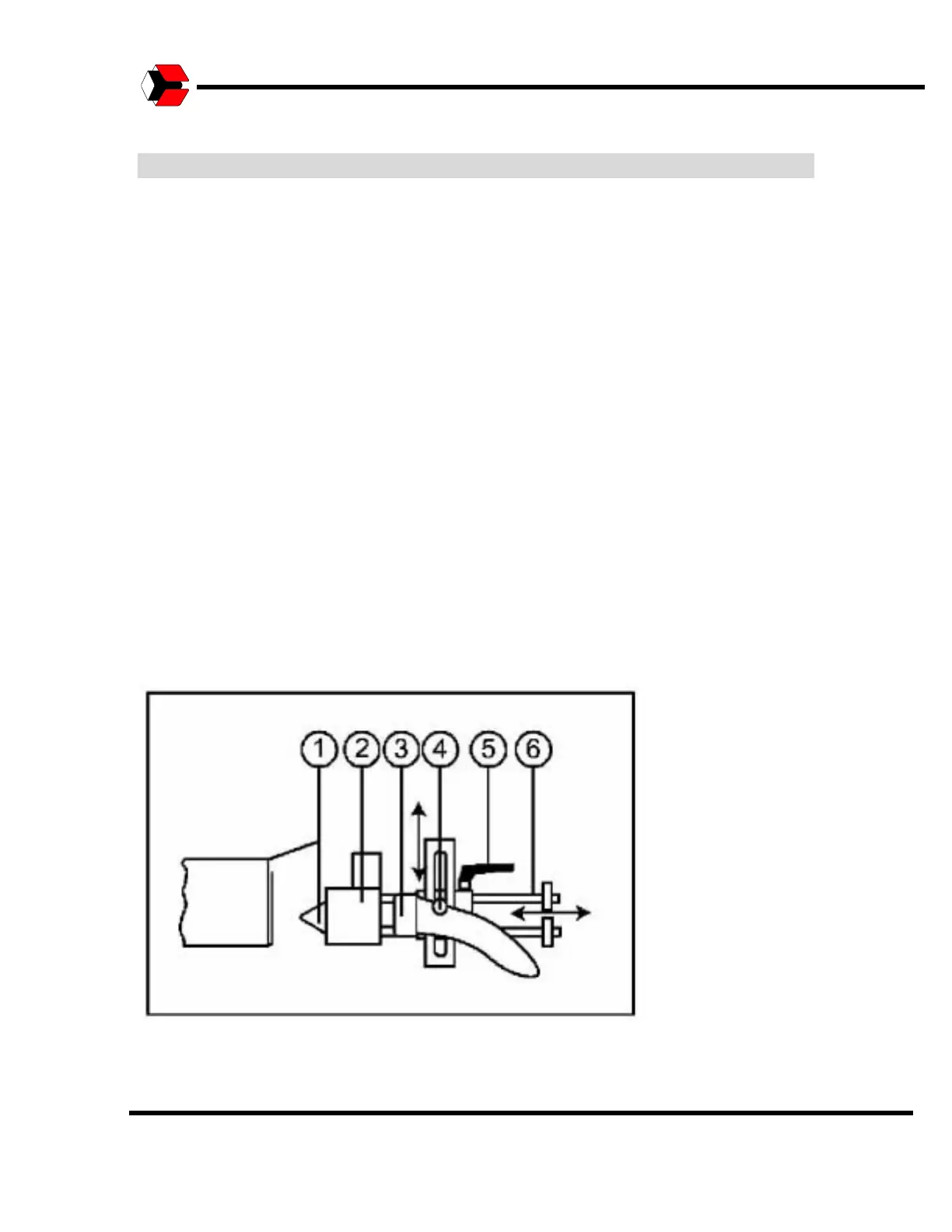
The glue heads (#2) must be adjusted mechanically to the height of the carton.
The position depends on the size of the carton and the location as to where the
glue is to be applied. To adjust the height, loosen clamping screw (#4) and then
move the glue head to the desired position and clamp it in place.
Distance from Carton
The distance to the carton can be adjusted by loosening the clamping lever (#5)
and moving the glue head on its axes (#6). Be careful the glue head is not
pushed in too far forward as the glue nozzle (#1) could contact moving parts.
After the adjustment is complete, tighten the clamping lever (#5) again.
Note: Verify that the glue hose (#3) and connecting lines are not jammed, kinked,
or bent.
Glue Station Controls
Where and how the glue is applied can be adjusted on the HMI touchscreen.
Other settings, such as the temperatures of the glue, are made on the gluing unit.
Depending on the design and specifications of the gluing unit, switching signals
for the glue heads may also be adjusted on the gluing unit. If this option is used,
please observe the operating instructions for the gluing unit!
Figure 7.26
Adjusting Glue Heads location.



 To Next Page