Rovema CMK Operator’s Manual
Section 5: Operator Controls
200246 CMK Operators Manual (02/06/2006) 5-30
HMI (Human-Machine-Interface)
Servo Menu Screens
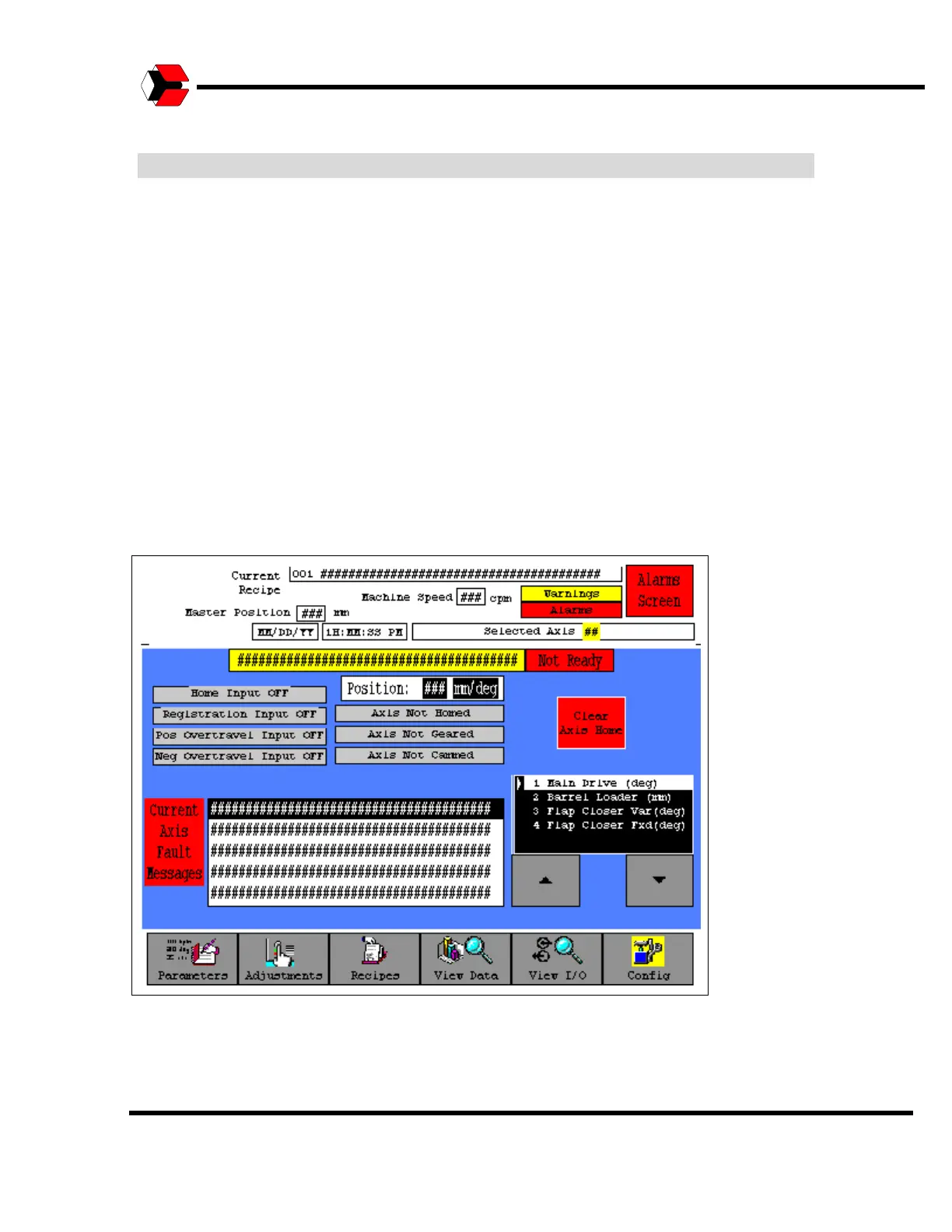
The Selected Axis screen is accessed from the specific Servo Axis Menu button on
the Adjustments screen. This screen allows you to select a specific Servo Axis and
view any Current Axis Fault Messages. Refer to the Alarms section of this manual
to obtain a description of the fault and a possible solution. Also note fault codes on
the actual servo drives and refer to the servo manufacturers documentation for
specific fault descriptions and corrective actions.
If it is believed that any Servo Axis has mechanically slipped or changed position (so
that the feedback position on the screen is NOT correct) then this screen allows the
user to force a new homing sequence on the axis. The appropriate axis must be
highlighted in the axis list box and the “Clear Axis Home” button pressed. The button
will change from Green to Red. The machine must then be put in an E-Stop
condition (by opening a guard door or pressing an E-Stop button) in order for the
home sequence to be properly initiated the next time the machine is started.
Figure 5.36
Servo Axis Screen



 To Next Page