Rovema CMK Operator’s Manual
Section 5: Operator Controls
200246 CMK Operators Manual (02/06/2006) 5-29
Additional Screens
Adjustments Screen
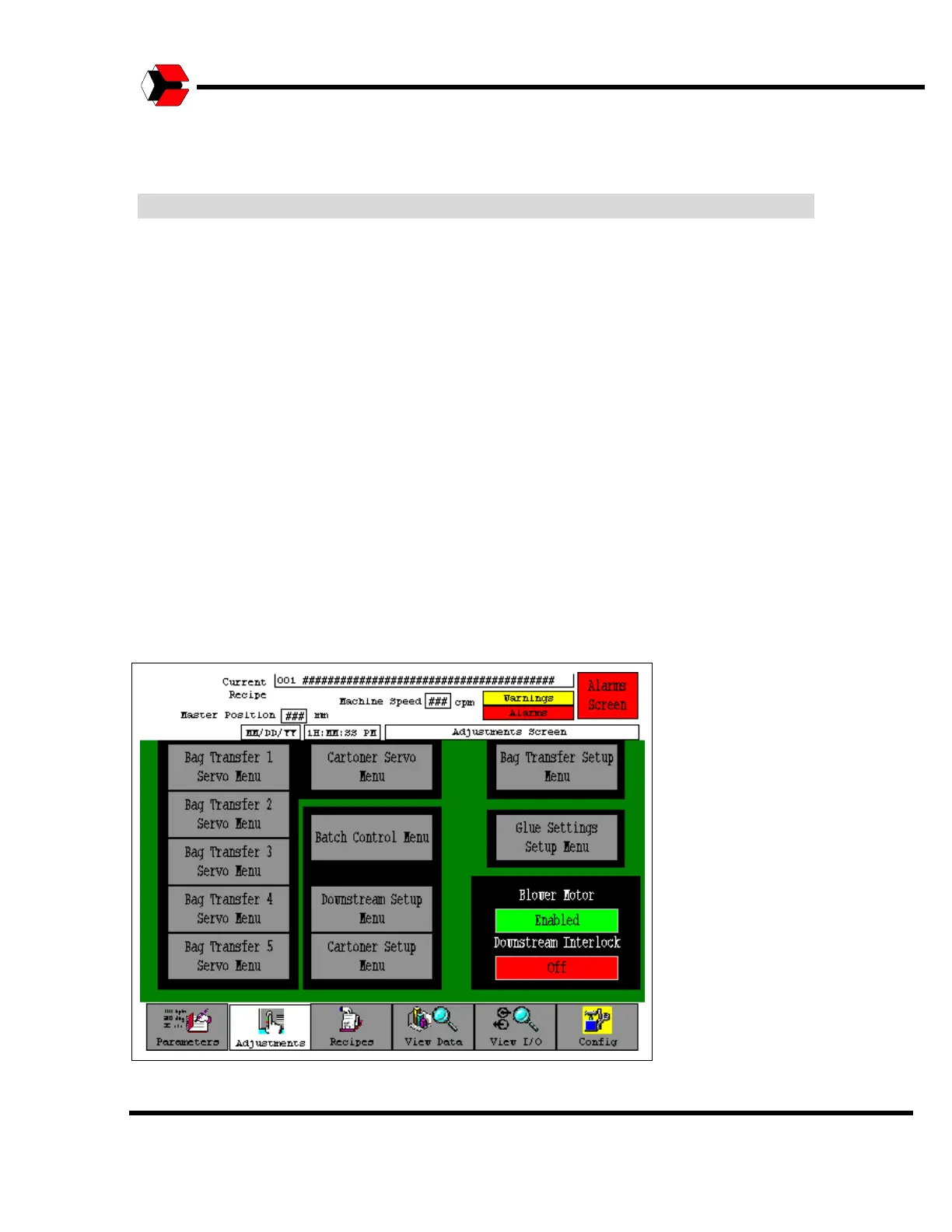
The Adjustments section of the menu tree is accessible at any time from the menu
bar at the bottom of the display. By selecting the “Adjustments” button, the Operator
enters the main Adjustments screen as shown in the figure below. From the
Adjustments screen, the Operator has access to the Servo Menus, Batch Control
Menu, Downstream Setup Menu, Cartoner Setup Menu, Bag Transfer Setup Menu,
and the Glue Settings Menu. There are also buttons to enable or disable the Blower
Motor and/or the Downstream Interlock.
When the "Downstream Interlock" button is in the OFF position the machine will
pack product into cartons regardless of the state of downstream equipment
(checkweigher, case packing and palletizing). When this button is in the ON
position the machine waits for signals that all the downstream equipment is ready
before processing product.
When operating the complete system, verify that the Downstream Interlocks are
ON for all of the baggers and the cartoner. The system will not shut down
properly if a problem occurs when the Downstream Interlock is in the “Off
Position.
Figure 5.35
Adjustments Screen



 To Next Page