Vista Digital Mixing System
Date printed: 05.08.03 SW V3.3 Introduction 1-19
Control Room
Studio
Talk to
CR
Ret 1
Ext 1
Studio Monitor
Red
Light
SIG1
SIG2
TB only
PFL/TB Out
CR Monitor
Signaling Keys
Talk to
Aux1
Talk to
Aux2
Talk to
Aux3
Talk to
Aux4
Talk to
Aux1
Talk to
Aux2
Talk to
Ext1
Talk to
Ext2
Talk to
Aux3
Talk to
Aux4
Talk to
preselected
Talk to
preselected
e.g.Speaker
GPI 1
GPI 3
GPI 4
GPO 2
GPO 1
GPI 0
Footswitch
GPI 6 GPI 7 GPI 8 GPI 9 GPI 10
e.g.Intercom
Ext 3
(Line level)
(always on)
Vista7 Desk
Mic "TB2"
TB Mic
GPO 0
Ext Location 1
Producer
(-> to PFL Speaker)
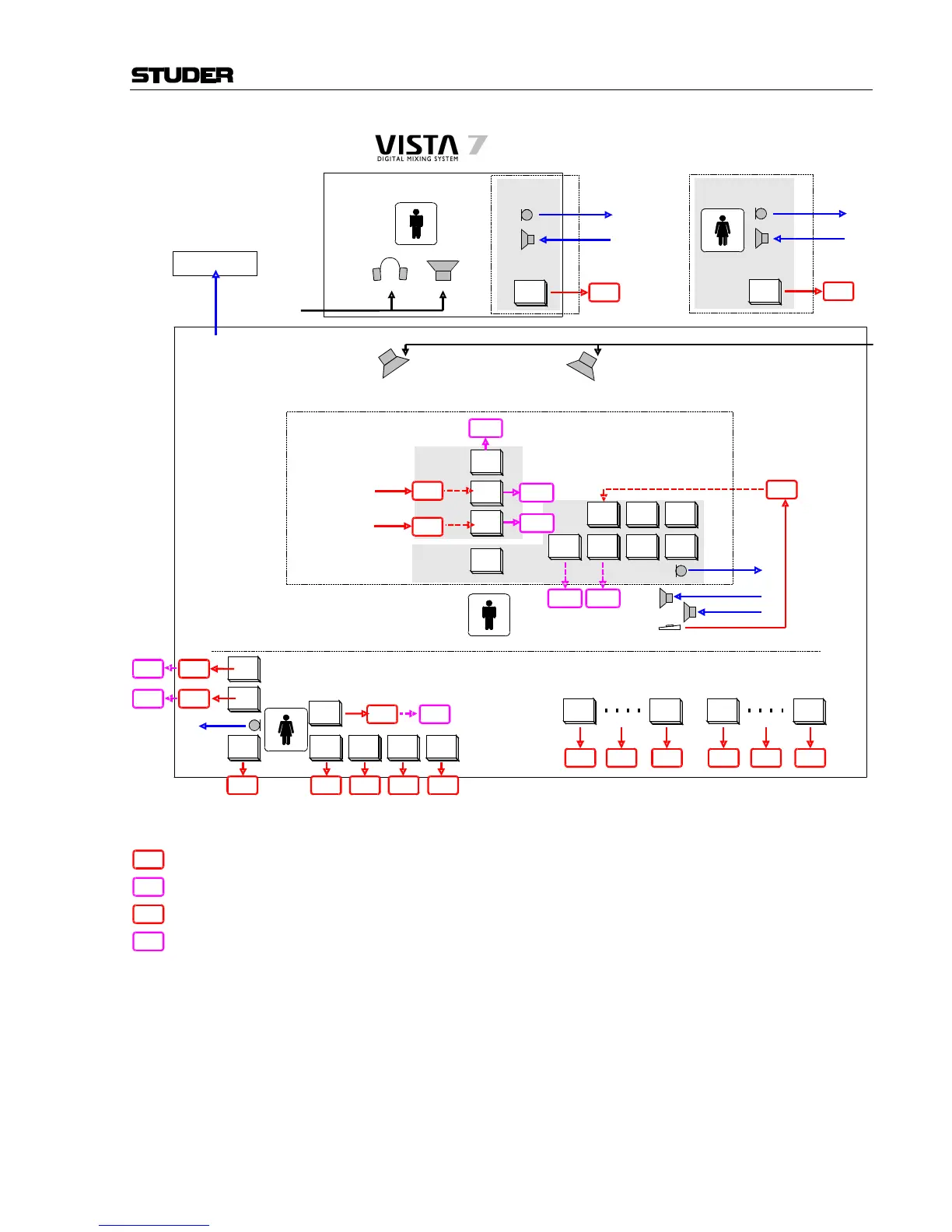
Talkback and Signaling Block Diagram
Talk to
CR
Ret 2
Ext 2
GPI 2
Ext Location 2
(-> to PFL Speaker)
Talk to
Studio
GPI 5
Talk to
ChanOut
Grp01
Talk to
ChanOut
Grp N
Channel
Mute
Grp01
Channel
Mute
Grp N
Talk to
EXT1
Talk to
EXT2
GPI12
GPI11
GPI X GPI X GPI X GPI XGPI XGPI X
Talk to
Studio
GPO 3
GPO 5
GPO X
TB Keys
GPO 4
Desk
Operator
GPO X
Producer area (either in control room or in another room)
Relations :
Dim CR and PFL if : Anytalk in Desk OR (Anytalk Producer AND Producer located in CR)
Dim Studio if : Ret1 Talk to CR AND Ret1 located in Studio [DimLock is activated]
Cut Studio if : (Faderstart of source which is assigned to Studio) OR (Studio is OnAir)
Cut Ext1 if : Studio Cut AND Ret1 located in Studio
Sig1 LED Studio = Sig1OutStudio OR Sig1InStudio
Sig2 LED Studio = Sig2OutStudio OR Sig2InStudio
RedLight Studio = StudioA Cut OR RedlightStudio manual
TalkLED Studio = DeskTalktoStudio OR Ret1TalktoCR
Legend :
GPI 1
GPO 2
GPI X
= GPI already configured in *.ini files
= GPO already configured in *.ini files
= GPI prepared to use, but not assigned to signaling card.
This can be configured in *.ini files
GPO X
= GPO prepared to use, but not assigned to signaling card.
This can be configured in *.ini files



 To Next Page