Vista Digital Mixing System
2-30 Desk Operation SW V3.3 Date printed: 05.08.03
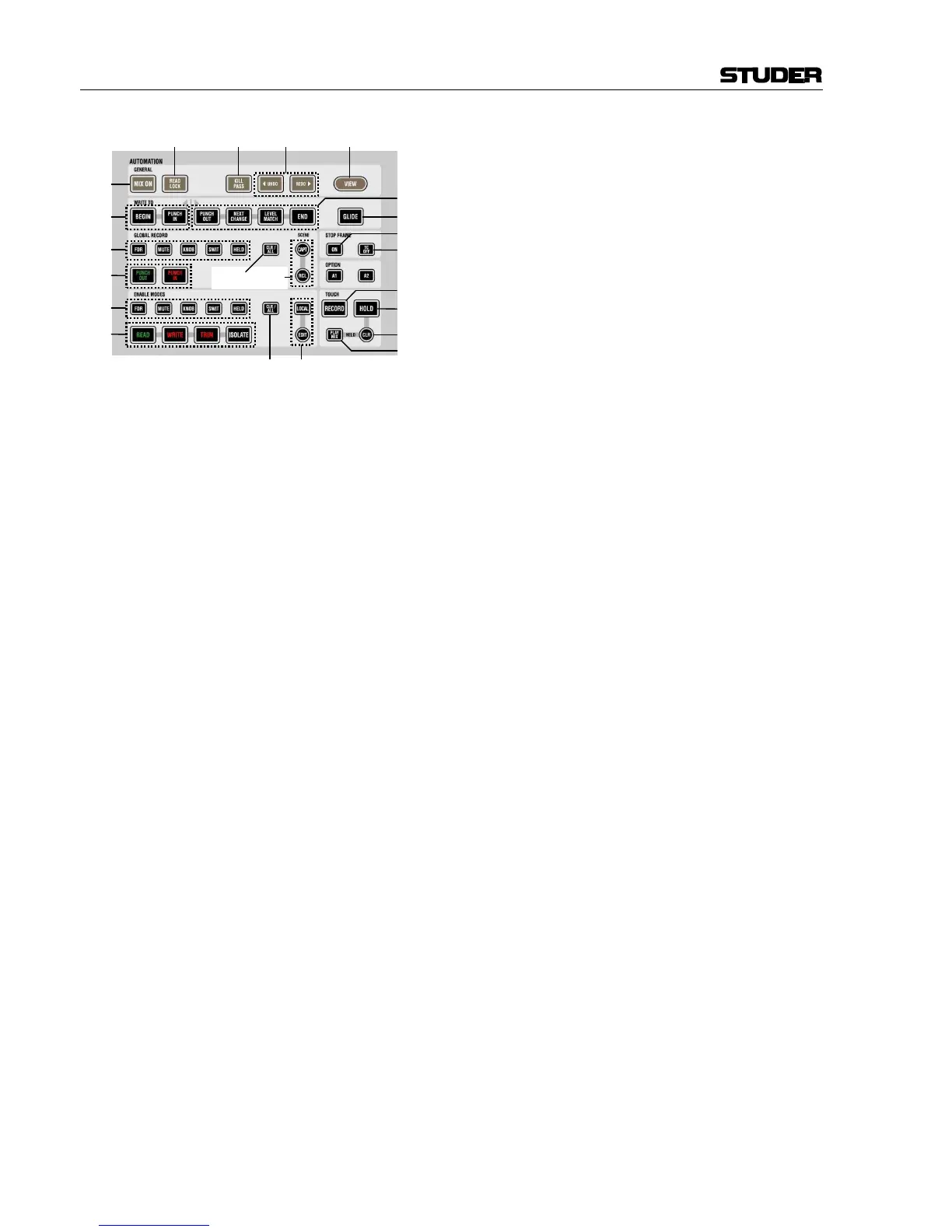
[192] STOP FRAME: ON
Instead of starting and stopping a mix pass auto-
matically by detecting the TC play speed, the user
can deactivate this automatism, and start and stop
a mix pass manually. When this key is lit, the mix
pass is started regardless of the TC speed. It is
now possible to record movements in slow mo-
tion.
Note: The AutoTouch+ Dynamic Automation
will not record backwards. If a TC address is
read, the values are already written to this point.
See STOP FRAME: TC OFF [193] for “correction
mode”.
[193] STOP FRAME: TC OFF
In order to look for a certain time code address and being able to
jog/shuttle without writing automation data too far ahead, this key will in-
hibit the automation from looking at TC addresses until deactivated again.
[194] FDR
MUTE
KNOB
SWIT
HELD
Pre-selector keys for global automation mode; used to change the automa-
tion modes of elements. Only the lit keys/elements will be changed upon
pressing one of the global automation mode keys (READ, WRITE, TRIM, or
ISOLATE [196]).
Note: No elements will ever change their record mode when pressing only
the pre-selector keys!
[195] CLR / ALL
This key will either clear all ENABLE MODES pre-selector keys [194] (if
some of them are already lit) or select them all (if all were dark before).
Shortcut: In order to change automation mode of all elements in the con-
sole, press and hold this key while pressing one of the global automation
mode keys READ, WRITE, TRIM, or ISOLATE [196].
[196] LOCAL and EDIT (static automation)
These keys are inactive in dynamic automation. However, when static
automation is active, they will open the Filter Edit window on the graphic
controller and allow to define a detailed snapshot filter.
[197] READ
WRITE
TRIM
ISOLATE
Global automation mode keys. Pressing one of these keys will put the pre-
selected elements (ENABLE MODES keys [194]) into the corresponding
automation mode:
• READ
Recorded data will be played back. If the changed element was never
being dynamically automated before in this mix (i.e., it was never in
WRITE or TRIM mode and recording), manual changes are still “re-
corded” (static) and stored within the mix pass.



 To Next Page