10-12 PN: 10580-00343 Rev. H S820E UG
10-4 Save Files File Management
Change Default Matrix Names
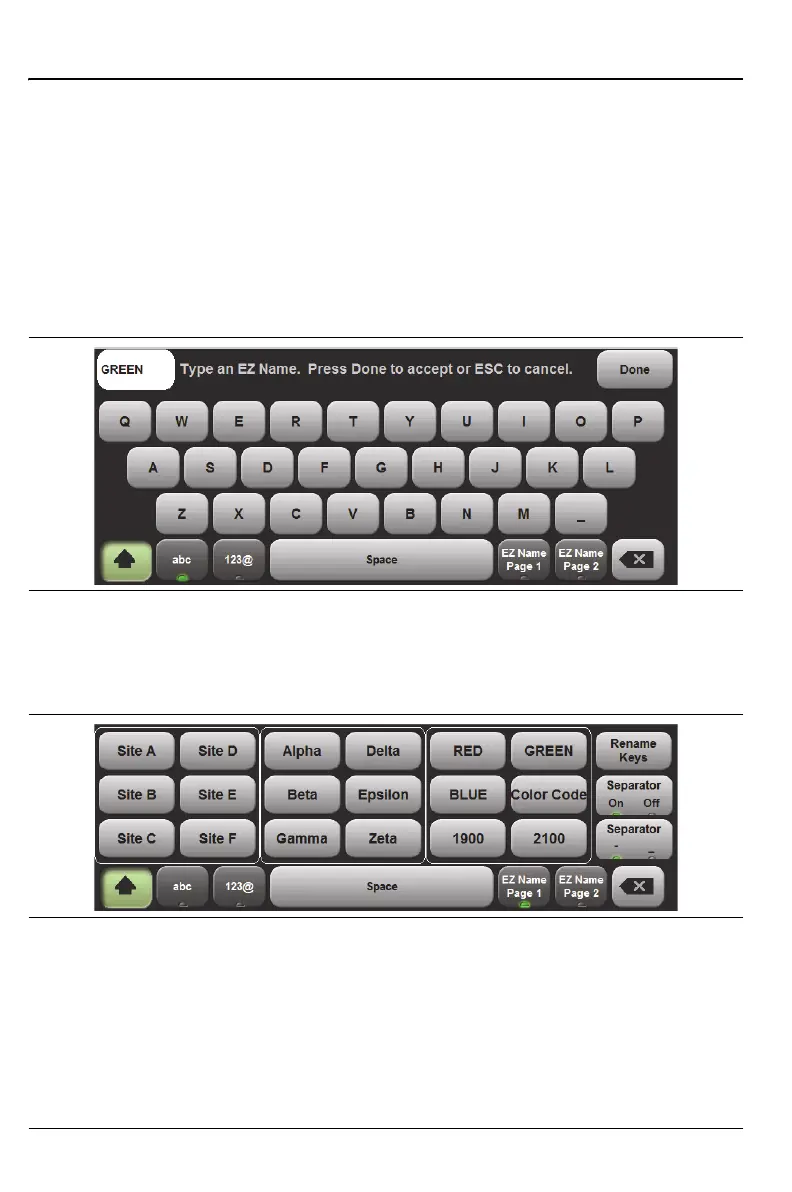
1. Press the Rename Keys button shown in Figure 10-6 (upper-right
button in either EZ Name matrix). Note that the name of the key
changes to Cancel. Choose (press) the matrix button that you want to
rename. The current name, such as Color Code, is displayed in the
upper-left corner above the letter keys (see Figure 10-7). Type the
desired name, which appears in the upper-left corner as you type. Then
press Done. In Figure 10-8 the upper-right button (Color Code) was
selected and renamed GREEN. See the original names in Figure 10-6.
2. When you press Done, the new name is displayed in the Matrix
(Figure 10-8).
3. Continue with renaming additional matrix keys as desired.
Figure 10-7. Renaming a Matrix Key
Figure 10-8. Renamed Matrix Key











 To Next Page