15-8 PN: 10580-00343 Rev. H S820E UG
15-4 Operation Video Inspection Probe (VIP)
8. To save the VIP data to file with one press of the touchscreen,
press the Save icon in the “System Function Tool Bar”. The
current auto filename settings are applied to the saved file,
provided the Auto Filename submenu key is set to On. Refer to
“VIP Test Settings” on page 15-4.
If Auto Filename is Off, or if you press the Save/Recall main menu
key followed by Save, or press Save (7) on the numeric keypad,
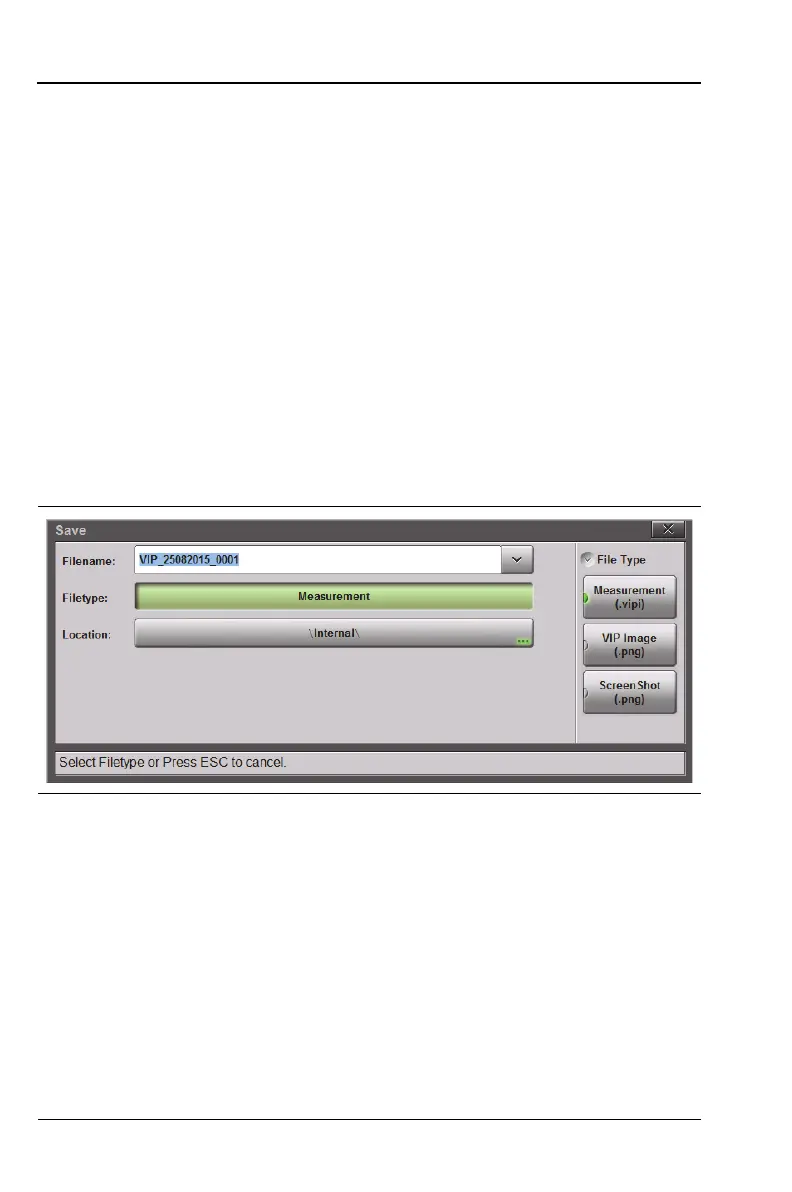
the Save dialog is displayed. See Figure 10-1 on page 10-4.
9. Enter the file name. Refer to “Choose the File Name” on page 10-9.
10. To select the type of file to save, press the Filetype button, then
press the desired submenu key. See Figure 15-7.
Measurement (.vipi) – Saves the VIP image and analysis results
VIP Image (.png) – Saves the VIP image only
ScreenShot (.png) – Saves a screen capture of the current display
11. Optionally, press the Location button and select the destination
folder as described in “Set the Save Location” on page 10-5.
12. Press the Save button in the Save dialog.
If the overall analysis result is a Fail, follow standard practices to clean
or replace the fiber optic connector.
Figure 15-7. VIP File Type











 To Next Page